Showing posts with label to. Show all posts
Showing posts with label to. Show all posts
Friday, February 27, 2015
How to See How Many Email Followers You Have and Who They Are Giveaway Announcement!
So the past two weeks I got mixed up and ended up missing two technology Tuesday posts in a row. Im so sorry! Im back today though... with a new Tech Tuesday post and a giveaway announcement!
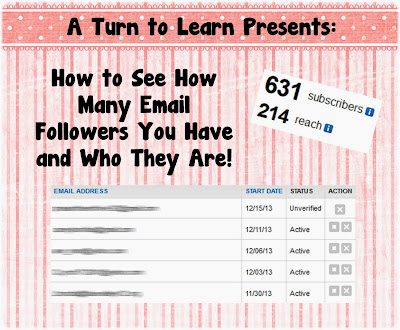
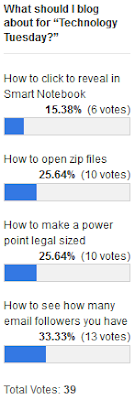
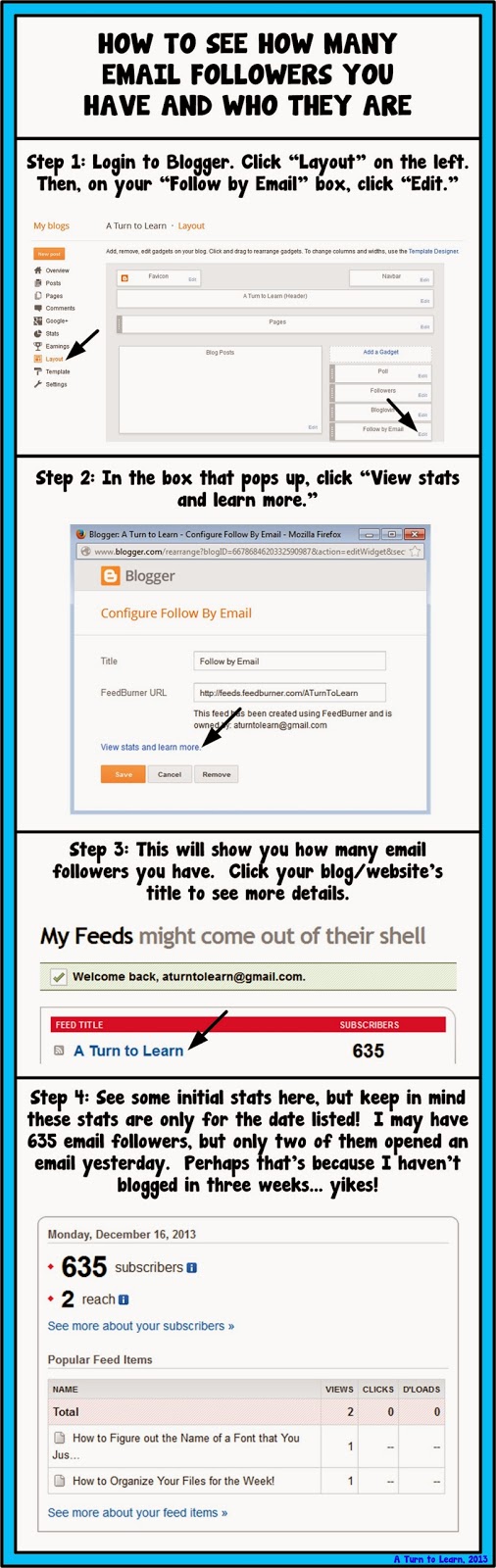
First things first, here is the tutorial. The winner on the poll this week was another blogger tutorial... how to see how many email followers you have and see who they are!
Here is the poll:
Now onto the tutorial!


For next weeks poll, Ill be adding the option to change the colors, features or special effects of a shape, picture, or text box in PowerPoint... even if those shapes/pictures are on different slides!
Now... for the giveaway announcement!!! For all of my lovely followers, check back in tomorrow to see some new products and a chance to win them all!
Read more »
First things first, here is the tutorial. The winner on the poll this week was another blogger tutorial... how to see how many email followers you have and see who they are!
Here is the poll:
Now onto the tutorial!
You can download this tutorial as a PDF by clicking this picture!
Note: This tutorial is hosted on Google Drive. To save it from there, just open the file and click File > Download to save onto your computer!
For next weeks poll, Ill be adding the option to change the colors, features or special effects of a shape, picture, or text box in PowerPoint... even if those shapes/pictures are on different slides!
Now... for the giveaway announcement!!! For all of my lovely followers, check back in tomorrow to see some new products and a chance to win them all!

Sunday, February 15, 2015
HandyTools Bat to Exe Converter
Hey Guys,
Check-out this latest find that I got, a .bat to .exe converter! Check it out in this link
http://www.f2ko.de/programs.php?lang=en&pid=b2e
Ill post a simple tutorial on how to use it later!
Read more »
Check-out this latest find that I got, a .bat to .exe converter! Check it out in this link
http://www.f2ko.de/programs.php?lang=en&pid=b2e
Ill post a simple tutorial on how to use it later!
Best Ways to Deal with Bad Links

Bad links are something that is going to damage your websites SEO. That is why it is a good idea to get rid of them. But, how do you do it? And, to what extent should these links be removed? Are all bad links so bad? Below you will find the answer to these questions and some top advice about how to get rid of bad links. There are four bad link varieties described in this article, but they are in no particular order.
Also Read: Best Way to Easily Find and Remove Broken Links from your Website or Blog
Also Read: The 5 Best Ways to Build Quality Backlinks for Your Website or Blog
What is SEO?
SEO stands for Search Engine Optimization, and it is a process that makes your website more search engine friendly. The search engines cannot read and comprehend what is on your website, they have to use clues in order to guess what the content is all about. Backlinks are used as clues, as are internal links. Backlinks are also used as a way of judging a website’s popularity.Bad link 1 - A backlink from a black-hat website
The most common version of this was the backlink that came from a link farm. This is a website that was built simply to upload content for the sake of adding a link to it. This is deemed as one of many type of black-hat website, and a link from here is bad news.How to deal with it
Try to have the backlink removed from the website. Do all that you can in order to remove the backlink? If you cannot, then copy your content and put in on a new URL. Then, remove the URL that the backlink points to. This breaks the link between your website and the black-hat website.
Bad link 2 - A backlink from black-hat methods
One of the most common ways this happens is when a spam bot places a link onto a number of comment sections. In many cases, the blog master will notice the spam and remove it.How to deal with it
If the blog master does not recognize or remove the spam link, then request that the spam link be moved. Some websites and blogs allow you to report spam, so you can simply report that it exists and the web master will remove it for you. Use a backlink checker to locate all of the backlinks that were spammed. If you cannot remove them all, then do as you did with bad link number one and discontinue the URL that they point towards.
Also Read: Tips on How to Have Better SEO Results with Link Building
Also Read: How to Find the Websites or Blogs that are Copying your Content?
Bad link 3 - An internal link that leads nowhere
This is known as a broken link, and they happen quite often for a number of reasons. They are not too bad in small numbers, but Google will start to penalize websites that have too many.How to deal with it
If you notice a lot of broken links, then you need to start being more meticulous when you start new pages, remove pages, and make updates to your website. Use a link checker to see how many of your internal links are broken. All you have to do is either fix the link so that it points to a working page, or remove the link if it no longer serves any purpose. The problem will then be resolved the next time that the search engines crawl your website.
Bad link 4 - An internal link that points to another URL that is not online
This happens quite a bit. It is where you link to another website page, but then the destination URL is deleted or the website goes offline, etc. Just link broken internal links, it does not matter if you only have a few of these. But, if you have lots, or if they happen on a regular occasions then Google may penalize you. It lowers your websites usability, which is one reason why you are penalized. Imagine if you have a list of products that you link to, and yet only 60% of the links work, it is going to be frustrating for your user (hence your website usability rating drops).Broken links that point to external websites are also a signature of a website that is selling backlinks or that has been hacked, which is another reason why you may be penalized.
Also Read: The 3 Basic Things You Should Know Before Creating a Blog to Become a Successful Blogger
How to deal with it
When you use a tool to check your internal links, they often show you if your external links are broken too. Go to the website of the broken link to see if it is still online. They may have messed around with the URL, or deleted the page completely. If you cannot fix the link, then you should delete it from your website.
About Author:
The article is provided by Sonia Jackson. If you have any problems with your accounting homework she’s ready to help you.
Saturday, February 14, 2015
C program to convert given binary number into decimal number

#include<stdio.h>
#include<conio.h>
#include<math.h>
void main()
{
long int i,n,x=0,a;
clrscr();
printf("Enter any Binary number: ");
scanf("%ld",&n);
printf("
The Decimal conversion of %ld is ",n);
for(i=0;n!=0;++i)
{
a=n%10;
x=(a)*(pow(2,i))+x;
n=n/10;
}
printf("%ld",x);
getch();
}
Friday, February 13, 2015
How to Report Duplicate Content to Google DMCA

Blogging is a good way of sharing your best ideas and thinking with others, for creating a free blog there are lot of web 2.0 websites where people can create a free blog and start sharing their ideas with the people living all around the world!, tons of blogs are created by tons of people and they’re not only helps others through their blogs but they earn through their blogs, people can make a research on internet to get ideas and completes their posts by giving it a new look which is not a bad thing but there are some people who have very bad habit, i.e they stoles contents from other blogs.
Also Read: How to Find the Websites or Blogs that are Copying your Content?
Also Read: Pros and Cons of Interviewing Bloggers on your Blog
That’s how? They just copy some posts from other blogs, paste and re-publish it on their own blogs, the blogs from which they copy contents lose their traffic from search engines, I recommend all bloggers to pay full attention to keep prevent your blog contents from text excerpted Because it will highly affect your blog traffic as it happens with my blog.
Recently, I noticed that my blog search traffic is decreasing day by day and just after two weeks, there was not only a single person came from a search. So I start searching why my blog traffic is so down quickly? So I found many of my blog posts which was copied from my blog, I was so angry because of my hard work to write every post and how they easily copied and pasted the content. I contacted so many authors but didn’t get any reply, so finally I started filing complaints to google DMCA and I got all of the posts deleted.
So if you’ve this problem too then don’t worry you can file a complaint to google DMCA and I am sure google will remove duplicate posts from other blogs. If you don’t know how I can file a complaint to google DMCA then here in this post you’ll learn how you can? All you need to do is to read this post step by step.
How to file a complaint to Google DMCA for duplicate content:
As we’re going to report for a copied post from blog by another blogger so follow the below steps and do it as I’m telling.
How to file a complaint to Google DMCA for duplicate content:
As we’re going to report for a copied post from blog by another blogger so follow the below steps and do it as I’m telling.
1. First of all go to this google legal help link: https://support.google.com/legal/contact/lr_dmca?product=blogger
2. Here in the first section it will collect contact information from you, including your full legal name, company name, email address and country of residency, what you’ve to is to enter your name and company name, so type your name in the first box, in company name box type your blog name or leave it blank.
3. Now you’ll have to enter full legal name of the copyrighted holder, you can write down your own full name in the box provided and then enter your email address trough which you’ll receive a confirmation message when they confirm that you’re the original owner of the copied material.
4. Next it will ask you to select your country of residency from the drop-down menu, so select your country and look forward.
5. Now the next section is need to be done very carefully, because in this section you’ll have to prove that you’re the original holder of the copyrighted materials, so in first box under the “Where can we see an authorized example of the work?” you’ve to enter the URL of your own blog post (s) which had been copied, if you’re going to report more than one post then paste one by one in that box enter one link per line.
And then in the next box you just write like this: My published post (comma)(“Title”)(comma) is infringed by…. (comma) ‘First three lines’ For example My Published post, “Post Title goes here”, is infringed by the text excerpted on the site, beginning with the text ‘First two or three lines goes here’. Here what if you provided more than one link in above box, you’ve to again type these with the information about the second post that must to be start in another line.
And then in the next box you just write like this: My published post (comma)(“Title”)(comma) is infringed by…. (comma) ‘First three lines’ For example My Published post, “Post Title goes here”, is infringed by the text excerpted on the site, beginning with the text ‘First two or three lines goes here’. Here what if you provided more than one link in above box, you’ve to again type these with the information about the second post that must to be start in another line.

6. Now in the next step under the “Allegedly Infringing Material” you’ve to paste the link of the post(s) copied from your blog. You can paste more than one link by clicking on additional link.
Also Read: The Top 10 Websites to create free Logo for your Blog
Also Read: Best Way to Easily Find and Remove Broken Links from your Website or Blog
7. The next step is to confirm that you’re the original owner of the materials, what here to do? Is to make a tick mark on the boxes which means that you agree with their statement,
8. One further step is the signature, You’ve to select the current date and time from the calendar and once again type your full name as a signature.

9. Now all the steps was required is done, you’ve to check all the sections once again whether if there is any mistakes so you’ll correct that if you noticed any mistake and finally click on submit button. After you click on submit button, a message appear that say thanks to you for using DMCA, now wait for a week to get your copied content removed from other place.
So friends! Above we discussed the method of filing a complaint to google DMCA in order to remove copyright contents from the blogs who copied your contents from your blog, I tried my best to make it understandable, and hope that you understand that and this tutorial will help you when you’re going to file a complaint to google DMCA.
Author Bio:
This post was contributed by Basheer Ahmad, who loves to share useful tools & tutorials regarding internet, SEO, blogging etc He recommends you to read his post free online video converters to convert videos online. Connect with him on Google+ or Facebook or Twitter.
S5DXJESTECMM
S5DXJESTECMM
Tip Export JPivot output to excel in Pentaho 5 x version By default export to Excel is disabled in 5 x server
Hi Readers,
This tip is useful to enable the "Print" property of JPivot output to Export into Excel sheet.
By default in pentaho 5.x version servers it is disabled.
Un comment below code in plugin.spring.xml file
<bean id="Print" class="org.pentaho.jpivot.proxies.ProxyPrintServlet"/>
Location of the file is :
<YourDrivePath>/biserver-ce/pentaho-solutions/system/pentaho-jpivot-plugin
NOTE : Once you enable the code, stop the BI server and start again. [Bz it is a configuration file and changes will be affected iff you restart the server.]
Test: In the xml file it was suggested to replace with fop-0.20.5, but I didnt do it instead just uncommented the code and tested which is worked as expected.. If you still unable to get export work , you might have to replace the specified jar file.
:-)
This tip is useful to enable the "Print" property of JPivot output to Export into Excel sheet.
By default in pentaho 5.x version servers it is disabled.
Un comment below code in plugin.spring.xml file
<bean id="Print" class="org.pentaho.jpivot.proxies.ProxyPrintServlet"/>
Location of the file is :
<YourDrivePath>/biserver-ce/pentaho-solutions/system/pentaho-jpivot-plugin
NOTE : Once you enable the code, stop the BI server and start again. [Bz it is a configuration file and changes will be affected iff you restart the server.]
Test: In the xml file it was suggested to replace with fop-0.20.5, but I didnt do it instead just uncommented the code and tested which is worked as expected.. If you still unable to get export work , you might have to replace the specified jar file.
:-)
Thursday, February 12, 2015
How to Find the Websites or Blogs that are Copying your Content

The websites or blogs that copy your content are actually committing Black-Hat SEO, which is something that Google punishes sites for. The trouble is that Google does not know who the duplicator is, and so will often punish both sites for duplicate content. This means that if another person copies your content, then they are also dragging your website down with them too. Added to this, is the insult that you have invested time (or money) into your web content, and now somebody else has come along and is stealing it.
Also Read: Tips on How to Have Better SEO Results with Link Building
CopyScape is a very good plagiarism checker
It is good because it has a reasonable mix of economy and quality. The truth is that there are some better plagiarism checkers out there, but they are very expensive when compared to CopyScape. On the other hand, do not let price fool you. There are some plagiarism checkers out there that are far more expensive than CopyScape and yet are not nearly as good as CopyScape.
This is a tool that you can use which will check the search engines for your content. The truth is that if the duplicate (plagiarized) content is not indexed by Google or Bing, then CopyScape is not going to find it. However, if Google or Bing has not indexed your plagiarized content yet, then there should not be any search engine penalizations.
You can check up to 2000 words in one go, and it only costs 5c. Or, you can load a number of text-filled documents into a batch search and it will check them all for you. It keys in on chains of three words. It also has a tolerance of around 5%. This is because some websites are going to have chains of three words that are the same as yours; however, if this occurs for more than 5% of the page, the CopyScape tool will show you a result. This does sometimes produce false positives, but they are few and far between.
CopySentry can stand guard over your content
If you are concerned that people are going to steal your content, then you can have CopySentry run a check on your chosen web pages every week. It is a tool offered by CopyScape, and it means that you will not have to keep running plagiarism checks manually. Also, as you can imagine, there is a small service charge for doing this, but CopyScape allows you to buy credit so that you will not have to make a payment every time it runs a check. CopyScape takes PayPal payments too, so you do not have to worry about entering your card details.
Also Read: Best Way to Easily Find and Remove Broken Links from your Website or Blog
CopyScape free URL searches
Every day you are able to run five free searches on the URLs of your choice. That means that if you were so inclined, you could check 35 pages per week for free. The tool will check the entire page and then show the pages that have been copied by others. If it does find copied content, the results it gives are pretty good. It will show you how many domains have the content, and you can click on the link to see what parts are copied from your website (or content). It will tell you how much of the page has copied content via a percentage, and it will highlight any copied content in red.
Google your own topics to look for plagiarism
When somebody re-writes your content or copies your content and hides it from the plagiarism checkers (it can be done), they are often uncreative in choosing a new title. All you need to do is Google your own page titles to see what turns up. Hopefully, you will see your own page riding high in the search engine results. Look around the search engine for articles with similar titles, and you may just come across your article that has been hidden from the plagiarism checkers.
Also Read: The Top 10 Websites to create free Logo for your Blog
You will have trouble finding spun content
This is true because according to a web crawler and plagiarism checker, if an article has been spun then it is new. Of course, it is not new by human standards, and if you are unlucky enough to read it then you will see that it makes very little sense and that it flows as well as syrup from a coffee filter. Nevertheless, for some reason people still do it, and it is possible to file a cease and desist order if you find content that has been spun from your content because it is still plagiarism.
About Author:
Kate Funk coaches individuals in SEO and business networking skills at Tutortop.
Wednesday, February 11, 2015
C Program to check whether a number is odd or even
#include<iostream.h>
#include<conio.h>
void main()
{
clrscr();
int a;
cout<<"enter the number:";
cin>>a;
if(a%2==0)
cout<<"
Even number";
else
cout<<"
Odd number";
getch();
}
#include<conio.h>
void main()
{
clrscr();
int a;
cout<<"enter the number:";
cin>>a;
if(a%2==0)
cout<<"
Even number";
else
cout<<"
Odd number";
getch();
}
How to Hack WPA WPA2 WiFi Password
 |
| How To Hack WPA/WPA2 WiFi Password |
WPA/WPA2 supports many types of authentication beyond pre-shared keys. aircrack-ng can ONLY crack pre-shared keys. So make sure airodump-ng shows the network as having the authentication type of PSK, otherwise, its simply uncrackable (yet). But most Networks do use PSK only, so your chances are good. Before continuing on just take a look at what type of protection the network has.
The only time you can crack the pre-shared key is if it is a dictionary word or relatively short in length. Conversely, if you want to have an unbreakable wireless network at home, use WPA/WPA2 and a 63 character password composed of random characters including special symbols. This is because in this Hack our only option is to use a Dictionary attack, that means literally test each and every word in a text file and checking whether it is the password. A simple google : "Dictionary attack list" will give you a text file containing all the known words, Pick the one thats the biggest.
There is another important difference between cracking WPA/WPA2 and WEP which is the approach used to crack the WPA/WPA2 pre-shared key. Unlike WEP, where statistical methods can be used to speed up the cracking process, only plain brute force techniques can be used against WPA/WPA2. That is, because the key is not static, so collecting IVs(more packets) like when cracking WEP encryption, does not speed up the attack. The only thing that does give the information to start an attack is the handshake between client and AP. Handshaking is done when the client connects to the network and attempts to authorize. Since the pre-shared key can be from 8 to 63 characters in length, it effectively becomes impossible to crack if the password is set to anything unusual, since even an 8 character password is almost impossible to brute-force.
This means that the passphrase must be contained in the dictionary you are using to break WPA/WPA2. If it is not in the dictionary then aircrack-ng will be unable to determine the key.
Also, there is no difference between cracking WPA or WPA2 networks. The authentication methodology is basically the same between them. So the techniques you use are identical.
Theres pretty much no steps in this tutorial. All you need is the .cap file and a dictionary list.
Check out the WEP cracking tutorial, complete till step 10. Then youll have your .cap file which contains information about handshakes that aircrack uses to crack the key.
After you get the .cap file open up Aircrack -ng, just on the first screen find and select your .cap file, select WPA Encryption option and find and select your dictionary list. If the password is in the dictionary list, youll see the magic happen and the key will appear.
You can simply try googling for a Dictionary WordList, there are tons out there .Try as many as you can, and if possible compile several into one and let aircrack do its thing overnight. Again, cracking WPA/WPA2 is much harder so you need probability on your side to have a real chance at getting the password.
Ive noticed that in many cases, the WPA key is simply the mobile number of our naive victim. Its usually 10 characters, easy to remember/type and luckily for us, relatively easy to crack.
(A tutorial on creating your own wordlists easily with Crunch can be found in "The Dark Side")
Introduction to WEKA GUI Chooser Basic Layouts Explained Are you bored of lengthy paragraphs of doucments A quick write up
Hi Guys,
This post will teach you basic layout structure of WEKA and in upcoming posts with examples.
Read my other article on how to download and install WEKA in Cent OS here
Documentation:
You can refer for the official documentation here : Click Here.
Alternatively you can find the pdf documentation in your WEKA installation :
Path : <WEKA installation folder>/weka-3-6-11/WekaManual.pdf
The official documentation gives you the clear & in depth details though Id like to share in my words how the layout looks like.
1) Once you launch the WEKA, the window opens with 4 different options which are 4 different applications with in WEKA.

2) The 4 Applications are
i) Explorer
ii) Experimentor
iii) Knowledge Flow and
iv) Simple CLI
3) Also, the window has Menu contains options "Programs", "Visualization","Tools" & "Help".
4)
Explorer An environment for exploring data with WEKA
Experimenter An environment for performing experiments and conduct-
ing statistical tests between learning schemes.
KnowledgeFlow An environment supports essentially the same func-
tions as the Explorer but with a drag-and-drop interface. One advantage
is that it supports incremental learning.
SimpleCLI Provides a simple command-line interface that allows direct
execution of WEKA commands for operating systems that do not provide
their own command line interface.
Thank you... Next post with some other basics on DataMining & with a simple example...
:-)
This post will teach you basic layout structure of WEKA and in upcoming posts with examples.
Read my other article on how to download and install WEKA in Cent OS here
Documentation:
You can refer for the official documentation here : Click Here.
Alternatively you can find the pdf documentation in your WEKA installation :
Path : <WEKA installation folder>/weka-3-6-11/WekaManual.pdf
The official documentation gives you the clear & in depth details though Id like to share in my words how the layout looks like.
1) Once you launch the WEKA, the window opens with 4 different options which are 4 different applications with in WEKA.
2) The 4 Applications are
i) Explorer
ii) Experimentor
iii) Knowledge Flow and
iv) Simple CLI
3) Also, the window has Menu contains options "Programs", "Visualization","Tools" & "Help".
4)
Explorer An environment for exploring data with WEKA
Experimenter An environment for performing experiments and conduct-
ing statistical tests between learning schemes.
KnowledgeFlow An environment supports essentially the same func-
tions as the Explorer but with a drag-and-drop interface. One advantage
is that it supports incremental learning.
SimpleCLI Provides a simple command-line interface that allows direct
execution of WEKA commands for operating systems that do not provide
their own command line interface.
Thank you... Next post with some other basics on DataMining & with a simple example...
:-)
Tuesday, February 10, 2015
Java Program to Find IP Address
In this program we will find ip address by using InetAddress class present in java.net package. Method getLocalHost() prints the ip of your local machine while method getByName() prints the ip of a particular url.
Also Read: Java Program to Find Union of two Arrays
class FindIP
{
public static void main(String...s)throws Exception
{
System.out.println(InetAddress.getLocalHost());
System.out.println(InetAddress.getByName("www.google.com"));
}
}

Also Read: Java Program to Find Union of two Arrays
Program:-
import java.net.*;class FindIP
{
public static void main(String...s)throws Exception
{
System.out.println(InetAddress.getLocalHost());
System.out.println(InetAddress.getByName("www.google.com"));
}
}
Wednesday, February 4, 2015
PART 3 The 3 types of symbols Introduction to Flash Symbols
The three types of symbols in Flash are:
Graphic
Use graphic symbols for static artwork and animation that you do not plan on adding any interactive functionality to. The reason for this is that youll need ActionScript to add interactivity, and graphic symbols are not designed to work with ActionScript.
Button
Use button symbols if you want to add mouse-related interactivity such as clicks and roll overs to your Flash movie. For example, you could create a button that plays a song whenever it is clicked.
Movie Clip
The movie clip symbol is like a combination of graphics, buttons and more. It can be used for static artwork and animation, but it can also be used with ActionScript so that interactive functionality can be added to it. But unlike buttons, movie clips are capable of much more than mouse-related interactivity.
Theres a lot more to learn about each type of symbol, but I will be covering them in later tutorials. For now, lets move on to the next part of this series where we will learn how to create a symbol from scratch.
<< PREV: Going inside a symbols timeline - Introduction to Flash Symbols PART 2
Read more »
Graphic
Use graphic symbols for static artwork and animation that you do not plan on adding any interactive functionality to. The reason for this is that youll need ActionScript to add interactivity, and graphic symbols are not designed to work with ActionScript.
Button
Use button symbols if you want to add mouse-related interactivity such as clicks and roll overs to your Flash movie. For example, you could create a button that plays a song whenever it is clicked.
Movie Clip
The movie clip symbol is like a combination of graphics, buttons and more. It can be used for static artwork and animation, but it can also be used with ActionScript so that interactive functionality can be added to it. But unlike buttons, movie clips are capable of much more than mouse-related interactivity.
Theres a lot more to learn about each type of symbol, but I will be covering them in later tutorials. For now, lets move on to the next part of this series where we will learn how to create a symbol from scratch.
<< PREV: Going inside a symbols timeline - Introduction to Flash Symbols PART 2
Creating and editing a symbol - Introduction to Flash Symbols - PART 4: NEXT >>
Tuesday, February 3, 2015


Friday, January 30, 2015

Thursday, January 29, 2015
MyPhone Storm TV stock rom to unbrick your phone
Hi all,
I now have the firmware or stock rom for your MyPhone Storm TV. If this is your first time to flash, unbrick, or reprogram ( or whatever you call it) I also have a tutorial below. Which I think you can follow. Just read and follow carefully.
I now have the firmware or stock rom for your MyPhone Storm TV. If this is your first time to flash, unbrick, or reprogram ( or whatever you call it) I also have a tutorial below. Which I think you can follow. Just read and follow carefully.

Firmware Here -->MyPhone Storm TV
VCOM Driver -->VCOM Manual
Alternative Driver --> AutoInstaller
Alternative Driver --> AutoInstaller
SPFlashTool --> SPFlashTool
SPFlashTool --> LatestVersion
"Extract the files to your desired folder" See picture below"
"If you encounter an error in Flashtool, use different version of it"

Installing Driver
First try the Alternative Driver, which is the AutoInstaller. Just open the install.bat then it will automatically install the driver. Then proceed to flashing. If it did not work then proceed with VCOM driver that you had downloaded. Then install it manually follow the guide below.
Video Reference using Driver Auto Installer (watch in HD)
When installing it manually your phone must be turned off, then connect it to your computer/laptop while pressing VOLUME UP or VOLUME DOWN. This will detect and look for the driver.

1. This is the first time that you will connect your phone and it will search for the correct driver.

2. Check include this location ... ... and click on browse. Look for USB VCOM Driver and Click on 2K_XP_COM folder if you are using Windows XP or Win7 for Windows 7 and then press OK when you are done picking the right folder for the driver.

3. If the driver is successfully installed MediaTek DA USB VCOM will appear in the New Hardware Wizard.
Video Installing VCOM Driver (please watch in HD)
Video Flashing your phone (please watch in HD)
Flashing
1. Launch FlashTool
2. Click on Scatter-Loading, and load your scatter file. (see example below with loaded file in Flash Tool


Video Reference Using FlashTool version 5.xxx (watch in HD)
3. After you load the file, press F9 or Press Download to Flash your Phone.
3. After you load the file, press F9 or Press Download to Flash your Phone.
4. If Download is not possible, you can press Firmware Upgrade.
5. After you press Download or Firmware Upgrade re-insert your battery and connect your Phone to the PC. Press Volume Down or Volume Up while connecting to PC.
"Hard reset your phone after flashing"
I hope this tutorial help you. Please drop a comment if something is not clear to you.
Cloudfone Excite 400dx Stock Rom Firmware to unbrick your phone
This firmware is for Cloudfone Excite 400dx. The stock rom is already rooted. The version of this rom is 4.2.2.

You can fix the following issue in your phone:
1. Bootloop
2. Damaged System UI
3. TP Upgrade only
4. Dead phone but it is detected in computer
5. Remove Gmail Account / Password / Pattern Lock (Alternative Way)
Firmware Here -->Cloudfone Excite 400dx
"Extract the files to your desired folder" See picture below"
"If you encounter error in flashtool, use different version of it."
Installing Driver
First try the Alternative Driver, which is the AutoInstaller. Just open the install.bat then it will automatically install the driver. Then proceed to flashing. If it did not work then proceed with VCOM driver that you had downloaded. Then install it manually follow the guide below.
Video Reference using Driver Auto Installer (watch in HD)
When installing it manually your phone must be turned off, then connect it to your computer/laptop while pressing VOLUME UP or VOLUME DOWN. This will detect and look for the driver.
1. This is the first time that you will connect your phone and it will search for the correct driver.
3. If the driver is successfully installed MediaTek DA USB VCOM will appear in the New Hardware Wizard.
Video Flashing your phone (please watch in HD)
Flashing
Video Reference Using FlashTool version 5.xxx (watch in HD)
3. After you load the file, press F9 or Press Download to Flash your Phone.
I hope this tutorial help you. Please drop a comment if something is not clear to you.
Read more »
You can fix the following issue in your phone:
1. Bootloop
2. Damaged System UI
3. TP Upgrade only
4. Dead phone but it is detected in computer
5. Remove Gmail Account / Password / Pattern Lock (Alternative Way)
Firmware Here -->Cloudfone Excite 400dx
VCOM Driver -->VCOM Manual
Alternative Driver --> AutoInstaller
Alternative Driver --> AutoInstaller
SPFlashTool --> SPFlashTool
SPFlashTool --> LatestVersion
"Extract the files to your desired folder" See picture below"
"If you encounter error in flashtool, use different version of it."
Installing Driver
First try the Alternative Driver, which is the AutoInstaller. Just open the install.bat then it will automatically install the driver. Then proceed to flashing. If it did not work then proceed with VCOM driver that you had downloaded. Then install it manually follow the guide below.
Video Reference using Driver Auto Installer (watch in HD)
When installing it manually your phone must be turned off, then connect it to your computer/laptop while pressing VOLUME UP or VOLUME DOWN. This will detect and look for the driver.
1. This is the first time that you will connect your phone and it will search for the correct driver.
2. Check include this location ... ... and click on browse. Look for USB VCOM Driver and Click on 2K_XP_COM folder if you are using Windows XP or Win7 for Windows 7 and then press OK when you are done picking the right folder for the driver.
3. If the driver is successfully installed MediaTek DA USB VCOM will appear in the New Hardware Wizard.
Video Installing VCOM Driver (please watch in HD)
Video Flashing your phone (please watch in HD)
"Your Phone must be turned off when you are ready to connect and flash your phone"
Flashing
1. Launch FlashTool
2. Click on Scatter-Loading, and load your scatter file. (see example below with loaded file in Flash Tool
Video Reference Using FlashTool version 5.xxx (watch in HD)
3. After you load the file, press F9 or Press Download to Flash your Phone.
4. If Download is not possible, you can press Firmware Upgrade.
5. After you press Download or Firmware Upgrade re-insert your battery and connect your Phone to the PC. Press Volume Down or Volume Up while connecting to PC.
Some workarounds:
Some workarounds:
If you encounter PMT_Changed error here is what you do:
In Older Version of FlashTool
- Load the scatter file
- Click in Format (a new menu will popup)
- Make sure that you select Format whole flash except bootloader then press OK
- Connect your phone in bootmode (Turn off your device then hold Volume UP or VOLUME DOWN then insert USB)
- It should detect your phone and continue to flash.
- Then Click Download to fully flash your phone.
- Hard Reset your phone after flashing.
- Load the scatter file
- Choose Format + Download (Underneath Scatter-loading file)
- Then Click Download and wait until it is done flashing
For Invalid IMEI:Your Phone/Tablet must be rooted first
Restore yong IMEI in MTKDroidTools version 2.5.3. You will have this error when you format your phone in Flashtool as I had experienced. To restore download MTKDroidTools version 2.5.3 After you extract the file. Open the green robot, you must enable the usb debugging in your phone. It is usually located in Settings>Devoloper Mode then look for usb debugging. After enabling it. Connect your phone in your computer then in MTKDroidTool click on ROOT. Wait for it to finish, then Click in IMEI/NVRAM, input 15 number in each box. Then click REPLACE. Then click Reboot or you can manually turn off your phone. Then turn your phone on again. You can see that you have fully restored your IMEI.
Restore yong IMEI in MTKDroidTools version 2.5.3. You will have this error when you format your phone in Flashtool as I had experienced. To restore download MTKDroidTools version 2.5.3 After you extract the file. Open the green robot, you must enable the usb debugging in your phone. It is usually located in Settings>Devoloper Mode then look for usb debugging. After enabling it. Connect your phone in your computer then in MTKDroidTool click on ROOT. Wait for it to finish, then Click in IMEI/NVRAM, input 15 number in each box. Then click REPLACE. Then click Reboot or you can manually turn off your phone. Then turn your phone on again. You can see that you have fully restored your IMEI.
"Hard reset your phone after flashing"
I hope this tutorial help you. Please drop a comment if something is not clear to you.
Wednesday, January 28, 2015
Documents to Go View documents on Smartphones and Tablets
Documents to Go
Android Apps to view Documents on Smartphones & Tablets.

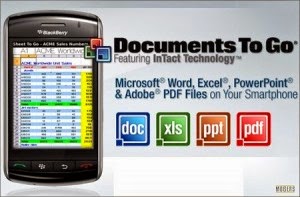
Documents to Go is android app to edit office documents from your smartphones or tablets. This app also allow you to view Adobe files , desktop file sync,multiple cloud storage accounts, opening password-protected files. you can make your documents look professional ,use excel sheets , make slides using power point to present.present. Font style , bold,italic,bullets etc same as you use Microsoft office on PC.
Platform : Android
Developer : Dataviz
Play store : Download
Full Version: Download
Monday, January 26, 2015
Cherry Mobile Thunder firmware stock rom to unbrick your phone
Hey,
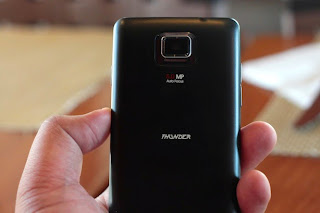
I got a new firmware, this is for Cherry Mobile Thunder, this is not for Thunder 2.0, this is for Cherry Mobile Thunder only. This is flashable via Flashtool. There is a tutorial below that you can follow. Hope you fix your phone:)
Firmware Here -->Cherry Mobile Thunder
"Extract the files to your desired folder" See picture below"
"If you encounter error in flashtool, use different version of it."
Installing Driver
First try the Alternative Driver, which is the AutoInstaller. Just open the install.bat then it will automatically install the driver. Then proceed to flashing. If it did not work then proceed with VCOM driver that you had downloaded. Then install it manually follow the guide below.
Video Reference using Driver Auto Installer (watch in HD)
When installing it manually your phone must be turned off, then connect it to your computer/laptop while pressing VOLUME UP or VOLUME DOWN. This will detect and look for the driver.
1. This is the first time that you will connect your phone and it will search for the correct driver.
3. If the driver is successfully installed MediaTek DA USB VCOM will appear in the New Hardware Wizard.
Video Flashing your phone (please watch in HD)
Flashing
Video Reference Using FlashTool version 5.xxx (watch in HD)
3. After you load the file, press F9 or Press Download to Flash your Phone.
"Hard reset your phone after flashing"
I hope this tutorial help you. Please drop a comment if something is not clear to you.
Read more »
I got a new firmware, this is for Cherry Mobile Thunder, this is not for Thunder 2.0, this is for Cherry Mobile Thunder only. This is flashable via Flashtool. There is a tutorial below that you can follow. Hope you fix your phone:)
Firmware Here -->Cherry Mobile Thunder
VCOM Driver -->VCOM Manual
Alternative Driver --> AutoInstaller
SPFlashTool --> SPFlashTool
SPFlashTool --> SPFlashTool
SPFlashTool --> LatestVersion
"Extract the files to your desired folder" See picture below"
"If you encounter error in flashtool, use different version of it."
Installing Driver
First try the Alternative Driver, which is the AutoInstaller. Just open the install.bat then it will automatically install the driver. Then proceed to flashing. If it did not work then proceed with VCOM driver that you had downloaded. Then install it manually follow the guide below.
Video Reference using Driver Auto Installer (watch in HD)
When installing it manually your phone must be turned off, then connect it to your computer/laptop while pressing VOLUME UP or VOLUME DOWN. This will detect and look for the driver.
1. This is the first time that you will connect your phone and it will search for the correct driver.
2. Check include this location ... ... and click on browse. Look for USB VCOM Driver and Click on 2K_XP_COM folder if you are using Windows XP or Win7 for Windows 7 and then press OK when you are done picking the right folder for the driver.
3. If the driver is successfully installed MediaTek DA USB VCOM will appear in the New Hardware Wizard.
Video Installing VCOM Driver (please watch in HD)
Video Flashing your phone (please watch in HD)
Flashing
1. Launch FlashTool
2. Click on Scatter-Loading, and load your scatter file. (see example below with loaded file in Flash Tool
Video Reference Using FlashTool version 5.xxx (watch in HD)
3. After you load the file, press F9 or Press Download to Flash your Phone.
4. If Download is not possible, you can press Firmware Upgrade.
5. After you press Download or Firmware Upgrade re-insert your battery and connect your Phone to the PC. Press Volume Down or Volume Up while connecting to PC.
"Hard reset your phone after flashing"
I hope this tutorial help you. Please drop a comment if something is not clear to you.
Subscribe to:
Posts (Atom)