Showing posts with label of. Show all posts
Showing posts with label of. Show all posts
Sunday, February 15, 2015
C Program for Implementation of Merge Sort
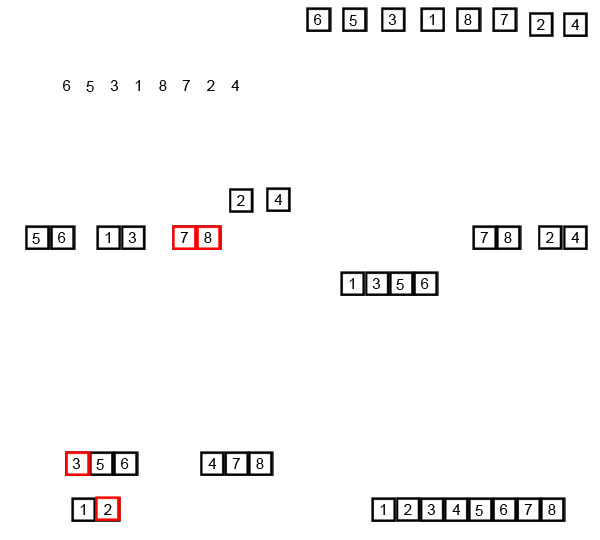
Merge sort runs in O (n log n) running time. It is very efficient sorting algorithm with near optimal number of comparison. Recursive algorithm used for merge sort comes under the category of divide and conquer technique. An array of n elements is split around its centre producing two smaller arrays. After these two arrays are sorted independently, they can be merged to produce the final sorted array. The process of splitting and merging can be carried recursively till there is only one element in the array. An array with 1 element is always sorted.
Also Read: C Program for Sorting an Array using Heap Sort
Also Read: What is Quick Sort? Algorithm and C Program to Implement Quick Sort
An example of merge sort is given below. First divide the list into the smallest unit (1 element), then compare each element with the adjacent list to sort and merge the two adjacent lists. Finally all the elements are sorted and merged.

#include<stdio.h>
void mergesort(int a[],int i,int j);
void merge(int a[],int i1,int j1,int i2,int j2);
int main()
{
int a[30],n,i;
printf("Enter no of elements:");
scanf("%d",&n);
printf("Enter array elements:");
for(i=0;i<n;i++)
scanf("%d",&a[i]);
mergesort(a,0,n-1);
printf("
Sorted array is :");
Sorted array is :");
for(i=0;i<n;i++)
printf("%d ",a[i]);
return 0;
}
void mergesort(int a[],int i,int j)
{
int mid;
if(i<j)
{
mid=(i+j)/2;
mergesort(a,i,mid); //left recursion
mergesort(a,mid+1,j); //right recursion
merge(a,i,mid,mid+1,j); //merging of two sorted sub-arrays
}
}
void merge(int a[],int i1,int j1,int i2,int j2)
{
int temp[50]; //array used for merging
int i,j,k;
i=i1; //beginning of the first list
j=i2; //beginning of the second list
k=0;
while(i<=j1 && j <=j2) //while elements in both lists
{
if(a[i]<a[j])
temp[k++]=a[i++];
else
temp[k++]=a[j++];
}
while(i<=j1) //copy remaining elements of the first list
temp[k++]=a[i++];
while(j<=j2) //copy remaining elements of the second list
temp[k++]=a[j++];
//Transfer elements from temp[] back to a[]
for(i=i1,j=0;i<=j2;i++,j++)
a[i]=temp[j];
}


Friday, February 13, 2015
Columns Grand total in Table component of Pentaho CDE
Hi Guys,
Table component has no direct feature of adding column totals as of this post written date(July 2nd 2013)....
Here is the pentaho community & data tables shared java script to find the Summation of columns in Table component.
Write below code in Draw Function of Table Component.
function f() {
var grandTotalRow = "<tfoot><tr><td>Total</td>";
for(i=1;i<4;i++) {
var total=0;
var rows = $(# + this.htmlObject + tbody tr);
rows.each(function() {
var cellVal = parseFloat($(td:eq(+i+), this).text().replace(,,));
if(!isNaN(cellVal)){
total+=cellVal;
}
});
grandTotalRow += "<td>"+total.toFixed(2);+"</td>";
}
grandTotalRow += "</tr></tfoot>";
if($(#+this.htmlObject+ tfoot).length===0)
$(#+this.htmlObject).find(table).append(grandTotalRow);
}
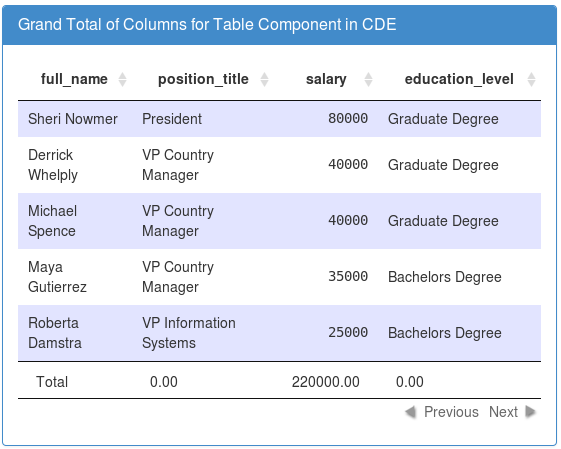
Sample output:
References :
https://www.datatables.net/forums/discussion/17132/summary-footer-row
http://forums.pentaho.com/showthread.php?94187-Table-Component-Grand-total
Example :
https://metrics.mozilla.com/data/content/pentaho-cdf-dd/Render?solution=metrics2&path=%2FgetInvolved&file=getInvolved.wcdf
Table component has no direct feature of adding column totals as of this post written date(July 2nd 2013)....
Here is the pentaho community & data tables shared java script to find the Summation of columns in Table component.
Write below code in Draw Function of Table Component.
function f() {
var grandTotalRow = "<tfoot><tr><td>Total</td>";
for(i=1;i<4;i++) {
var total=0;
var rows = $(# + this.htmlObject + tbody tr);
rows.each(function() {
var cellVal = parseFloat($(td:eq(+i+), this).text().replace(,,));
if(!isNaN(cellVal)){
total+=cellVal;
}
});
grandTotalRow += "<td>"+total.toFixed(2);+"</td>";
}
grandTotalRow += "</tr></tfoot>";
if($(#+this.htmlObject+ tfoot).length===0)
$(#+this.htmlObject).find(table).append(grandTotalRow);
}
Sample output:
References :
https://www.datatables.net/forums/discussion/17132/summary-footer-row
http://forums.pentaho.com/showthread.php?94187-Table-Component-Grand-total
Example :
https://metrics.mozilla.com/data/content/pentaho-cdf-dd/Render?solution=metrics2&path=%2FgetInvolved&file=getInvolved.wcdf
Thursday, February 12, 2015
Table Component Tooltip in Pentaho CDE Showing hidden column values as tool tip on 1st column or any column of table component
Hi Guys,
A requirement make you go in-depth of subject. Few days back I have got a requirement to show tool tip on table component column(s).
Id like to thank you to pentaho forum for their support in working with java script/jQuery in achieving this functionality.
Requirement :
Take a single query of 4 columns, hide 4th column and its values on table component and show this hidden column values as tool tip on the first column of table component.
In other words, Using CDA get 4 columns output but get only 1st 3 columns on table component and show the 4th column(hidden column) values as tool tip on the 1st column of table component.
Example Environment :
Pentaho C-Tools of TRUNK version(after 14 version trunk)
Pentaho BA server 5.1.0 stable
PostgreSQL foodmart database for querying purpose.
Here Id like to concentrate on the core part of the example hence design your layout.
What you can learn in this post ?
1. Query component usage.
2. How to store result set in a parameter using query component.
3. How to hide columns using java script/jQuery script on table component.
4. How to make use of tipsy function to show tooltip on table component.
Layout section :
Design as per your requirement
Data source section :
Query 1 :
SELECT employee_id,full_name,gender,position_title from employee limit 10
Sample image
 Query output:

Components panel section
Here for this post you need to work out with a parameter, a query component and table component.
first lets have a parameter : Name it as tooltipValues

Query component :
You will be storing the query output in parameter using query component.

Write below Code in PostFetch Expressionof Query Component :
function f2(data){
var tooltipValues = [];
for(var i=0; i <data.resultset.length; i++){
tooltipValues.push(data.resultset[i][3]);
}
alert(tooltipValues);
alert("length="+data.resultset.length);
return tooltipValues;
}
Now the table Component
Add the table component, give a name to it, and the data source for it,(in this example give the same data source i.e., Datasource=query1_table) & the HTML Object here it is Panel_1
Write below code in Post Execution of table component
function myTip()
{
$(th:nth-child(4),td:nth-child(4)).hide();
$(#Panel_1 tr td:first-child).each(
function(index){
$(this).tipsy({title: function(){ return tooltipValues[index][3] ; }});
}
);
}
In the above code
Using hide() function you are hiding the result of 4th column
#Panel_1 is the HTML Object
Using tipsy() function you are showing the 4th column values as tooltip on the 1st column.
td:first-child, you are telling the jQuery to show the tooltip values on 1st column of the table component.
Thats it you are done...!!!
Save the dashboard and see the preview.
Preview/Observations :
Image 1 :

Image 2:

Image-3:

Source Code of this example :
Download here
Thank you for reading this article.
A requirement make you go in-depth of subject. Few days back I have got a requirement to show tool tip on table component column(s).
Id like to thank you to pentaho forum for their support in working with java script/jQuery in achieving this functionality.
Requirement :
Take a single query of 4 columns, hide 4th column and its values on table component and show this hidden column values as tool tip on the first column of table component.
In other words, Using CDA get 4 columns output but get only 1st 3 columns on table component and show the 4th column(hidden column) values as tool tip on the 1st column of table component.
Example Environment :
Pentaho C-Tools of TRUNK version(after 14 version trunk)
Pentaho BA server 5.1.0 stable
PostgreSQL foodmart database for querying purpose.
Here Id like to concentrate on the core part of the example hence design your layout.
What you can learn in this post ?
1. Query component usage.
2. How to store result set in a parameter using query component.
3. How to hide columns using java script/jQuery script on table component.
4. How to make use of tipsy function to show tooltip on table component.
Layout section :
Design as per your requirement
Data source section :
Query 1 :
SELECT employee_id,full_name,gender,position_title from employee limit 10
Sample image
Components panel section
Here for this post you need to work out with a parameter, a query component and table component.
first lets have a parameter : Name it as tooltipValues
Query component :
You will be storing the query output in parameter using query component.
Write below Code in PostFetch Expressionof Query Component :
function f2(data){
var tooltipValues = [];
for(var i=0; i <data.resultset.length; i++){
tooltipValues.push(data.resultset[i][3]);
}
alert(tooltipValues);
alert("length="+data.resultset.length);
return tooltipValues;
}
Now the table Component
Add the table component, give a name to it, and the data source for it,(in this example give the same data source i.e., Datasource=query1_table) & the HTML Object here it is Panel_1
Write below code in Post Execution of table component
function myTip()
{
$(th:nth-child(4),td:nth-child(4)).hide();
$(#Panel_1 tr td:first-child).each(
function(index){
$(this).tipsy({title: function(){ return tooltipValues[index][3] ; }});
}
);
}
In the above code
Using hide() function you are hiding the result of 4th column
#Panel_1 is the HTML Object
Using tipsy() function you are showing the 4th column values as tooltip on the 1st column.
td:first-child, you are telling the jQuery to show the tooltip values on 1st column of the table component.
Thats it you are done...!!!
Save the dashboard and see the preview.
Preview/Observations :
Image 1 :
Image 2:
Image-3:
Source Code of this example :
Download here
Thank you for reading this article.
Wednesday, February 11, 2015
Introduction to WEKA GUI Chooser Basic Layouts Explained Are you bored of lengthy paragraphs of doucments A quick write up
Hi Guys,
This post will teach you basic layout structure of WEKA and in upcoming posts with examples.
Read my other article on how to download and install WEKA in Cent OS here
Documentation:
You can refer for the official documentation here : Click Here.
Alternatively you can find the pdf documentation in your WEKA installation :
Path : <WEKA installation folder>/weka-3-6-11/WekaManual.pdf
The official documentation gives you the clear & in depth details though Id like to share in my words how the layout looks like.
1) Once you launch the WEKA, the window opens with 4 different options which are 4 different applications with in WEKA.

2) The 4 Applications are
i) Explorer
ii) Experimentor
iii) Knowledge Flow and
iv) Simple CLI
3) Also, the window has Menu contains options "Programs", "Visualization","Tools" & "Help".
4)
Explorer An environment for exploring data with WEKA
Experimenter An environment for performing experiments and conduct-
ing statistical tests between learning schemes.
KnowledgeFlow An environment supports essentially the same func-
tions as the Explorer but with a drag-and-drop interface. One advantage
is that it supports incremental learning.
SimpleCLI Provides a simple command-line interface that allows direct
execution of WEKA commands for operating systems that do not provide
their own command line interface.
Thank you... Next post with some other basics on DataMining & with a simple example...
:-)
This post will teach you basic layout structure of WEKA and in upcoming posts with examples.
Read my other article on how to download and install WEKA in Cent OS here
Documentation:
You can refer for the official documentation here : Click Here.
Alternatively you can find the pdf documentation in your WEKA installation :
Path : <WEKA installation folder>/weka-3-6-11/WekaManual.pdf
The official documentation gives you the clear & in depth details though Id like to share in my words how the layout looks like.
1) Once you launch the WEKA, the window opens with 4 different options which are 4 different applications with in WEKA.
2) The 4 Applications are
i) Explorer
ii) Experimentor
iii) Knowledge Flow and
iv) Simple CLI
3) Also, the window has Menu contains options "Programs", "Visualization","Tools" & "Help".
4)
Explorer An environment for exploring data with WEKA
Experimenter An environment for performing experiments and conduct-
ing statistical tests between learning schemes.
KnowledgeFlow An environment supports essentially the same func-
tions as the Explorer but with a drag-and-drop interface. One advantage
is that it supports incremental learning.
SimpleCLI Provides a simple command-line interface that allows direct
execution of WEKA commands for operating systems that do not provide
their own command line interface.
Thank you... Next post with some other basics on DataMining & with a simple example...
:-)
Thursday, February 5, 2015
The Spirit of The Holly Quran by Sultan Bashir Mahmood


Wednesday, February 4, 2015
The hardest workouts of all time
What are the toughest, most mentally and physically challenging workouts that youve ever done? There are many discussions online on this topic, so I figured Id add my own opinion to the mix. These are in no particular order; just a list of things that absolutely, positively destroyed me.
20 rep squats

I have to admit that, week after week, 20 rep squats were the one workout I dreaded. I typically did them on Wednesdays and would spend all day at work thinking about them and trying to come up with excuses for skipping the gym. Once the weight got heavy, Id be sore for days after the 20 rep workout. Having said that, they were also extremely effective. I saw huge gains in 2009 both in terms of mental toughness and overall strength: squat +90lbs, deadlift +50lbs, overhead press +30lbs, power clean +50lbs, snatch +60lbs, etc.
Eva

Five rounds for time of:
Rowing and burpees

For time:
Inverted burpees

Five rounds for time of:
You know whats worse than burpees? Inverted burpees. Seriously, these things are downright mean. And 125 of them - in addition to 125 pull-ups and 125 normal burpees - is just plain evil.
400m repeats

This may seem like a strange one, but Im not sure any other workout allows me to approach 100% exertion quite like all-out 400m repeats. Im actually a pretty terrible runner and suffer at any distance, but 400m has a special place in my heart. It starts out easy, but before you know it, every muscle in your body is burning and your veins are pumping battery acid.
Pick your poison
What workouts do YOU fear? Post them in the comments.
Read more »
20 rep squats
- Load a barbell with a load you normally squat for ~10 reps
- Unrack the barbell
- Dont rack it again until youve done 20 reps
I have to admit that, week after week, 20 rep squats were the one workout I dreaded. I typically did them on Wednesdays and would spend all day at work thinking about them and trying to come up with excuses for skipping the gym. Once the weight got heavy, Id be sore for days after the 20 rep workout. Having said that, they were also extremely effective. I saw huge gains in 2009 both in terms of mental toughness and overall strength: squat +90lbs, deadlift +50lbs, overhead press +30lbs, power clean +50lbs, snatch +60lbs, etc.
Eva
Five rounds for time of:
- Run 800 meters
- 2 pood Kettlebell swing, 30 reps
- 30 Pull-ups
Rowing and burpees
For time:
- Row 1000 meters
- 25 Burpees
- Row 750 meters
- 50 Burpees
- Row 500 meters
- 75 Burpees
Inverted burpees
Five rounds for time of:
- 25 Inverted Burpees
- 25 Pull-ups
- 25 Burpees
You know whats worse than burpees? Inverted burpees. Seriously, these things are downright mean. And 125 of them - in addition to 125 pull-ups and 125 normal burpees - is just plain evil.
400m repeats
This may seem like a strange one, but Im not sure any other workout allows me to approach 100% exertion quite like all-out 400m repeats. Im actually a pretty terrible runner and suffer at any distance, but 400m has a special place in my heart. It starts out easy, but before you know it, every muscle in your body is burning and your veins are pumping battery acid.
Pick your poison
What workouts do YOU fear? Post them in the comments.
PART 3 The 3 types of symbols Introduction to Flash Symbols
The three types of symbols in Flash are:
Graphic
Use graphic symbols for static artwork and animation that you do not plan on adding any interactive functionality to. The reason for this is that youll need ActionScript to add interactivity, and graphic symbols are not designed to work with ActionScript.
Button
Use button symbols if you want to add mouse-related interactivity such as clicks and roll overs to your Flash movie. For example, you could create a button that plays a song whenever it is clicked.
Movie Clip
The movie clip symbol is like a combination of graphics, buttons and more. It can be used for static artwork and animation, but it can also be used with ActionScript so that interactive functionality can be added to it. But unlike buttons, movie clips are capable of much more than mouse-related interactivity.
Theres a lot more to learn about each type of symbol, but I will be covering them in later tutorials. For now, lets move on to the next part of this series where we will learn how to create a symbol from scratch.
<< PREV: Going inside a symbols timeline - Introduction to Flash Symbols PART 2
Read more »
Graphic
Use graphic symbols for static artwork and animation that you do not plan on adding any interactive functionality to. The reason for this is that youll need ActionScript to add interactivity, and graphic symbols are not designed to work with ActionScript.
Button
Use button symbols if you want to add mouse-related interactivity such as clicks and roll overs to your Flash movie. For example, you could create a button that plays a song whenever it is clicked.
Movie Clip
The movie clip symbol is like a combination of graphics, buttons and more. It can be used for static artwork and animation, but it can also be used with ActionScript so that interactive functionality can be added to it. But unlike buttons, movie clips are capable of much more than mouse-related interactivity.
Theres a lot more to learn about each type of symbol, but I will be covering them in later tutorials. For now, lets move on to the next part of this series where we will learn how to create a symbol from scratch.
<< PREV: Going inside a symbols timeline - Introduction to Flash Symbols PART 2
Creating and editing a symbol - Introduction to Flash Symbols - PART 4: NEXT >>
Subscribe to:
Posts (Atom)