Showing posts with label for. Show all posts
Showing posts with label for. Show all posts
Sunday, February 15, 2015
C Program for Implementation of Merge Sort
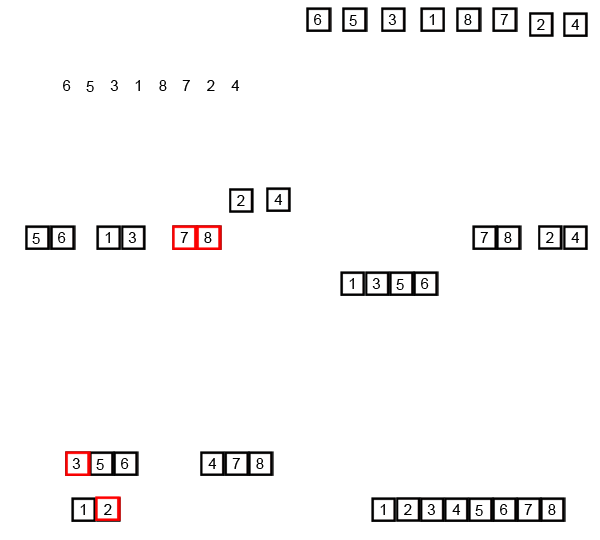
Merge sort runs in O (n log n) running time. It is very efficient sorting algorithm with near optimal number of comparison. Recursive algorithm used for merge sort comes under the category of divide and conquer technique. An array of n elements is split around its centre producing two smaller arrays. After these two arrays are sorted independently, they can be merged to produce the final sorted array. The process of splitting and merging can be carried recursively till there is only one element in the array. An array with 1 element is always sorted.
Also Read: C Program for Sorting an Array using Heap Sort
Also Read: What is Quick Sort? Algorithm and C Program to Implement Quick Sort
An example of merge sort is given below. First divide the list into the smallest unit (1 element), then compare each element with the adjacent list to sort and merge the two adjacent lists. Finally all the elements are sorted and merged.

#include<stdio.h>
void mergesort(int a[],int i,int j);
void merge(int a[],int i1,int j1,int i2,int j2);
int main()
{
int a[30],n,i;
printf("Enter no of elements:");
scanf("%d",&n);
printf("Enter array elements:");
for(i=0;i<n;i++)
scanf("%d",&a[i]);
mergesort(a,0,n-1);
printf("
Sorted array is :");
Sorted array is :");
for(i=0;i<n;i++)
printf("%d ",a[i]);
return 0;
}
void mergesort(int a[],int i,int j)
{
int mid;
if(i<j)
{
mid=(i+j)/2;
mergesort(a,i,mid); //left recursion
mergesort(a,mid+1,j); //right recursion
merge(a,i,mid,mid+1,j); //merging of two sorted sub-arrays
}
}
void merge(int a[],int i1,int j1,int i2,int j2)
{
int temp[50]; //array used for merging
int i,j,k;
i=i1; //beginning of the first list
j=i2; //beginning of the second list
k=0;
while(i<=j1 && j <=j2) //while elements in both lists
{
if(a[i]<a[j])
temp[k++]=a[i++];
else
temp[k++]=a[j++];
}
while(i<=j1) //copy remaining elements of the first list
temp[k++]=a[i++];
while(j<=j2) //copy remaining elements of the second list
temp[k++]=a[j++];
//Transfer elements from temp[] back to a[]
for(i=i1,j=0;i<=j2;i++,j++)
a[i]=temp[j];
}


Saturday, February 14, 2015
Turbo C for Windows 8 64 bit
Hello Everyone, in my previous posts I have shared links to download turbo c++ for windows xp and windows 7. From last few days I am getting requests from my blog readers to share a link to download turbo c++ for windows 8. So in this article I have shared about it and it will run in full screen. Just click on Download Now button to download turbo c++ for windows 8. I will not recommend you to use turbo C++ compiler because it is very old compiler. You should use some modern compiler like GCC.

Also Read: GCC Compiler: Download Code::Blocks 12.11 a Free C/C++ IDE
Size: 10.1 MB
OS: Windows Vista / Vista 64 bit / 7 / 7 64 bit / 8 / 8 64 bit
Also Read: GCC Compiler: Download Code::Blocks 12.11 a Free C/C++ IDE
Size: 10.1 MB
OS: Windows Vista / Vista 64 bit / 7 / 7 64 bit / 8 / 8 64 bit
- Download Turbo C++ for Windows 8 64 bit -
Source: http://www.softpedia.com/get/Programming/Coding-languages-Compilers/TurboCplusplus-for-Windows-7.shtml
Thursday, February 12, 2015
Need for Speed Underground 2 for PC full version with system requirements

In addition to the racing modes included in the previous Underground game (Circuit, Sprint, Drag and Drift races), four new variations of races have been provided in Underground 2. One racing mode was dropped, this being the Knockout competitions. Still, a Lap Knockout option is available when racing Circuit in non-career races. Underground 2 is unique among the games in the Need For Speed series in that it requires players to drive to a certain place in the city in order to begin a race (other games allow the player to select a race from a menu). Most races are marked on the in-game radar, but some are hidden and the player must search for them, should he decide to play them.
A circuit race is a standard race that involves up to four cars driving around a track that loops back to the start line of itself. A circuit race is typically a maximum of four laps and minimum of 2 laps. A sprint race is just like a circuit race except that the track does not loop back to the start line. Its a race from A to B involving a maximum of four vehicles, and because of the track design there is only one lap. Street X races are similar to Circuit races, but they take place on closed courses similar to Drift races.
Drifting is one of the easier types of racing (depending on difficulty level) in Need for Speed Underground 2. One difference to the drifting mode compared to the original Need for Speed Underground is that the player drifts with the other competitors at the same time. Players race against a maximum of three competitors. Points are awarded when the player successfully slide the car and finishes the drift without hitting any walls. Like the Street X mode, no nitrous oxide is allowed. There are also some special downhill drift races where the player starts at the top of a hill and has to slide down from top to bottom, a drifting equivalent of a sprint race (from point A to point B). In these races, there are no other racers, however there is normal city traffic. Players increase their points by sliding past city cars. Drag racing is a point-to-point race that forces players to use a manual transmission. Steering in this mode is simplified to simply allow for lane changes, while the game handles the steering along the lanes, and the player focuses more on maintaining an optimum speed for the car. The Nitrous Oxide meter is enlarged and displayed on the left side of the screen.
The Underground Racing League (URL) is a set of tournaments which takes place in a specific set of closed tracks outside city streets - either actual racing circuits or airport runways. URL tournaments typically consist of one to three races, with the player racing against five opponents. In tournaments with two or more races, a points system is used. At the end of each race, drivers receive a specific amount of points according to their standing in a race. The total score at the end of these races determines the winner of the tournament.
While cruising around the city, players can challenge other cruising opponents in a one-on-one race(these are called "Outrun Races"). The leader is given the freedom to pick his/her racing route, and must attempt to outrun the opponent and distance itself from him/her to as much as 300 metres (980 feet) to win. This racing formula is similar to that of Tokyo Xtreme Racer and Wangan Midnight video games, which uses health bars instead of distance to determine the winner. Once a certain amount of victories have been won by player in certain levels, the player is awarded a unique part free of charge by another racer. These parts are necessary to achieve 100% completion of the game. Read more
System requirements:
MINIMUM PC REQUIREMENTS
Windows 98/ME/2000/XP
933MHz Processor
256MB RAM
8X CD-ROM Drive
2GB Hard Disk Space
32MB DirectX compatible ATi Radeon 7500 or nVidia GeForce2 Class Video Card
DirectX compatible Sound Card
DirectX compatible Controller or Keyboard
DirectX 9.0c
MULTIPLAYER SYSTEM REQUIREMENTS
Broadband Internet Connection
Screen Shots; Click on the image to view large
 |  |  |
How to Download

File Size: 232 MB
Need for Speed: Under ground 2 for PC: Download
I hope you like it....!
Wednesday, February 11, 2015
Midtown Madness 2 for PC full version with system requirements

There are few sure things in life, but one of them is that if Microsoft puts out a racing game with "Madness" in the title, you might as well grab it as soon as it hits store shelves. Midtown Madness 2 is no exception to this rule. It doesnt matter whether youre a hard-core simulation fan or you simply crave speed, destruction, and mayhem in your games - if you want to play a very fun racing game, then Midtown Madness 2 is for you.
But thats not to say that Midtown Madness 2 is ideal. In fact, it seems as though it could have used a couple more weeks in testing. On several occasions the game completely locked up on a fairly standard system (Celeron 450MHz, 256MB RAM, TNT2 video card with the latest drivers), and only through uninstalling and reinstalling did the problem finally seem to go away. As in some other racing games, the brakes dont truly function as real-life brakes when both pedals are configured to use the y-axis: Slamming on the pedal doesnt lock the wheels but merely decelerates your car more quickly. An attempt to correct this by configuring the pedals to use two axes revealed a bug - the brakes worked in reverse, forcing you to keep the pedal down for no brakes and releasing it to stop. Your only true braking option is the hand brake, which tends to cause unpredictable slides when all you really want to do is slow down in a hurry. Also, at the beginning of one race, my car was positioned facing in the opposite direction of the other cars, and stepping on the gas sent me hurtling backward along with them even though I was in first gear. Fortunately, none of these problems were persistent or detrimental to how enjoyable the game turns out to be.
You can actually work your way around most of these issues, and in fact you might never experience a game crash yourself. But theres no getting past the games rather pathetic engine noises. When you see a 68 Mustang Fastback tearing through downtown San Francisco, you want to hear a mighty rumbling sound thatll make bystanders think the big earthquakes finally happening. Instead, the cars in Midtown Madness 2 give off a little purr that barely changes in tone even when youre redlining the tachometer. Even in an arcade-style racing game such as this, its good to be able to hear when you should change gears, rather than constantly have to check the tachometer.
The occasional bugs and the weak sound effects are the only low points in Midtown Madness 2, because otherwise, the game is a blast. Midtown Madness players whove grown used to screaming through Chicago will be happy to find two new venues featured in the sequel: San Francisco and London. As in the original game, both cities have been meticulously modeled to include many notable landscapes. In San Fran, youll see Coit Tower, the Palace of Fine Arts, and of course the Golden Gate Bridge; in London, you can tool around Trafalgar Square and even ram through the gates of Buckingham Palace and do a few donuts on the well-manicured lawn. Read more
System requirements:
CPU Type: Pentium II
CPU Speed in MHz: 266MHz
RAM: 32MB, 64MB (Windows 2000)
Hard Drive Space: 250MB
Sound Card: DrectSound Compatible
CD Drive Speed: 4X
Graphics Type: SVGA
Graphics Resolution(s): 800x600
Compatible Devices:
Software (DirectX 5.0, etc.): DirectX 7.0a
Screen Shots: Click on the image to view large
 |  |  |
How to Download
File Size: 157.3 MB
Midtown madness 2: Download
Midtown madness 2: Download
Password: 4hthebest.blogspot.com
Bloody Roar 2 for PC full version with system requirements

Bloody Roar II is a 3D versus fighter where 1 or 2 players can play as a variety of fighters who can transform into larger Beast forms. Each fighter is a Zoanthrope, a human who can transform into a large animal-human hybrid, a combination of the character and their token animal. This second form grants additional power to a player for as long as that power can be sustained. Rock solid graphics and fierce involved fighting are hallmarks of the Bloody Roar series. Some new features in the game since the previous one are: new story modes, 7 new characters, addition to the beast drive, more than 90 drawings in the game, and new cheats, including small head and big head.
Like Bloody Roar, the game was acclaimed for stunning graphics and special effects on the PSone. Both characters could transform and revert from a second form with no loading. Arenas were rendered in full 3D with destructible walls that would wear from collisions. It had directional lighting and shadow. It was also one of the few game to run at a smooth 60 frames per second and ,640x480 resolution on the PSone hardware.
Most charming of all, was the "player model" feature which made a return form BR1. With it the scale of character models can be changed. "Big Head" mode inflates the size of characters heads while "Kid" mode shrinks characters bodies two half their original size while their head and hands remain the same. Matches are not hampered by this mode and the technical game stays the same.
Gameplay is primarily based on taking advantage of the beast form which make fighters stronger, faster and feature special moves. To regulate a fighters beast form there is a power bar placed in the corner for each player. Players are always given the power to transform at the start of a match however when the bar is blue the character can only fight as a human. Taking and giving damage, both build the blue bar till it begins a yellow bar that overlapping the blue bar. With just a sliver of yellow in their power bar, fighters can transform into their beast form. However the yellow bar indicates how much damage the beast form can take before it depletes and reverts the character to their human form. So player would prefer to build this yellow gauge before transforming. The yellow bar does not increase while supporting the beast form. Building up the yellow bar without taking too much damage is the balance players consider as they compete. Read more
System requirements:
Cpu: 700Mhz
Ram:256 Mb
Video Memory:32 Mb
Windows Xp,7,Vista,8
Screen Shots: Click on the image to view large
 |  |  |
How to Download

File Size: 20.53 MB
Bloody Roar 2 for PC: Download
Bloody Roar 2 for PC: Download
I hope you like it....!
Tuesday, February 10, 2015
Practicing For DDOS
 |
| Practicing For DDOS |
What well attempt to do in this article is similar to testing a nuclear bomb (okay, not really). But still, theres no way to tell exactly what will happen, other than to blast the damn thing because more often than not thats just the way it is with DDOSing.
To refresh your memory, DDOS Attacks involve saturating the target machine with external communications requests (packets) so much so that it cannot respond to legitimate traffic. In most cases, this presents an obvious obstacle - Where to get massive amounts of bandwidth? By definition, servers are designed to handle huge quantities of traffic and when we are trying to attack it with traffic, its going to be very difficult (or is it?).
The usual way to DDOS is to slowly build up a botnet for example, by spreading a trojan (or RAT) that installs the DDOSing software and sets up a backdoor listener. When the infection has spread to thousands of systems, the hacker then activates the trojan and the DDOSing begins. Clearly, breaking into several thousand systems is not very legal or ethical, so even if some genuine website administrator wants to perform a dummy DDOS just to see what will happen and whats the best way to handle it, they wont be able to do it. This is another reason why small websites particularly are very vulnerable to attack - they dont practice because apparently the only way to practice is illegal. So, when they are hit by an actual DDOS they simply dont stand a chance. So, below we take a look at a possible solution that works for both good and bad guys. An alternative practice methods for website admins and a shortcut for DDOSing for hackers.
The method described below is quite unpopular. In a sentence, we use online services to DDOS for us. These are called "stressers" or "booters" and are simply services which provide large internet bandwidth for the purposes of simulating a DDOS attack. Before moving on, some of the websites mentioned below do offer trials but most of them are fully unlocked only after a payment. So, these may be useful mainly for serious networking administrators or website owners only.
Clearly, doing an actual BlackHat DDOS using this is very much possible if done correctly. But that would require using a VPN or TOR browser to hide your identity. Even with that, since you would have to make a payment, it could potentially lead back to you making this a very dangerous alternative if not done exactly right. Hence, I recommend using this method only for what its meant for, as simply fooling around can get you into very serious legal trouble.
Below you can see the names of a few well known stressers and booters and the links to their websites.
#1: Power Stresser - http://www.powerstresser.com (60GB/s of Power)(Stop Button)(Instant)(Skype Resolvers)
#2: Safe Stresser - http://safestresser.com/ (Easy to Use)(Strongest Attack)(100% uptime)
#3: Titanium Stresser - http://titaniumstresser.net/ (Powerful)(Up for 2 years)(Best Price)(Great Support)
#4: Cell Stresser - www.renegade-products.net (Strong Power)(Max Boot Time)
#5: Legion Stresser - http://legion.cm/ (Max Power) (Max Time)
#6: Avenge Stresser - www.avengestresser.com/ (Great Power)(Great Price)
For some reasons, majority of these websites appear quite dull on first look. Perhaps they dont want to attract a lot of attention. Anyways, In most of the above websites youll simply see a login page with a "Register" option. So, pretty much the only way to get inside is to make an account. Pick anyone and create an account. (Again, this tutorial is mainly for online service/website owners who want to make sure their website is well protected) Once youve registered for the first time. You will see several packages of boot time and strength. Whether youre trying to DDOS someone else (which you shouldnt) or your own online website or service, I recommend having several (2-3) booters or Stressers with moderate time instead of just 1 large DDOSer.
On The websites you will see a control panel-like window, where you can initiate your DDOS Attacks after selecting a package. To DDOS a home connection or a server, you will first need the (host) IP address. Many Booters Contain a built in Skype resolver and Domain Resolver. For "Port" option, the usual choice is Port 80 (Directed at home modems).
You will then be able to set your Boot time anywhere from 0 to the maximum time you paid for. Generally, UDP(User Datagram Protocol) is used for targeting a PC. For website and larger servers, SSYN attack is usually used which is considerably more powerful. You can think of these as DDOS attacks in which different types of optimal requests are sent for different situations and targets. Anything more than this will get a bit too technical than required here.
So thats that for configuring and optimizing the DDOS attack. After this you will be able to start your DDOS attack as and when you please. Below you will find some useful relevant information that is frequently required for DDOSing using stressers and/or booters:
Skype Beta Resolver - http://www.iSkypeResolve.com
Other Ports:
(Home Connections)
53 - DNS Port
80 - Default Internet Port
(Xbox Connections)
80 - Default Internet Port
88 - Authentication Port
3074 - Xbox Default Port
(Web Servers)
21 - FTP Port
25 - SMTP/Mail
53 - DNS Port/Nameserver
80 - Default Internet Port
3306 - MySQL Port
Subscribe to:
Posts (Atom)