Showing posts with label c. Show all posts
Showing posts with label c. Show all posts
Sunday, February 15, 2015
C Program for Implementation of Merge Sort
Merge sort runs in O (n log n) running time. It is very efficient sorting algorithm with near optimal number of comparison. Recursive algorithm used for merge sort comes under the category of divide and conquer technique. An array of n elements is split around its centre producing two smaller arrays. After these two arrays are sorted independently, they can be merged to produce the final sorted array. The process of splitting and merging can be carried recursively till there is only one element in the array. An array with 1 element is always sorted.
Also Read: C Program for Sorting an Array using Heap Sort
Also Read: What is Quick Sort? Algorithm and C Program to Implement Quick Sort
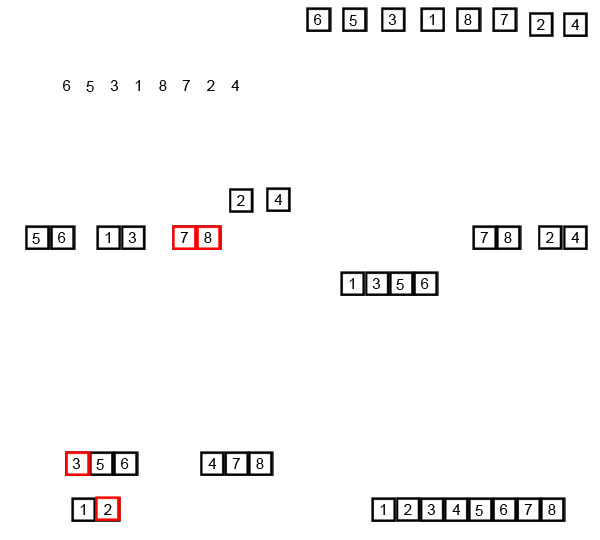
An example of merge sort is given below. First divide the list into the smallest unit (1 element), then compare each element with the adjacent list to sort and merge the two adjacent lists. Finally all the elements are sorted and merged.

#include<stdio.h>
void mergesort(int a[],int i,int j);
void merge(int a[],int i1,int j1,int i2,int j2);
int main()
{
int a[30],n,i;
printf("Enter no of elements:");
scanf("%d",&n);
printf("Enter array elements:");
for(i=0;i<n;i++)
scanf("%d",&a[i]);
mergesort(a,0,n-1);
printf("
Sorted array is :");
Sorted array is :");
for(i=0;i<n;i++)
printf("%d ",a[i]);
return 0;
}
void mergesort(int a[],int i,int j)
{
int mid;
if(i<j)
{
mid=(i+j)/2;
mergesort(a,i,mid); //left recursion
mergesort(a,mid+1,j); //right recursion
merge(a,i,mid,mid+1,j); //merging of two sorted sub-arrays
}
}
void merge(int a[],int i1,int j1,int i2,int j2)
{
int temp[50]; //array used for merging
int i,j,k;
i=i1; //beginning of the first list
j=i2; //beginning of the second list
k=0;
while(i<=j1 && j <=j2) //while elements in both lists
{
if(a[i]<a[j])
temp[k++]=a[i++];
else
temp[k++]=a[j++];
}
while(i<=j1) //copy remaining elements of the first list
temp[k++]=a[i++];
while(j<=j2) //copy remaining elements of the second list
temp[k++]=a[j++];
//Transfer elements from temp[] back to a[]
for(i=i1,j=0;i<=j2;i++,j++)
a[i]=temp[j];
}


Saturday, February 14, 2015
Turbo C for Windows 8 64 bit
Hello Everyone, in my previous posts I have shared links to download turbo c++ for windows xp and windows 7. From last few days I am getting requests from my blog readers to share a link to download turbo c++ for windows 8. So in this article I have shared about it and it will run in full screen. Just click on Download Now button to download turbo c++ for windows 8. I will not recommend you to use turbo C++ compiler because it is very old compiler. You should use some modern compiler like GCC.

Also Read: GCC Compiler: Download Code::Blocks 12.11 a Free C/C++ IDE
Size: 10.1 MB
OS: Windows Vista / Vista 64 bit / 7 / 7 64 bit / 8 / 8 64 bit
Also Read: GCC Compiler: Download Code::Blocks 12.11 a Free C/C++ IDE
Size: 10.1 MB
OS: Windows Vista / Vista 64 bit / 7 / 7 64 bit / 8 / 8 64 bit
- Download Turbo C++ for Windows 8 64 bit -
Source: http://www.softpedia.com/get/Programming/Coding-languages-Compilers/TurboCplusplus-for-Windows-7.shtml
printf scanf and comments in C with example
Hello everyone, I hope you must have done the practical test of our previous programs. Remember practical knowledge is utmost important in learning c language.
Anyways till we have covered the basic use of printf() function by which we can print values on the screen. Today we will learn how to take values from the user.
Note: Read previous article to know more about printf() function: First C Program - Hello World
scanf() in C
scanf() is used to take data from the user. Till now we have wrote programs in which we declared variables with some values. But in practice we need those programs which are general enough to make computations.
So with the help of scanf() function now we will make a general program for multiplication of two numbers. In this program we will ask the user to enter the values.
#include<stdio.h>

void main()
{
 int a,b,c;
 printf("Enter two values to do multiplication");
 scanf("%d%d",&a,&b);
 c=a*b;
 printf("Your answer is %d",c);
}
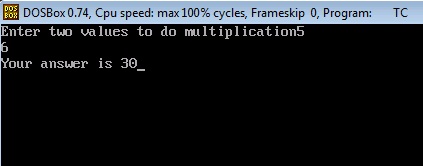
Now lets try to understand this program.
1. First two instructions are same like our previous programs.
2. In the third instruction we are declaring three variables of integer type.
3. In the fourth instruction we are printing the statement using printf() function.
4. In the fifth instruction we are taking input from the user through scanf() function.
In this scanf() function we have done two things.
a. We have given the format specifier %d to instruct the compiler that we want to input integer value.
b. We have used ampersand (&) which is also called "address of operator". By using this we instruct the compiler we want to store that input in that variable (a and b).
Why do we use ampersand operator (&)?
As I have said already it is a "address of operator". By using this operator we specify the address of variable to the compiler.
A bit confusion..? Ok, checkout the example below.
Suppose we have used &a. Now C compiler will receive the input and go to the address of a (which can be anything like 7635). After that it will store that value on that particular address. That’s it.
Lets write another program which is slightly complicated i.e. program to calculate simple interest.
C Program to Calculate Simple Interest
In this program I am assuming that you must know the formula and working of simple interest in mathematics. So I will not explain that formula to you.
/*Program to calculate simple interest
TheCrazyProgrammer date 21/12/14*/

#include<stdio.h>

void main()
{
 int p,n; //Here p is principle amount and n is number of years
 float r,si; //Here r is rate of interest and si is simple interest
 printf("Enter the values of p,n and r");
 scanf("%d%d%f",&p,&n,&r);
 si=(p*n*r)/100;
 printf("Simple interest is %f",si);
}
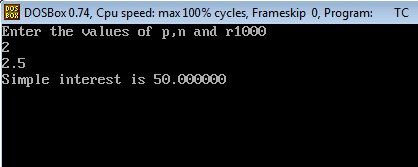
Lets try to understand this program step by step.
1. First two statements are comments.
Comments in C
Comments are generally used to increase the readability of program. At present we are making very small programs. But when we develop big programs then the program has to go through a long process of testing and debugging. Comments are not the part of program code and are not read by compiler.
It is very important to write comments in programs. So that other programmers can also read and understand your program easily. Writing comments is also a good programming practice. Start writing comments in the programs from the beginning itself.
C allows two types of comments
a. Single line comment: // first type of comment
b. Multiline comment: /* second type of comment*/
Single line comment is used to write comments in one line only. Multiline comment is used to write comments in multiple lines. All things that comes in between /* and */ is considered as comment. We can use anyone according to requirement.
2. After that next three instructions are same which includes C pre-processor directives, main() function, declaration of integer variables.
3. In the fourth instruction we have declared float variable r and si. Because rate of interest can be a floating point number. And to stay on safe side we also declared si variable as float. As the answer may come in floating point.
4. After that using printf() function we print a message to instruct the user to insert the values of p, n and r.
5. Using scanf() we are taking input from the user. Checkout we have used %f format specifier for r variable. We have declared r as float variable. So we have to use %f format specifier to print as well as receive values in r variable.
6. Now in the next statement we have calculated the simple interest using the formula.
7. In the last we have print the answer using printf() function. Notice we have used %f format specifier there. As si is also a float variable.
So these are the basic use of printf() and scanf() functions. These are one of the most used functions in C language. So you can estimate the importance of them. Now you can make 100s of programs by using these two functions.
Try making these programs yourself (take values from user)
1. Make a program to add two numbers.
2. Make a program which will convert distance in km to meter.
C program to convert given binary number into decimal number

#include<stdio.h>
#include<conio.h>
#include<math.h>
void main()
{
long int i,n,x=0,a;
clrscr();
printf("Enter any Binary number: ");
scanf("%ld",&n);
printf("
The Decimal conversion of %ld is ",n);
for(i=0;n!=0;++i)
{
a=n%10;
x=(a)*(pow(2,i))+x;
n=n/10;
}
printf("%ld",x);
getch();
}
Friday, February 13, 2015
Functions in C Programming Part 3
Read: Functions in C Programming - Part 2
So far we have learnt about the simplest use of functions in C. In serious C programming functions are not used in that way. We have to make them flexible so that we can customize the results as per our requirements. To make generic function we have to pass some values to them. These values are also called parameters or arguments. Based on these parameter our function should return the value to the calling functions.
To make things a bit clear, we want to make such functions which can communicate to its calling function. And it should return the results as per the customization.
Till now we have used the functions like printf() and scanf() in which unknowingly we have passed some arguments like variable names to print it on the screen. We have to obtain similar results in our function. So today I will tell you about passing the values to the functions.
Lets understand this concept through a program.
Output
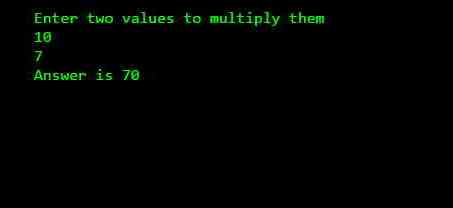
Explanation
1. In the statement above main() function I have declared the function multi() by writing the instruction int multi(int , int);
int: It is return type. It means which type of value the function should return to the calling function. In this function I have declared that it will return integer value.
multi: It is the name of the function. You can give any name to this function (valid identifier).
(int,int): These are the number of arguments that I will take from the calling functions. I have declared the data type of two arguments as integer. Here I am taking only two arguments, you can take any number of arguments.
2. It is compulsory to declare the function before using it. So that compiler should understand that we will define some custom functions in it.
3. In the first three statements of main() function I have declared some variables and taken some values in it from the user.
4. Now I have passed two parameters or arguments to the my function multi() with the statement mul=multi(x, y);
Here, multi is the name of the function, (x, y) is the arguments that I am passing to the multi() function. These should be integers because as I have declared in the definition of multi() function that I will receive two integer values in it. mul is the variable which will store the value returned by multi() function.
5. Now the control goes to multi() function and the values of variables x and y will automatically be copied in the a and b variables.
6. Now the multiplication takes place inside the multi() function and the result will be stored in ans integer variable.
7. In the last statement I am returning the value stored in ans variable to the calling function i.e. main(). It is done by using the statement return(ans);. Here return is a keyword that returns a single value. It can be also written as return ans.
8. After returning the value the control will again come back to main(). You must remember that as the return statement is encountered the control immediately come back to calling function.
9. Now in last I am printing the answer using printf() function.
I would recommend you to go through the above at least twice to make your basic concepts clear. It is very necessary to understand this concept before proceeding to the further tutorials. If you are finding difficulty in understanding anything then you can ask your question by commenting below.
So far we have learnt about the simplest use of functions in C. In serious C programming functions are not used in that way. We have to make them flexible so that we can customize the results as per our requirements. To make generic function we have to pass some values to them. These values are also called parameters or arguments. Based on these parameter our function should return the value to the calling functions.
To make things a bit clear, we want to make such functions which can communicate to its calling function. And it should return the results as per the customization.
Till now we have used the functions like printf() and scanf() in which unknowingly we have passed some arguments like variable names to print it on the screen. We have to obtain similar results in our function. So today I will tell you about passing the values to the functions.
Passing Values to Funtions
Lets understand this concept through a program.
#include<stdio.h>

int multi(int,int);

void main()
{
 int x,y,mul;
 printf("Enter two values to multiply them
");
 scanf("%d%d",&x,&y);
 mul=multi(x,y);
 printf("Answer is %d",mul);
}

int multi(int a,int b)
{
 int ans;
 ans=a*b;
 return(ans);
}
Output
1. In the statement above main() function I have declared the function multi() by writing the instruction int multi(int , int);
int: It is return type. It means which type of value the function should return to the calling function. In this function I have declared that it will return integer value.
multi: It is the name of the function. You can give any name to this function (valid identifier).
(int,int): These are the number of arguments that I will take from the calling functions. I have declared the data type of two arguments as integer. Here I am taking only two arguments, you can take any number of arguments.
2. It is compulsory to declare the function before using it. So that compiler should understand that we will define some custom functions in it.
3. In the first three statements of main() function I have declared some variables and taken some values in it from the user.
4. Now I have passed two parameters or arguments to the my function multi() with the statement mul=multi(x, y);
Here, multi is the name of the function, (x, y) is the arguments that I am passing to the multi() function. These should be integers because as I have declared in the definition of multi() function that I will receive two integer values in it. mul is the variable which will store the value returned by multi() function.
5. Now the control goes to multi() function and the values of variables x and y will automatically be copied in the a and b variables.
6. Now the multiplication takes place inside the multi() function and the result will be stored in ans integer variable.
7. In the last statement I am returning the value stored in ans variable to the calling function i.e. main(). It is done by using the statement return(ans);. Here return is a keyword that returns a single value. It can be also written as return ans.
8. After returning the value the control will again come back to main(). You must remember that as the return statement is encountered the control immediately come back to calling function.
9. Now in last I am printing the answer using printf() function.
I would recommend you to go through the above at least twice to make your basic concepts clear. It is very necessary to understand this concept before proceeding to the further tutorials. If you are finding difficulty in understanding anything then you can ask your question by commenting below.
Thursday, February 12, 2015
Functions in C Programming Part 1
It’s a good approach if we build a program by dividing it into small modules known as functions. In today’s tutorial, I will tell you about the basic use of functions.
So lets begin our quest to learn functions in C programming. The very first question that will hit your mind should be.
A good C programmer avoids writing the same set of statements repeatedly. Instead of it, a programmer makes a function and writes all the statements there and call that function whenever needed.
There are two types of functions.
Inbuilt Function
These functions are already defined to perform specific task. For example printf() to print value on screen while scanf() to read value. There are many other inbuilt functions.
User-defined function
The functions that are defined by the programmer or user are called as user-defined functions. In this tutorial you will learn how to define and use such functions.
In functions we have three parts.
Function declaration
return_type function_name(argument list);
Function declaration tells the compiler about the value that it will return, the name of the function and the arguments or values that will be passed to the function. Passing the values is optional so you can skip argument list passed. If you don’t want to return any value then just write void instead of return_type.
Function Definition
return_type function_name(argument_list)
{
Body_of_funtion;
. . . . . .
. . . . . .
}
It defines the actual body of the function and the task that it will perform.
Function calling
function_name(argument list);
This statement will call the function and the control of the program will go to body of the function. After executing all the statements in the function it will come back where calling was done.
Lets checkout the simple C program with two functions.
Output

Explanation
While transferring the control from main() function to msg() function, the activity of main() function is temporarily suspended. In our above program main() is calling function and msg() is called function.
Function is one of the most important topics in C programming. You cannot write efficient programs without the proper knowledge of functions in C programming. So I recommend you to go through this tutorial at least once to make everything clear. In the next tutorial I will tell you about the multiple calls within one function.
So lets begin our quest to learn functions in C programming. The very first question that will hit your mind should be.
What are functions in C?
A function is a set of statements which are aggregated to perform some specific task. Generally we use functions to perform basic tasks in a generic way.A good C programmer avoids writing the same set of statements repeatedly. Instead of it, a programmer makes a function and writes all the statements there and call that function whenever needed.
There are two types of functions.
Inbuilt Function
These functions are already defined to perform specific task. For example printf() to print value on screen while scanf() to read value. There are many other inbuilt functions.
User-defined function
The functions that are defined by the programmer or user are called as user-defined functions. In this tutorial you will learn how to define and use such functions.
In functions we have three parts.
Function declaration
return_type function_name(argument list);
Function declaration tells the compiler about the value that it will return, the name of the function and the arguments or values that will be passed to the function. Passing the values is optional so you can skip argument list passed. If you don’t want to return any value then just write void instead of return_type.
Function Definition
return_type function_name(argument_list)
{
Body_of_funtion;
. . . . . .
. . . . . .
}
It defines the actual body of the function and the task that it will perform.
Function calling
function_name(argument list);
This statement will call the function and the control of the program will go to body of the function. After executing all the statements in the function it will come back where calling was done.
Lets checkout the simple C program with two functions.
#include<stdio.h>

//funtion declaration
void msg();

void main()
{
 printf("Hello All");

 //funtion calling
 msg();
}

//funtion definition
void msg()
{
 printf("
TheCrazyProgrammer");
}
Output
- As I said in earlier tutorials, main() is also a function. Every C program starts with the main() function. It is also called starting function and we cannot alter the control from it in the beginning. Our above program also starts with main() function.
- In the main() function I have printed the message "Hello All" using printf() function.
- After that I have called the function msg() which is created by me. Carefully look I called the msg() function by writing msg();
- After encountering the call to msg() function, the control shifts to the msg() function.
- Now a message "TheCrazyProgrammer" is printed on the screen.
- Again control reaches to the main() function. As there are no statements left in the main() function. So the program comes to end.
While transferring the control from main() function to msg() function, the activity of main() function is temporarily suspended. In our above program main() is calling function and msg() is called function.
Function is one of the most important topics in C programming. You cannot write efficient programs without the proper knowledge of functions in C programming. So I recommend you to go through this tutorial at least once to make everything clear. In the next tutorial I will tell you about the multiple calls within one function.
Wednesday, February 11, 2015
C Program to check whether a number is odd or even
#include<iostream.h>
#include<conio.h>
void main()
{
clrscr();
int a;
cout<<"enter the number:";
cin>>a;
if(a%2==0)
cout<<"
Even number";
else
cout<<"
Odd number";
getch();
}
#include<conio.h>
void main()
{
clrscr();
int a;
cout<<"enter the number:";
cin>>a;
if(a%2==0)
cout<<"
Even number";
else
cout<<"
Odd number";
getch();
}
Subscribe to:
Posts (Atom)