Showing posts with label and. Show all posts
Showing posts with label and. Show all posts
Friday, February 27, 2015
How to See How Many Email Followers You Have and Who They Are Giveaway Announcement!
So the past two weeks I got mixed up and ended up missing two technology Tuesday posts in a row. Im so sorry! Im back today though... with a new Tech Tuesday post and a giveaway announcement!
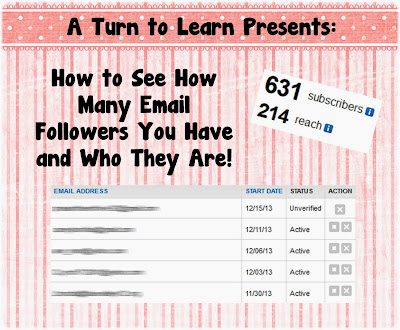
First things first, here is the tutorial. The winner on the poll this week was another blogger tutorial... how to see how many email followers you have and see who they are!
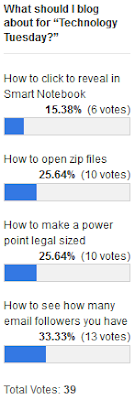
Here is the poll:
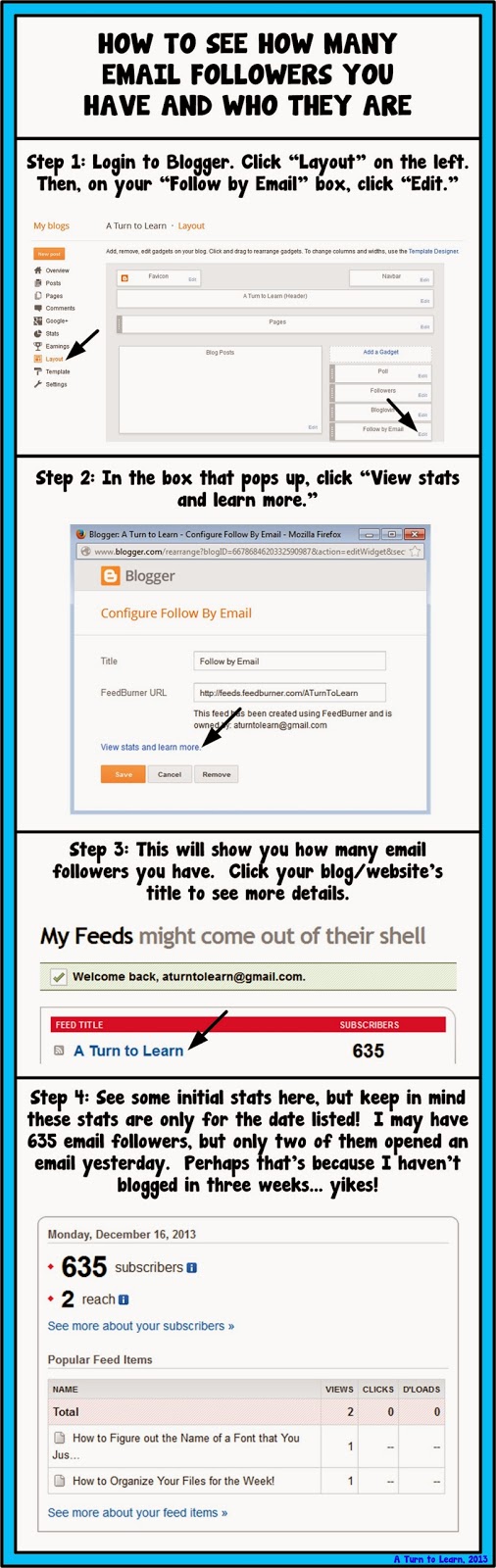
Now onto the tutorial!


For next weeks poll, Ill be adding the option to change the colors, features or special effects of a shape, picture, or text box in PowerPoint... even if those shapes/pictures are on different slides!
Now... for the giveaway announcement!!! For all of my lovely followers, check back in tomorrow to see some new products and a chance to win them all!
Read more »
First things first, here is the tutorial. The winner on the poll this week was another blogger tutorial... how to see how many email followers you have and see who they are!
Here is the poll:
Now onto the tutorial!
You can download this tutorial as a PDF by clicking this picture!
Note: This tutorial is hosted on Google Drive. To save it from there, just open the file and click File > Download to save onto your computer!
For next weeks poll, Ill be adding the option to change the colors, features or special effects of a shape, picture, or text box in PowerPoint... even if those shapes/pictures are on different slides!
Now... for the giveaway announcement!!! For all of my lovely followers, check back in tomorrow to see some new products and a chance to win them all!

Saturday, February 14, 2015
IOS vs Android Difference and Comparison Infographic
Apple’s iOS and Google’s Android both are very popular mobile operating systems. It’s still a debate topic that which one is the best Android or iOS?
In this article, iOS and Android are differentiated over various perspectives.
Globally, around 1 billion units of smartphones have been sold out of which android has 80% market share and iOS has a 15 % market share. Thus, the global revenue generated by smartphones is approx. $265 billion.
Also Read: Top 100 Android Apps 2014
Also Read: iCloud - How to Backup iPhone Data
Also Read: Top 100 Android Apps 2014
Also Read: iCloud - How to Backup iPhone Data
The reason behind the largest market share by android is that it is also available at cheaper rates that make it popular in emerging countries where per capita income is low. Out of 227 countries, Android has leadership in 138 countries and iOS is popular in 38 countries which are developed countries with high capita income.
![IOS vs Android - Difference and Comparison [Infographic]](https://blogger.googleusercontent.com/img/b/R29vZ2xl/AVvXsEiOw084IjGbVswb74mUYnL2je4Cv_HLaa5Hwf5m48taJV5K7Ss_wUkjjX0KKpZnXE2UNr90nmOapadLCT5YF6VlUF-YxAdmDhi3dr72LO087QJx_u19xGgmOrgsHPhDu04ytBlZsgoXFxaK/s400/IOS+vs+Android.jpg "IOS vs Android - Difference and Comparison [Infographic]")
There are 1.4 million android apps, 85% of which are available for free while out of around 1.3 million iOS apps only 25% apps are free. Apple’s iTunes charges $99 per year and Play Store charges $25 per year to publish any app.
If we look at revenues and profits, iOS make more profit than android apps. There are 67% shopping apps for iOS and 33% for android. iOS users spend an average amount of $93.94 per order, while Android users spend average amount $48.10 per order.
It is also considered that iOS users are more internet savvy than Android users as share of web traffic comes more from iOS devices that is 62% than android devices that is 38%. It makes more employment in iPhone app development as 60%, while 40% employment in android development.
Find more interesting facts regarding iOS and android in the following infographic.
IOS vs Android Infographic

Image courtesy: Nine Hertz
printf scanf and comments in C with example
Hello everyone, I hope you must have done the practical test of our previous programs. Remember practical knowledge is utmost important in learning c language.
Anyways till we have covered the basic use of printf() function by which we can print values on the screen. Today we will learn how to take values from the user.
Note: Read previous article to know more about printf() function: First C Program - Hello World
scanf() in C
scanf() is used to take data from the user. Till now we have wrote programs in which we declared variables with some values. But in practice we need those programs which are general enough to make computations.
So with the help of scanf() function now we will make a general program for multiplication of two numbers. In this program we will ask the user to enter the values.
#include<stdio.h>

void main()
{
 int a,b,c;
 printf("Enter two values to do multiplication");
 scanf("%d%d",&a,&b);
 c=a*b;
 printf("Your answer is %d",c);
}
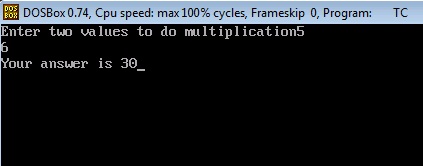
Now lets try to understand this program.
1. First two instructions are same like our previous programs.
2. In the third instruction we are declaring three variables of integer type.
3. In the fourth instruction we are printing the statement using printf() function.
4. In the fifth instruction we are taking input from the user through scanf() function.
In this scanf() function we have done two things.
a. We have given the format specifier %d to instruct the compiler that we want to input integer value.
b. We have used ampersand (&) which is also called "address of operator". By using this we instruct the compiler we want to store that input in that variable (a and b).
Why do we use ampersand operator (&)?
As I have said already it is a "address of operator". By using this operator we specify the address of variable to the compiler.
A bit confusion..? Ok, checkout the example below.
Suppose we have used &a. Now C compiler will receive the input and go to the address of a (which can be anything like 7635). After that it will store that value on that particular address. That’s it.
Lets write another program which is slightly complicated i.e. program to calculate simple interest.
C Program to Calculate Simple Interest
In this program I am assuming that you must know the formula and working of simple interest in mathematics. So I will not explain that formula to you.
/*Program to calculate simple interest
TheCrazyProgrammer date 21/12/14*/

#include<stdio.h>

void main()
{
 int p,n; //Here p is principle amount and n is number of years
 float r,si; //Here r is rate of interest and si is simple interest
 printf("Enter the values of p,n and r");
 scanf("%d%d%f",&p,&n,&r);
 si=(p*n*r)/100;
 printf("Simple interest is %f",si);
}
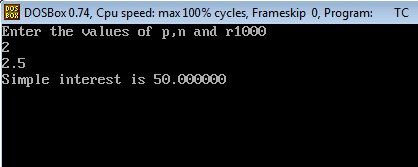
Lets try to understand this program step by step.
1. First two statements are comments.
Comments in C
Comments are generally used to increase the readability of program. At present we are making very small programs. But when we develop big programs then the program has to go through a long process of testing and debugging. Comments are not the part of program code and are not read by compiler.
It is very important to write comments in programs. So that other programmers can also read and understand your program easily. Writing comments is also a good programming practice. Start writing comments in the programs from the beginning itself.
C allows two types of comments
a. Single line comment: // first type of comment
b. Multiline comment: /* second type of comment*/
Single line comment is used to write comments in one line only. Multiline comment is used to write comments in multiple lines. All things that comes in between /* and */ is considered as comment. We can use anyone according to requirement.
2. After that next three instructions are same which includes C pre-processor directives, main() function, declaration of integer variables.
3. In the fourth instruction we have declared float variable r and si. Because rate of interest can be a floating point number. And to stay on safe side we also declared si variable as float. As the answer may come in floating point.
4. After that using printf() function we print a message to instruct the user to insert the values of p, n and r.
5. Using scanf() we are taking input from the user. Checkout we have used %f format specifier for r variable. We have declared r as float variable. So we have to use %f format specifier to print as well as receive values in r variable.
6. Now in the next statement we have calculated the simple interest using the formula.
7. In the last we have print the answer using printf() function. Notice we have used %f format specifier there. As si is also a float variable.
So these are the basic use of printf() and scanf() functions. These are one of the most used functions in C language. So you can estimate the importance of them. Now you can make 100s of programs by using these two functions.
Try making these programs yourself (take values from user)
1. Make a program to add two numbers.
2. Make a program which will convert distance in km to meter.
Friday, February 13, 2015
Difference Between Coder and Programmer
We all know that computer programmers or coders or software engineers are one of the most sought after professionals in the world of technology. Since most devices are now automated through lines of codes burned in their microprocessors and chips, coding has become the one superpower that anyone can gain with a little experience and can use to create wonders. However, there is a lot of confusion regarding the different names that are used to refer these professionals. This post aims to demystify the difference.
Are programmers and coders the same? In a layman’s language, programmer, coder, software developer or software engineer all may refer to the same person, but if you ask an expert the answer will be no. Programmers find it quite offensive to be labeled as coders; robotic machines that churn out lines of codes without much thought or emotions. However nothing could be further from the truth.
Also Read: Top 5 Movies for Programmers - Must Watch!
Coder
A coder, typically, is a person with strong grasp of the fundamentals of writing codes in a particular language. They are clearly instructed on what should be done and what needs to be accomplished. They handle only a part of much larger scale project. Large software programs that often have a billion lines of codes are only designed by a limited number of programmers. Coders follow instructions of the large programs. Coders often have repetitive and monotonous work profile as opposed to programmers.
Programmers
Writing codes is only a part of the duties of a programmer as there is so much more to it. As a programmer you must be able to imagine a broad set of solutions to a problem before you even start writing codes. You will have to take the help of a notebook or a whiteboard where you will scribble your ideas. Instead of fretting about every small detail, programmers look at the broader picture and decide on a plan that best accomplishes the end objective. Here are some of the responsibilities of the programmer.
Project management
In most of the companies there is a dedicated project manager who takes care of every moving or immovable part of the project. However, a programmer is also responsible for overseeing the timeline either in coordination with the Project manager or by themselves. As a lead programmer, you have to be adept at managing your time otherwise you might have to face a lot of problems.
Maintaining Code Quality
Since you have decided to become a programmer, your job role will include maintaining the code quality up to mark. This actually refers to taking in consideration that the project you are working on might need to scale, or modified with new components. Fastest is not always the best approach in programming. You will need to devote extra time to setup semantics, and developing a framework over time.
Also Read: 5 Tips to Become a Better Programmer
How To Become A Programmer?
Thus a programmer’s role encapsulates a lot more responsibilities, and functions than a coder. Now the million dollar question is how to end up as a programmer? For starters, you might decide to pursue a degree in computer science engineering or information technology. Pursuing a degree has multiple benefits. You will have the bragging rights of being known as a software engineer to the outside world. Next, you will become eligible for many government jobs also that require at least a degree. In addition to a degree, aspiring candidates are also advised to pursue online courses of their favorite computer language to gain further expertise.
Choosing which language to learn might depend on multiple factors, such as ease to learn or the Role. There are some computer languages which result in highest paying jobs in the field of technology, and then there are languages which don’t require much effort to learn and hence you will find it easy to break into the world of programming. Realizing the potential that programming holds for the next generation technology, many online certification courses have cropped up in the past that offer easy to understand lessons in in-demand computer languages like C, C++.
MySQL installation in remote Ubuntu 12 04 server using PuTTY and accessing 3306 port in local mysql client by Tunneling
In this post you will learn how you can install MySQL in remote Ubuntu server as well how you can access the installed database from server to your local machine using PuTTY Tunneling.
Environment:
Client location
1) Ubuntu Server 12.04
Development location
1) Windows 7 64 bit OS ( DEV location)
2) PuTTY installed in Windows.
3) DBVisulalizer(OR any MySQL client tool installed for connecting to remote servers)
4) MySQL installed in Windows and service running state.
This post is divided into two sections.
PART-I : MySQL installation in remote Ubuntu 12.04 Server using PuTTY
PART-II : How to by pass 3306 port number by Tunneling concept to access the MySQL database.
( Even though if 3306 port number is not opened in the Ubuntu server we can access the mySQL database)
Connect to Ubuntu server using given credentials(Username, password and ppk file)
PART-I : MySQL installation in remote Ubuntu 12.04 Server using PuTTY
1)root@SAD-AKAR-LLM167: aptitude update
2) Download and install using below command
root@SAD-AKAR-LLM167:aptitude install mysql-server
3) The installer should ask you to set a root password : set it as "password" and click on OK.
4) Installation will complete after clicking on OK.
5) MySQL Service status command after installation completed
root@SAD-AKAR-LLM167:/# service mysql status
mysql start/running, process 28645
6) MySQL Start command :
root@SAD-AKAR-LLM167:/# service mysql start
mysql start/running, process 29040
7) MySQL Stop command:
root@SAD-AKAR-LLM167:/# service mysql stop
mysql stop/waiting
8) MySQL installed location:
root@SAD-AKAR-LLM167:/# which mysql
/usr/bin/mysql
9) Connect to MySQL
root@SAD-AKAR-LLM167:/# /usr/bin/mysql -u root -p
Enter password:password
Welcome to the MySQL monitor. Commands end with ; or g.
Your MySQL connection id is 36
Server version: 5.5.34-0ubuntu0.12.04.1 (Ubuntu)
Copyright (c) 2000, 2013, Oracle and/or its affiliates. All rights reserved.
Oracle is a registered trademark of Oracle Corporation and/or its
affiliates. Other names may be trademarks of their respective
owners.
Type help; or h for help. Type c to clear the current input statement.
mysql>
10) Find mySQL version using below command
mysql>SHOW VARIABLES LIKE "%version%";
PART-II : How to by pass 3306 port number by Tunneling concept to access the MySQL database
1. On your PuTTY window which will drop down the options in a list shown in below figure.
(Assume that you have already working with PuTTY for MySQL installation and not closed it).
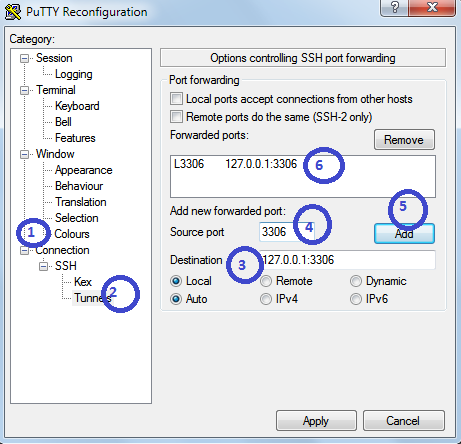
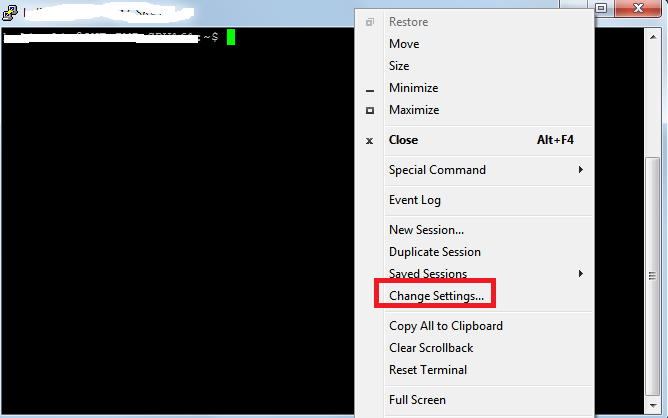 2. Click on Change Settings
i) On the left side click on "Connections"
ii) Expand SSH then click on Tunnels
iii) Give destination as : 127.0.0.1:3306 or localhost:3306
iv) Give source port as : 3306
v) Now, click on Add
Find OS version
Find which Ubuntu version number using this command
root@SAD-AKAR-LLM167:/usr/bin# cat /etc/*-release
DISTRIB_ID=Ubuntu
DISTRIB_RELEASE=12.04
DISTRIB_CODENAME=precise
DISTRIB_DESCRIPTION="Ubuntu 12.04.3 LTS"
NAME="Ubuntu"
VERSION="12.04.3 LTS, Precise Pangolin"
ID=ubuntu
ID_LIKE=debian
PRETTY_NAME="Ubuntu precise (12.04.3 LTS)"
VERSION_ID="12.04"
Environment:
Client location
1) Ubuntu Server 12.04
Development location
1) Windows 7 64 bit OS ( DEV location)
2) PuTTY installed in Windows.
3) DBVisulalizer(OR any MySQL client tool installed for connecting to remote servers)
4) MySQL installed in Windows and service running state.
This post is divided into two sections.
PART-I : MySQL installation in remote Ubuntu 12.04 Server using PuTTY
PART-II : How to by pass 3306 port number by Tunneling concept to access the MySQL database.
( Even though if 3306 port number is not opened in the Ubuntu server we can access the mySQL database)
Connect to Ubuntu server using given credentials(Username, password and ppk file)
PART-I : MySQL installation in remote Ubuntu 12.04 Server using PuTTY
1)root@SAD-AKAR-LLM167: aptitude update
2) Download and install using below command
root@SAD-AKAR-LLM167:aptitude install mysql-server
3) The installer should ask you to set a root password : set it as "password" and click on OK.
4) Installation will complete after clicking on OK.
5) MySQL Service status command after installation completed
root@SAD-AKAR-LLM167:/# service mysql status
mysql start/running, process 28645
6) MySQL Start command :
root@SAD-AKAR-LLM167:/# service mysql start
mysql start/running, process 29040
7) MySQL Stop command:
root@SAD-AKAR-LLM167:/# service mysql stop
mysql stop/waiting
8) MySQL installed location:
root@SAD-AKAR-LLM167:/# which mysql
/usr/bin/mysql
9) Connect to MySQL
root@SAD-AKAR-LLM167:/# /usr/bin/mysql -u root -p
Enter password:password
Welcome to the MySQL monitor. Commands end with ; or g.
Your MySQL connection id is 36
Server version: 5.5.34-0ubuntu0.12.04.1 (Ubuntu)
Copyright (c) 2000, 2013, Oracle and/or its affiliates. All rights reserved.
Oracle is a registered trademark of Oracle Corporation and/or its
affiliates. Other names may be trademarks of their respective
owners.
Type help; or h for help. Type c to clear the current input statement.
mysql>
10) Find mySQL version using below command
mysql>SHOW VARIABLES LIKE "%version%";
PART-II : How to by pass 3306 port number by Tunneling concept to access the MySQL database
1. On your PuTTY window which will drop down the options in a list shown in below figure.
(Assume that you have already working with PuTTY for MySQL installation and not closed it).
i) On the left side click on "Connections"
ii) Expand SSH then click on Tunnels
iii) Give destination as : 127.0.0.1:3306 or localhost:3306
iv) Give source port as : 3306
v) Now, click on Add
3. Once you click on Add you should find added host in the box.
4. Impotently note that in your local machine(Windows) MySQL server is running.
In Destination you are giving localhost or 127.0.0.1 so you should run MySQL server in your local machine. And note that from the PuTTY(lets say Ubuntu server) you are by passing 3306 port number to get the actual MySQL database installed on the Ubuntu server.
5. Now test whether it is working or not.
Open MySQL Query browser or any client tool where you can access remote MySQL server.
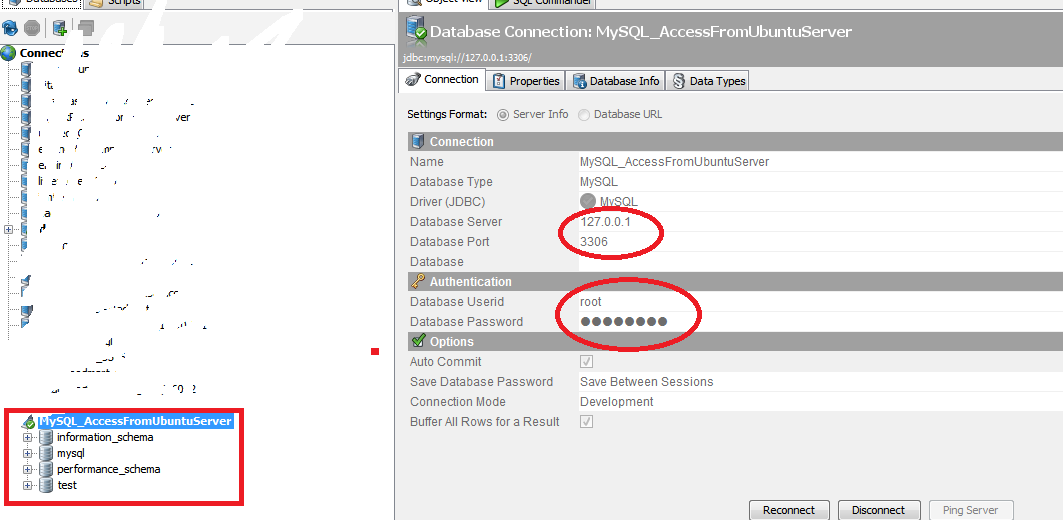
In this example I have taken DBVisualizer
Give all the database deatils
Database server : 127.0.0.1 or localhost (remember that it is not the IP of Ubuntu server).
Database Port : 3306
Username and password : root/password
Find OS version
Find which Ubuntu version number using this command
root@SAD-AKAR-LLM167:/usr/bin# cat /etc/*-release
DISTRIB_ID=Ubuntu
DISTRIB_RELEASE=12.04
DISTRIB_CODENAME=precise
DISTRIB_DESCRIPTION="Ubuntu 12.04.3 LTS"
NAME="Ubuntu"
VERSION="12.04.3 LTS, Precise Pangolin"
ID=ubuntu
ID_LIKE=debian
PRETTY_NAME="Ubuntu precise (12.04.3 LTS)"
VERSION_ID="12.04"
Tuesday, February 3, 2015
Travel quirks part 3 sculpture animals doppelgängers art and more!
In part one of this series, I showed you weird signs, billboards and writing. In part two, I showcased my gastronomic adventures. Today, in the thrilling conclusion of my travel quirks series, I leave you with all the stuff that didnt fit into the previous two categories. Youll see some sculptures, some animals, some celebrity Doppelgängers, and a bunch of other stuff that made me laugh while traveling.
Sculpture
I think this statue is supposed to represent a heroic soldier calling people to arms, but, to be honest, the most heroic thing about it is holding that ridiculous pose. It took me a few tries to not fall over so we could get this priceless photo. I also prefer the local interpretation of the statue: a waiter chasing down a customer. "Sir! Wait! You forgot your jacket!"
Animals
While sitting on the main square in Krakow, we saw a strange looking pigeon waddle up to us. As it came closer, we realized that there was a ring of bread stuck around its neck. Im not sure how it got there, but the pigeon seemed to be unaware of it. In fact, the dumb bird spent most of its time wandering around and frantically searching and fighting for, uh, more bread. It would occasionally walk up to other pigeons and make a face like "hey, seen any bread around here?" The tragic irony, of course, is that if this bird is successful and eats enough to make itself fat... itll suffocate.

Doppelgänger
Does the man in the following image look familiar?
Uncanny, right?
Lets try another one:
Coincidence?
Ok, last one:
How far Sauran has fallen: relegated to a hotel Ibis in Germany for all eternity.
Tetris
When I moved across the country to California, I took advantage of Virgin Americas cheap baggage policy: $25 per bag, 50lbs per bag, up to 10 (!) bags. I had about 7 bags worth of stuff that I wanted to bring with me and taking it on the plane turned out to be far cheaper than shipping it or buying it new. There was just one issue: I flew in alone. As it turns out, lugging 7 bags through the airport by yourself can be a bit tricky. Fortunately, my Tetris skills came in handy.
Faces
Humans have a remarkable ability for facial recognition. So remarkable, in fact, that we tend to see faces everywhere. There are entire blogs dedicated to it.
European cars
Youll rarely see an SUV, van or other big vehicle in Europe. They tend to stick to small cars. Really small.


Toilets
You probably know that medieval castles often had huge, thick walls designed to keep enemies out. You may have even heard that they would rain down arrows and boiling hot oil on any invaders who dared approach. What you probably didnt known, however, is the other thing that would rain down castle walls. It turns out that they built outhouses - which were little more than a seat with a hole in it - high up on the outside of the castle walls. Talk about adding insult to injury. Funnier still is the fact that the doors to these outhouses would only have locks from inside the walls; apparently, some invaders were determined enough that they tried scaling the walls and breaking in through the outhouse.
Happy travels!
On that classy note, I conclude my travel quirks series. I wish you the best of luck on your own journeys, weird as they may be.
Read more »
Sculpture
 |
| Memento Park near Budapest, Hungary |
Animals
While sitting on the main square in Krakow, we saw a strange looking pigeon waddle up to us. As it came closer, we realized that there was a ring of bread stuck around its neck. Im not sure how it got there, but the pigeon seemed to be unaware of it. In fact, the dumb bird spent most of its time wandering around and frantically searching and fighting for, uh, more bread. It would occasionally walk up to other pigeons and make a face like "hey, seen any bread around here?" The tragic irony, of course, is that if this bird is successful and eats enough to make itself fat... itll suffocate.
 |
Doppelgänger
Does the man in the following image look familiar?
 |
| Budapest Museum of Fine Arts in Budapest, Hungary |
 |
| Robert Downey Jr in Sherlock Holmes |
Uncanny, right?
Lets try another one:
 |
| Budapest Museum of Fine Arts in Budapest, Hungary |
 |
| Lord Farquaad from Shrek |
Coincidence?
Ok, last one:
 |
| Hotel Ibis, Nurnberg |
 |
| The eye of Sauron, Lord of the Rings |
Tetris
When I moved across the country to California, I took advantage of Virgin Americas cheap baggage policy: $25 per bag, 50lbs per bag, up to 10 (!) bags. I had about 7 bags worth of stuff that I wanted to bring with me and taking it on the plane turned out to be far cheaper than shipping it or buying it new. There was just one issue: I flew in alone. As it turns out, lugging 7 bags through the airport by yourself can be a bit tricky. Fortunately, my Tetris skills came in handy.
 |
| San Francisco Airport |
Humans have a remarkable ability for facial recognition. So remarkable, in fact, that we tend to see faces everywhere. There are entire blogs dedicated to it.
 |
| Potsdam, Germany |
Youll rarely see an SUV, van or other big vehicle in Europe. They tend to stick to small cars. Really small.
Toilets
You probably know that medieval castles often had huge, thick walls designed to keep enemies out. You may have even heard that they would rain down arrows and boiling hot oil on any invaders who dared approach. What you probably didnt known, however, is the other thing that would rain down castle walls. It turns out that they built outhouses - which were little more than a seat with a hole in it - high up on the outside of the castle walls. Talk about adding insult to injury. Funnier still is the fact that the doors to these outhouses would only have locks from inside the walls; apparently, some invaders were determined enough that they tried scaling the walls and breaking in through the outhouse.
 |
| Marksburg Castle, Germany |
Happy travels!
On that classy note, I conclude my travel quirks series. I wish you the best of luck on your own journeys, weird as they may be.
Saturday, January 31, 2015
jQuery Touch Screen Effect Image Slider Mouse Press and Move
As the People started using Touch Screen devices, More than half of the Traffic now comes from Touch Screen Devices. It is important to have Image Slider having same effect on Computer screen.

Download Demo view-source
<script type=text/javascript src=http://code.jquery.com/jquery-1.4.2.js></script>
<script type=text/javascript src=http://smoothdivscroll.com/js/jquery-ui-1.8.23.custom.min.js></script>
<script type=text/javascript src=http://smoothdivscroll.com/js/jquery.mousewheel.min.js></script>
<script src="http://smoothdivscroll.com/js/jquery.smoothdivscroll-1.3-min.js"></script>
<script src="http://smoothdivscroll.com/js/jquery.kinetic.js"></script>
<script type="text/javascript">
    // Initialize the plugin with no custom options
    $(document).ready(function () {
        $("#makeMeScrollable").smoothDivScroll({
            hotSpotScrolling: false,
            touchScrolling: true,
            manualContinuousScrolling: true,
            mousewheelScrolling: false
        });
    });
</script>
Wednesday, January 28, 2015
Documents to Go View documents on Smartphones and Tablets
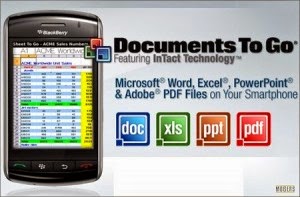
Documents to Go
Android Apps to view Documents on Smartphones & Tablets.

Documents to Go is android app to edit office documents from your smartphones or tablets. This app also allow you to view Adobe files , desktop file sync,multiple cloud storage accounts, opening password-protected files. you can make your documents look professional ,use excel sheets , make slides using power point to present.present. Font style , bold,italic,bullets etc same as you use Microsoft office on PC.
Platform : Android
Developer : Dataviz
Play store : Download
Full Version: Download
Friday, January 23, 2015
Hard Reset your Star Mobile Vida and remove password pattern lock gmail account
The Star Mobile Vida dropped by in my workplace and I made a tutorial in how to hard reset your Star Mobile Vida.

Hard resetting / factory resetting your phone will solve the following issues:
1. If you forgot your pattern lock
2. If you forgot your gmail account
3. If you forgot your password
4. Apps that automatically force closing
5. Stuck in Star Mobile Logo (sometimes does not work if the firmware is totally damage)
NOTE: Performing hard reset will erase your data.
To hard reset:
1. Turn off your phone.
2. Press and Hold VOLUME DOWN and Power Button simultaneously and wait for it to power on but keep holding the button until you see the engineering mode
3. Engineering mode will appear.
4.Select CLEAR eMMC, press Volume rocker to navigate and press the POWER Button to confirm your selection
5. Reboot your phone.
I hope this tutorial helps you.. If you have any question just drop a comment.
Read more »
Hard resetting / factory resetting your phone will solve the following issues:
1. If you forgot your pattern lock
2. If you forgot your gmail account
3. If you forgot your password
4. Apps that automatically force closing
5. Stuck in Star Mobile Logo (sometimes does not work if the firmware is totally damage)
NOTE: Performing hard reset will erase your data.
To hard reset:
1. Turn off your phone.
2. Press and Hold VOLUME DOWN and Power Button simultaneously and wait for it to power on but keep holding the button until you see the engineering mode
3. Engineering mode will appear.
4.Select CLEAR eMMC, press Volume rocker to navigate and press the POWER Button to confirm your selection
5. Reboot your phone.
I hope this tutorial helps you.. If you have any question just drop a comment.
Thursday, January 22, 2015
HTML5 Interview Questions and Answers Part 1
What is the relationship between SGML,HTML , XML and HTML? SGML (Standard generalized markup language) is a standard which tells how to specify document markup. It’s only a Meta language which describes how a document markup should be. HTML is a markup language which is described using SGML. So by SGML they created DTD which the HTML refers and needs to adhere to the same. So you will always find “DOCTYPE” attribute at the top of HTML page which defines which DTD is used for parsing purpose. 
Read more »
Now parsing SGML was a pain so they created XML to make things better. XML uses SGML. For example in SGML you have to start and end tags but in XML you can have closing tags which close automatically (“”). XHTML was created from XML which was used in HTML 4.0. So for example in SGML derived HTML “ ” is not valid but in XHTML it’s valid. You can refer XML DTD as shown in the below code snippet.

Subscribe to:
Posts (Atom)