Showing posts with label 12. Show all posts
Showing posts with label 12. Show all posts
Friday, February 13, 2015
MySQL installation in remote Ubuntu 12 04 server using PuTTY and accessing 3306 port in local mysql client by Tunneling
In this post you will learn how you can install MySQL in remote Ubuntu server as well how you can access the installed database from server to your local machine using PuTTY Tunneling.
Environment:
Client location
1) Ubuntu Server 12.04
Development location
1) Windows 7 64 bit OS ( DEV location)
2) PuTTY installed in Windows.
3) DBVisulalizer(OR any MySQL client tool installed for connecting to remote servers)
4) MySQL installed in Windows and service running state.
This post is divided into two sections.
PART-I : MySQL installation in remote Ubuntu 12.04 Server using PuTTY
PART-II : How to by pass 3306 port number by Tunneling concept to access the MySQL database.
( Even though if 3306 port number is not opened in the Ubuntu server we can access the mySQL database)
Connect to Ubuntu server using given credentials(Username, password and ppk file)
PART-I : MySQL installation in remote Ubuntu 12.04 Server using PuTTY
1)root@SAD-AKAR-LLM167: aptitude update
2) Download and install using below command
root@SAD-AKAR-LLM167:aptitude install mysql-server
3) The installer should ask you to set a root password : set it as "password" and click on OK.
4) Installation will complete after clicking on OK.
5) MySQL Service status command after installation completed
root@SAD-AKAR-LLM167:/# service mysql status
mysql start/running, process 28645
6) MySQL Start command :
root@SAD-AKAR-LLM167:/# service mysql start
mysql start/running, process 29040
7) MySQL Stop command:
root@SAD-AKAR-LLM167:/# service mysql stop
mysql stop/waiting
8) MySQL installed location:
root@SAD-AKAR-LLM167:/# which mysql
/usr/bin/mysql
9) Connect to MySQL
root@SAD-AKAR-LLM167:/# /usr/bin/mysql -u root -p
Enter password:password
Welcome to the MySQL monitor. Commands end with ; or g.
Your MySQL connection id is 36
Server version: 5.5.34-0ubuntu0.12.04.1 (Ubuntu)
Copyright (c) 2000, 2013, Oracle and/or its affiliates. All rights reserved.
Oracle is a registered trademark of Oracle Corporation and/or its
affiliates. Other names may be trademarks of their respective
owners.
Type help; or h for help. Type c to clear the current input statement.
mysql>
10) Find mySQL version using below command
mysql>SHOW VARIABLES LIKE "%version%";
PART-II : How to by pass 3306 port number by Tunneling concept to access the MySQL database
1. On your PuTTY window which will drop down the options in a list shown in below figure.
(Assume that you have already working with PuTTY for MySQL installation and not closed it).
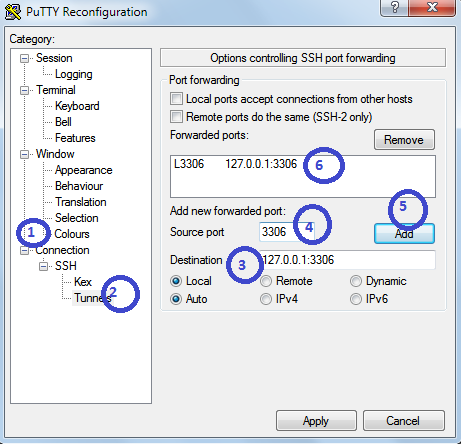
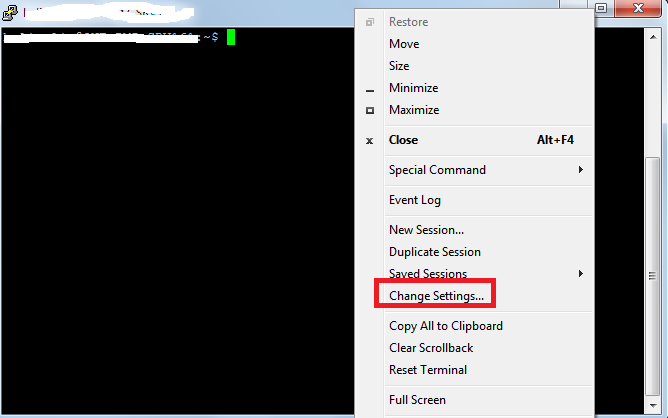 2. Click on Change Settings
i) On the left side click on "Connections"
ii) Expand SSH then click on Tunnels
iii) Give destination as : 127.0.0.1:3306 or localhost:3306
iv) Give source port as : 3306
v) Now, click on Add
Find OS version
Find which Ubuntu version number using this command
root@SAD-AKAR-LLM167:/usr/bin# cat /etc/*-release
DISTRIB_ID=Ubuntu
DISTRIB_RELEASE=12.04
DISTRIB_CODENAME=precise
DISTRIB_DESCRIPTION="Ubuntu 12.04.3 LTS"
NAME="Ubuntu"
VERSION="12.04.3 LTS, Precise Pangolin"
ID=ubuntu
ID_LIKE=debian
PRETTY_NAME="Ubuntu precise (12.04.3 LTS)"
VERSION_ID="12.04"
Environment:
Client location
1) Ubuntu Server 12.04
Development location
1) Windows 7 64 bit OS ( DEV location)
2) PuTTY installed in Windows.
3) DBVisulalizer(OR any MySQL client tool installed for connecting to remote servers)
4) MySQL installed in Windows and service running state.
This post is divided into two sections.
PART-I : MySQL installation in remote Ubuntu 12.04 Server using PuTTY
PART-II : How to by pass 3306 port number by Tunneling concept to access the MySQL database.
( Even though if 3306 port number is not opened in the Ubuntu server we can access the mySQL database)
Connect to Ubuntu server using given credentials(Username, password and ppk file)
PART-I : MySQL installation in remote Ubuntu 12.04 Server using PuTTY
1)root@SAD-AKAR-LLM167: aptitude update
2) Download and install using below command
root@SAD-AKAR-LLM167:aptitude install mysql-server
3) The installer should ask you to set a root password : set it as "password" and click on OK.
4) Installation will complete after clicking on OK.
5) MySQL Service status command after installation completed
root@SAD-AKAR-LLM167:/# service mysql status
mysql start/running, process 28645
6) MySQL Start command :
root@SAD-AKAR-LLM167:/# service mysql start
mysql start/running, process 29040
7) MySQL Stop command:
root@SAD-AKAR-LLM167:/# service mysql stop
mysql stop/waiting
8) MySQL installed location:
root@SAD-AKAR-LLM167:/# which mysql
/usr/bin/mysql
9) Connect to MySQL
root@SAD-AKAR-LLM167:/# /usr/bin/mysql -u root -p
Enter password:password
Welcome to the MySQL monitor. Commands end with ; or g.
Your MySQL connection id is 36
Server version: 5.5.34-0ubuntu0.12.04.1 (Ubuntu)
Copyright (c) 2000, 2013, Oracle and/or its affiliates. All rights reserved.
Oracle is a registered trademark of Oracle Corporation and/or its
affiliates. Other names may be trademarks of their respective
owners.
Type help; or h for help. Type c to clear the current input statement.
mysql>
10) Find mySQL version using below command
mysql>SHOW VARIABLES LIKE "%version%";
PART-II : How to by pass 3306 port number by Tunneling concept to access the MySQL database
1. On your PuTTY window which will drop down the options in a list shown in below figure.
(Assume that you have already working with PuTTY for MySQL installation and not closed it).
i) On the left side click on "Connections"
ii) Expand SSH then click on Tunnels
iii) Give destination as : 127.0.0.1:3306 or localhost:3306
iv) Give source port as : 3306
v) Now, click on Add
3. Once you click on Add you should find added host in the box.
4. Impotently note that in your local machine(Windows) MySQL server is running.
In Destination you are giving localhost or 127.0.0.1 so you should run MySQL server in your local machine. And note that from the PuTTY(lets say Ubuntu server) you are by passing 3306 port number to get the actual MySQL database installed on the Ubuntu server.
5. Now test whether it is working or not.
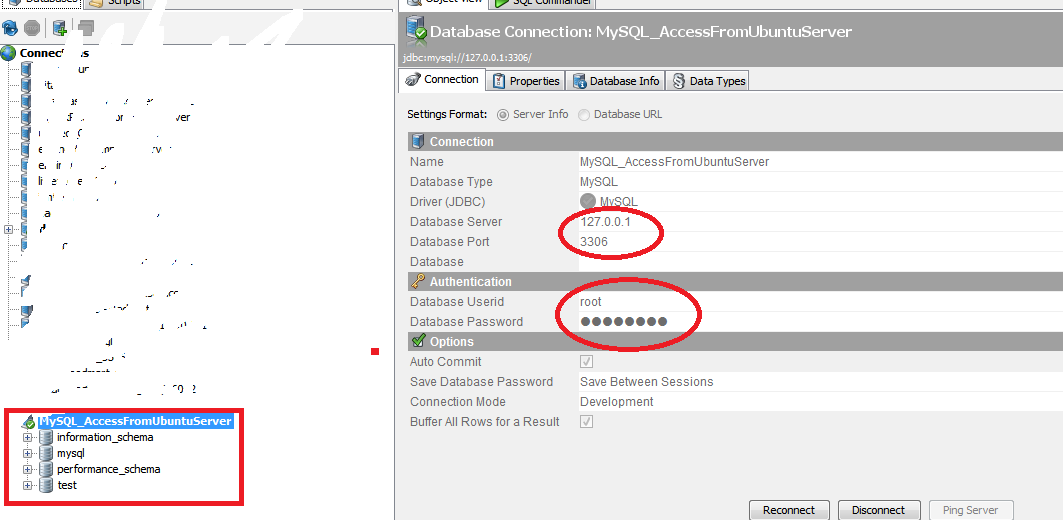
Open MySQL Query browser or any client tool where you can access remote MySQL server.
In this example I have taken DBVisualizer
Give all the database deatils
Database server : 127.0.0.1 or localhost (remember that it is not the IP of Ubuntu server).
Database Port : 3306
Username and password : root/password
Find OS version
Find which Ubuntu version number using this command
root@SAD-AKAR-LLM167:/usr/bin# cat /etc/*-release
DISTRIB_ID=Ubuntu
DISTRIB_RELEASE=12.04
DISTRIB_CODENAME=precise
DISTRIB_DESCRIPTION="Ubuntu 12.04.3 LTS"
NAME="Ubuntu"
VERSION="12.04.3 LTS, Precise Pangolin"
ID=ubuntu
ID_LIKE=debian
PRETTY_NAME="Ubuntu precise (12.04.3 LTS)"
VERSION_ID="12.04"

Monday, February 2, 2015
Creating a Flex AIR Annotator app Part 12
In this part we will add an eye-dropper to our program.
First, draw an eye dropper icon and save it as ic_eyedropper.png in the lib folder. Heres the one I made:

Add it to the toolbarToggle array collection like this:
Lets increase the width of our ToggleButtonBar because of this:
Now, go and declare a newcursor variable - pickerCursor, with the same picture as the eye dropper icon.
Go to the canvasOver function and set cursor to pickerCursor with proper offset values when the fifth tool is selected:
Now go to drawDown(), and add a conditional for the eye dropper tool. Set drawMode to picker, and call 2 functions - drawTempBitmap() and getPickerColor():
Go to drawMove(). Here, add a conditional for picker drawMode and call getPickerColor() in it:
When we are using the eye dropper tool, we are supposed to take the coordinates of the picture and find out the color of the pixel of those coordinates. To do that, we will use a temporary BitmapData object to store the graphic value, and then its getPixel() method to get color value of a pixel.
First declare it:
Then add the 2 functions we called above. The drawTempBitmap() one creates a bitmap data object and fills it with picture data, and the getPickerColor() function gets pixel color at mouse coordinates:
Theres one little problem that exists when importing new pictures - the drawHitArea doesnt update its sizes when it should. Turn the second part of updateLineExample() into a updateDrawHitArea() function:
And call this function at the end of stackChange():
There we go.
Full code:
Thanks for reading!
Read more »
First, draw an eye dropper icon and save it as ic_eyedropper.png in the lib folder. Heres the one I made:
Add it to the toolbarToggle array collection like this:
<mx:ArrayCollection id="toolbarToggle">
<fx:Object icon="@Embed(../lib/ic_pen.png)" />
<fx:Object icon="@Embed(../lib/ic_ellipse.png)"/>
<fx:Object icon="@Embed(../lib/ic_rect.png)"/>
<fx:Object icon="@Embed(../lib/ic_line.png)"/>
<fx:Object icon="@Embed(../lib/ic_arrow.png)"/>
<fx:Object icon="@Embed(../lib/ic_eyedropper.png)"/>
</mx:ArrayCollection>
Lets increase the width of our ToggleButtonBar because of this:
<mx:ToggleButtonBar dataProvider="{toolbarToggle}" width="130" id="drawTools" />
Now, go and declare a newcursor variable - pickerCursor, with the same picture as the eye dropper icon.
[Embed(source="../lib/ic_eyedropper.png")]
private var pickerCursor:Class;
Go to the canvasOver function and set cursor to pickerCursor with proper offset values when the fifth tool is selected:
private function canvasOver():void {
if (toolbarStack.selectedIndex == 2 && drawTools) {
if(drawTools.selectedIndex < 5){
cursorManager.setCursor(crossCursor, 2, -10, -10);
} else {
cursorManager.setCursor(pickerCursor, 2, 0, -18);
}
}
}
Now go to drawDown(), and add a conditional for the eye dropper tool. Set drawMode to picker, and call 2 functions - drawTempBitmap() and getPickerColor():
if (toolbarStack.selectedIndex == 2 && drawTools.selectedIndex == 5) {
drawMode = "picker";
drawTempBitmap();
getPickerColor();
}
Go to drawMove(). Here, add a conditional for picker drawMode and call getPickerColor() in it:
if (drawMode == "picker") {
getPickerColor();
}
When we are using the eye dropper tool, we are supposed to take the coordinates of the picture and find out the color of the pixel of those coordinates. To do that, we will use a temporary BitmapData object to store the graphic value, and then its getPixel() method to get color value of a pixel.
First declare it:
private var temporaryBitmap:BitmapData;
Then add the 2 functions we called above. The drawTempBitmap() one creates a bitmap data object and fills it with picture data, and the getPickerColor() function gets pixel color at mouse coordinates:
private function drawTempBitmap():void {
temporaryBitmap = new BitmapData(content.width, content.height, false, 0xffffff);
temporaryBitmap.draw(drawArea);
}

private function getPickerColor():void {
lineColor = temporaryBitmap.getPixel(drawArea.mouseX, drawArea.mouseY);
}
Theres one little problem that exists when importing new pictures - the drawHitArea doesnt update its sizes when it should. Turn the second part of updateLineExample() into a updateDrawHitArea() function:
private function updateLineExample():void{
lineExample.graphics.clear();
lineExample.graphics.lineStyle(lineThickness, lineColor);
lineExample.graphics.moveTo(10, 10);
lineExample.graphics.lineTo(30, 10);

updateDrawHitArea();
}

private function updateDrawHitArea():void {
drawHitArea.width = content.width - lineThickness;
drawHitArea.height = content.height - lineThickness;
drawHitArea.x = lineThickness / 2;
drawHitArea.y = lineThickness / 2;
}
And call this function at the end of stackChange():
private function stackChange():void {
if (stack.selectedIndex == 1) {
imgHolder.source = new Bitmap(bitmapData);
drawArea.width = content.width;
drawArea.height = content.height;
drawGroup.width = content.width;
drawGroup.height = content.height;
buttonsEnabled = true;
drawSprite.graphics.clear();
drawTempBitmap();
updateDrawHitArea();
}
}
There we go.
Full code:
<?xml version="1.0" encoding="utf-8"?>
<s:WindowedApplication xmlns:fx="http://ns.adobe.com/mxml/2009"
   xmlns:s="library://ns.adobe.com/flex/spark"
   xmlns:mx="library://ns.adobe.com/flex/mx"
   xmlns:custom="*"
   showStatusBar="false"
   creationComplete="init();"
   applicationComplete="listeners();"
   minWidth="740" minHeight="400"
   width="740" height="500">

<fx:Script>
<![CDATA[
import flash.display.Bitmap;
import flash.display.BitmapData;
import flash.display.FocusDirection;
import flash.display.Loader;
import flash.display.Sprite;
import flash.events.Event;
import flash.events.KeyboardEvent;
import flash.events.MouseEvent;
import flash.filesystem.File;
import flash.filesystem.FileStream;
import flash.filters.DropShadowFilter;
import flash.geom.Matrix;
import flash.geom.Point;
import flash.net.FileFilter;
import flash.net.URLRequest;
import flash.utils.ByteArray;
import mx.controls.Alert;
import flash.filesystem.FileMode;
import mx.core.FlexGlobals;
import spark.primitives.Rect;

private var bitmapData:BitmapData;
private var content:*;
[Bindable]
private var buttonsEnabled:Boolean = false;
[Bindable]
private var lineThickness:int = 5;
[Bindable]
private var lineColor:uint = 0xff0000;

[Embed(source="../lib/cursor_cross.png")]
private var crossCursor:Class;
[Embed(source="../lib/ic_eyedropper.png")]
private var pickerCursor:Class;

private var drawMode:String = "";
private var anchorX:Number;
private var anchorY:Number;
private var lastX:Number;
private var lastY:Number;
private var isShift:Boolean = false;
private var temporaryBitmap:BitmapData;

private function init():void{
drawArea.filters = [new DropShadowFilter(4, 60, 0, 0.7, 10, 10, 1, 3)];
}

private function listeners():void {
addEventListener(MouseEvent.MOUSE_UP, drawUp);
stage.addEventListener(KeyboardEvent.KEY_DOWN, keyDown);
stage.addEventListener(KeyboardEvent.KEY_UP, keyUp);
addEventListener(Event.ENTER_FRAME, everyFrame);
}

private function keyDown(evt:KeyboardEvent):void {
if (evt.keyCode == 16) {
isShift = true;
}
}

private function keyUp(evt:KeyboardEvent):void {
if (evt.keyCode == 16) {
isShift = false;
}
}

private function everyFrame(evt:Event):void {
if (toolbarStack.selectedIndex == 2) {
focusManager.setFocus(saveBtn);
}
}

private function canvasOver():void {
if (toolbarStack.selectedIndex == 2 && drawTools) {
if(drawTools.selectedIndex < 5){
cursorManager.setCursor(crossCursor, 2, -10, -10);
} else {
cursorManager.setCursor(pickerCursor, 2, 0, -18);
}
}
}

private function canvasOut():void {
cursorManager.removeAllCursors();
}

private function drawDown():void {
if (toolbarStack.selectedIndex == 2 && drawTools.selectedIndex == 0) {
drawMode = "pen";
drawSprite.graphics.moveTo(drawArea.mouseX, drawArea.mouseY);
}
if (toolbarStack.selectedIndex == 2 && drawTools.selectedIndex == 3) {
drawMode = "line";
tempSprite.graphics.moveTo(drawArea.mouseX, drawArea.mouseY);
anchorX = drawArea.mouseX;
anchorY = drawArea.mouseY;
}
if (toolbarStack.selectedIndex == 2 && drawTools.selectedIndex == 2) {
drawMode = "rect";
anchorX = drawArea.mouseX;
anchorY = drawArea.mouseY;
}
if (toolbarStack.selectedIndex == 2 && drawTools.selectedIndex == 1) {
drawMode = "ellipse";
anchorX = drawArea.mouseX;
anchorY = drawArea.mouseY;
}
if (toolbarStack.selectedIndex == 2 && drawTools.selectedIndex == 4) {
drawMode = "arrow";
tempSprite.graphics.moveTo(drawArea.mouseX, drawArea.mouseY);
anchorX = drawArea.mouseX;
anchorY = drawArea.mouseY;
lastX = drawArea.mouseX;
lastY = drawArea.mouseY;
}
if (toolbarStack.selectedIndex == 2 && drawTools.selectedIndex == 5) {
drawMode = "picker";
drawTempBitmap();
getPickerColor();
}
}

private function drawUp(evt:MouseEvent):void {
if (drawMode == "line") {
tempSprite.graphics.clear();
drawSprite.graphics.lineStyle(lineThickness, lineColor);
drawSprite.graphics.moveTo(anchorX, anchorY);
drawSprite.graphics.lineTo(lastX, lastY);
}
if (drawMode == "rect") {
tempSprite.graphics.clear();
drawSprite.graphics.lineStyle(lineThickness, lineColor);
var newRectValues:Array;
if (!isShift) {
newRectValues = calculateRectValues(lastX, lastY, anchorX, anchorY);
}
if(isShift){
newRectValues = calculateSquareValues(lastX, lastY, anchorX, anchorY);
}
drawSprite.graphics.drawRect(newRectValues[0], newRectValues[1], newRectValues[2], newRectValues[3]);
}
if (drawMode == "ellipse") {
tempSprite.graphics.clear();
drawSprite.graphics.lineStyle(lineThickness, lineColor);
var newEllipseValues:Array;
if (!isShift) {
newEllipseValues = calculateRectValues(lastX, lastY, anchorX, anchorY);
}
if(isShift){
newEllipseValues = calculateSquareValues(lastX, lastY, anchorX, anchorY);
}
drawSprite.graphics.drawEllipse(newEllipseValues[0], newEllipseValues[1], newEllipseValues[2], newEllipseValues[3]);
}
if (drawMode == "arrow") {
tempSprite.graphics.clear();
var angle:Number = Math.atan2(anchorY - lastY, anchorX - lastX);
var armlength:Number = 10 + 2.5 * lineThickness;
var offset:Number = (24 - 0.5 * lineThickness) * Math.PI / 180;
var arm1x:Number = armlength * Math.cos(angle + offset) + lastX;
var arm1y:Number = armlength * Math.sin(angle + offset) + lastY;
var arm2x:Number = armlength * Math.cos(angle - offset) + lastX;
var arm2y:Number = armlength * Math.sin(angle - offset) + lastY;

if (arm1x > 0 + lineThickness / 2 && arm1x < drawArea.width - lineThickness / 2 &&
arm1y > 0 + lineThickness / 2 && arm1y < drawArea.height - lineThickness / 2 &&
arm2x > 0 + lineThickness / 2 && arm2x < drawArea.width - lineThickness / 2 &&
arm2y > 0 + lineThickness / 2 && arm2y < drawArea.height - lineThickness / 2 &&
lastX > 9 + lineThickness / 2 && lastX < drawArea.width - lineThickness / 2 - 9 &&
lastY > 9 + lineThickness / 2 && lastY < drawArea.height - lineThickness / 2 - 9){
drawSprite.graphics.lineStyle(lineThickness, lineColor, 1, false, "normal", CapsStyle.NONE, JointStyle.MITER);
drawSprite.graphics.moveTo(anchorX, anchorY);
drawSprite.graphics.lineTo(lastX, lastY);

drawSprite.graphics.beginFill(lineColor, 1);
drawSprite.graphics.moveTo(arm1x, arm1y);
drawSprite.graphics.lineTo(lastX, lastY);
drawSprite.graphics.lineTo(arm2x, arm2y);
drawSprite.graphics.lineTo(arm1x, arm1y);
drawSprite.graphics.endFill();
}
}
drawMode = "";
}

private function drawMove():void {
if (drawMode == "pen") {
drawSprite.graphics.lineStyle(lineThickness, lineColor);
drawSprite.graphics.lineTo(drawArea.mouseX, drawArea.mouseY);
}
if (drawMode == "line") {
if (!isShift) {
tempSprite.graphics.clear();
tempSprite.graphics.lineStyle(lineThickness, lineColor);
tempSprite.graphics.moveTo(anchorX, anchorY);
tempSprite.graphics.lineTo(drawArea.mouseX, drawArea.mouseY);
lastX = drawArea.mouseX;
lastY = drawArea.mouseY;
}
if (isShift) {
var straightLinePoint:Point = straightLine(drawArea.mouseX, drawArea.mouseY, anchorX, anchorY);
if (straightLinePoint.x > lineThickness / 2 && straightLinePoint.x < drawArea.width - lineThickness / 2 &&
straightLinePoint.y > lineThickness/2 && straightLinePoint.y < drawArea.height - lineThickness /2) {
tempSprite.graphics.clear();
tempSprite.graphics.lineStyle(lineThickness, lineColor);
tempSprite.graphics.moveTo(anchorX, anchorY);
tempSprite.graphics.lineTo(straightLinePoint.x, straightLinePoint.y);
lastX = straightLinePoint.x;
lastY = straightLinePoint.y;
}
}
}
if (drawMode == "rect") {
var newRectValues:Array;
if (!isShift) {
tempSprite.graphics.clear();
tempSprite.graphics.lineStyle(lineThickness, lineColor);
newRectValues = calculateRectValues(drawArea.mouseX, drawArea.mouseY, anchorX, anchorY);
}
if(isShift){
newRectValues = calculateSquareValues(drawArea.mouseX, drawArea.mouseY, anchorX, anchorY);
}
tempSprite.graphics.drawRect(newRectValues[0], newRectValues[1], newRectValues[2], newRectValues[3]);
lastX = drawArea.mouseX;
lastY = drawArea.mouseY;
}
if (drawMode == "ellipse") {
var newEllipseValues:Array;
if (!isShift) {
tempSprite.graphics.clear();
tempSprite.graphics.lineStyle(lineThickness, lineColor);
newEllipseValues = calculateRectValues(drawArea.mouseX, drawArea.mouseY, anchorX, anchorY);
}
if(isShift){
newEllipseValues = calculateSquareValues(drawArea.mouseX, drawArea.mouseY, anchorX, anchorY);
}
tempSprite.graphics.drawEllipse(newEllipseValues[0], newEllipseValues[1], newEllipseValues[2], newEllipseValues[3]);
lastX = drawArea.mouseX;
lastY = drawArea.mouseY;
}
if (drawMode == "arrow") {
var mouseX:Number = (isShift)?(straightLine(drawArea.mouseX, drawArea.mouseY, anchorX, anchorY).x):(drawArea.mouseX);
var mouseY:Number = (isShift)?(straightLine(drawArea.mouseX, drawArea.mouseY, anchorX, anchorY).y):(drawArea.mouseY);
var angle:Number = Math.atan2(anchorY - mouseY, anchorX - mouseX);
var armlength:Number = 10 + 2.5 * lineThickness;
var offset:Number = (24 - 0.5 * lineThickness) * Math.PI / 180;
var arm1x:Number = armlength * Math.cos(angle + offset) + mouseX;
var arm1y:Number = armlength * Math.sin(angle + offset) + mouseY;
var arm2x:Number = armlength * Math.cos(angle - offset) + mouseX;
var arm2y:Number = armlength * Math.sin(angle - offset) + mouseY;

if (arm1x > 0 + lineThickness / 2 && arm1x < drawArea.width - lineThickness / 2 &&
arm1y > 0 + lineThickness / 2 && arm1y < drawArea.height - lineThickness / 2 &&
arm2x > 0 + lineThickness / 2 && arm2x < drawArea.width - lineThickness / 2 &&
arm2y > 0 + lineThickness / 2 && arm2y < drawArea.height - lineThickness / 2 &&
mouseX > 9 + lineThickness / 2 && mouseX < drawArea.width - lineThickness / 2 - 9 &&
mouseY > 9 + lineThickness / 2 && mouseY < drawArea.height - lineThickness / 2 - 9){
tempSprite.graphics.clear();
tempSprite.graphics.lineStyle(lineThickness, lineColor, 1, false, "normal", CapsStyle.NONE, JointStyle.MITER);
tempSprite.graphics.moveTo(anchorX, anchorY);
tempSprite.graphics.lineTo(mouseX, mouseY);

tempSprite.graphics.beginFill(lineColor, 1);
tempSprite.graphics.moveTo(arm1x, arm1y);
tempSprite.graphics.lineTo(mouseX, mouseY);
tempSprite.graphics.lineTo(arm2x, arm2y);
tempSprite.graphics.lineTo(arm1x, arm1y);
tempSprite.graphics.endFill();

lastX = mouseX;
lastY = mouseY;
}
}
if (drawMode == "picker") {
getPickerColor();
}
}

private function straightLine(mouseX:Number, mouseY:Number, anchX:Number, anchY:Number):Point {
var p:Point = new Point(0, 0);
var rotation:Number = Math.atan2(mouseY - anchY, mouseX - anchX) * 180 / Math.PI;
if (rotation<-35 && rotation>-55) {
p = new Point(mouseX, anchY - (mouseX - anchX));
}else
if (rotation<-125 && rotation>-145) {
p = new Point(mouseX, (mouseX - anchX) + anchY);
}else
if (rotation>35 && rotation<55) {
p = new Point(mouseX, (mouseX - anchX) + anchY);
}else
if (rotation>125 && rotation<145) {
p = new Point(mouseX, anchY - (mouseX - anchX));
}else
if (Math.abs(mouseX - anchX) > Math.abs(mouseY - anchY)) {
p = new Point(mouseX, anchY);
}else
if (Math.abs(mouseX - anchX) < Math.abs(mouseY - anchY)) {
p = new Point(anchX, mouseY);
}
return p;
}

private function calculateRectValues(currentX:Number, currentY:Number, anchX:Number, anchY:Number):Array {
var newrect:Array = [0, 0, 0, 0];
// bottom - right
if (currentX > anchX  && currentY > anchY) {
newrect[0] = anchX;
newrect[1] = anchY-1;
newrect[2] = currentX - anchX;
newrect[3] = currentY - anchY;
}
// bottom - left
if (currentX < anchX  && currentY > anchY) {
newrect[0] = currentX;
newrect[1] = anchY-1;
newrect[2] = anchX - currentX;
newrect[3] = currentY - anchY;
}
// top - right
if (currentX > anchX  && currentY < anchY) {
newrect[0] = anchX;
newrect[1] = currentY-1;
newrect[2] = currentX - anchX;
newrect[3] = anchY - currentY;
}
// top - left
if (currentX < anchX  && currentY < anchY) {
newrect[0] = currentX;
newrect[1] = currentY-1;
newrect[2] = anchX - currentX;
newrect[3] = anchY - currentY;
}
return newrect;
}

private function calculateSquareValues(currentX:Number, currentY:Number, anchX:Number, anchY:Number):Array {
var newrect:Array = [0, 0, 0, 0];
// bottom - right
if (currentX > anchX  && currentY > anchY) {
currentY = (currentX - anchX) + anchY;
if (currentY > 0 + lineThickness/2 && currentY < drawArea.height - lineThickness/2) {
tempSprite.graphics.clear();
tempSprite.graphics.lineStyle(lineThickness, lineColor);
newrect[0] = anchX;
newrect[1] = anchY-1;
newrect[2] = currentX - anchX;
newrect[3] = currentY - anchY;
}
}
// bottom - left
if (currentX < anchX  && currentY > anchY) {
currentY = anchY - (currentX - anchX);
if (currentY > 0 + lineThickness/2 && currentY < drawArea.height - lineThickness/2) {
tempSprite.graphics.clear();
tempSprite.graphics.lineStyle(lineThickness, lineColor);
newrect[0] = currentX;
newrect[1] = anchY-1;
newrect[2] = anchX - currentX;
newrect[3] = currentY - anchY;
}
}
// top - right
if (currentX > anchX  && currentY < anchY) {
currentY = anchY - (currentX - anchX);
if (currentY > 0 + lineThickness/2 && currentY < drawArea.height - lineThickness/2) {
tempSprite.graphics.clear();
tempSprite.graphics.lineStyle(lineThickness, lineColor);
newrect[0] = anchX;
newrect[1] = currentY-1;
newrect[2] = currentX - anchX;
newrect[3] = anchY - currentY;
}
}
// top - left
if (currentX < anchX  && currentY < anchY) {
currentY = (currentX - anchX) + anchY;
if (currentY > 0 + lineThickness/2 && currentY < drawArea.height - lineThickness/2) {
tempSprite.graphics.clear();
tempSprite.graphics.lineStyle(lineThickness, lineColor);
newrect[0] = currentX;
newrect[1] = currentY-1;
newrect[2] = anchX - currentX;
newrect[3] = anchY - currentY;
}
}
return newrect;
}

private function importPicture():void {
var file:File = new File();
var imageFilter:FileFilter = new FileFilter("Images", "*.jpg;*jpeg;*.gif;*.png");
file.browseForOpen("Import picture", [imageFilter]);
file.addEventListener(Event.SELECT, fileSelect);
}

private function fileSelect(evt:Event):void {
var file:File = evt.target as File;
var loader:Loader = new Loader();
loader.contentLoaderInfo.addEventListener(Event.COMPLETE, loadComplete);
loader.load(new URLRequest(file.url));
}

private function loadComplete(evt:Event):void {
content = evt.target.content;
bitmapData = new BitmapData(content.width, content.height, false);
bitmapData.draw(content, new Matrix(), null, null, null, true);
stackChange(); // needed if selectedIndex was already 1 when the function was called
stack.selectedIndex = 1;
}

private function stackChange():void {
if (stack.selectedIndex == 1) {
imgHolder.source = new Bitmap(bitmapData);
drawArea.width = content.width;
drawArea.height = content.height;
drawGroup.width = content.width;
drawGroup.height = content.height;
buttonsEnabled = true;
drawSprite.graphics.clear();
drawTempBitmap();
updateDrawHitArea();
}
}

private function toolbarChange():void {
if (toolbarStack.selectedIndex == 2) {
updateLineExample();
}
}

private function updateLineExample():void{
lineExample.graphics.clear();
lineExample.graphics.lineStyle(lineThickness, lineColor);
lineExample.graphics.moveTo(10, 10);
lineExample.graphics.lineTo(30, 10);

updateDrawHitArea();
}

private function updateDrawHitArea():void {
drawHitArea.width = content.width - lineThickness;
drawHitArea.height = content.height - lineThickness;
drawHitArea.x = lineThickness / 2;
drawHitArea.y = lineThickness / 2;
}

private function drawTempBitmap():void {
temporaryBitmap = new BitmapData(content.width, content.height, false, 0xffffff);
temporaryBitmap.draw(drawArea);
}

private function getPickerColor():void {
lineColor = temporaryBitmap.getPixel(drawArea.mouseX, drawArea.mouseY);
}
]]>
</fx:Script>

<fx:Declarations>
<mx:ArrayCollection id="toolbarToggle">
<fx:Object icon="@Embed(../lib/ic_pen.png)" />
<fx:Object icon="@Embed(../lib/ic_ellipse.png)"/>
<fx:Object icon="@Embed(../lib/ic_rect.png)"/>
<fx:Object icon="@Embed(../lib/ic_line.png)"/>
<fx:Object icon="@Embed(../lib/ic_arrow.png)"/>
<fx:Object icon="@Embed(../lib/ic_eyedropper.png)"/>
</mx:ArrayCollection>
</fx:Declarations>

<s:VGroup width="100%" height="100%" gap="0">
<mx:HBox backgroundColor="#ccccdd" width="100%" height="52">
<custom:IconButton icon="@Embed(../lib/new.png)" toolTip="New" enabled="{buttonsEnabled}" buttonMode="true" click="importPicture();" />
<custom:IconButton icon="@Embed(../lib/move.png)" toolTip="Move" enabled="{buttonsEnabled}" buttonMode="true" click="toolbarStack.selectedIndex=1;" />
<custom:IconButton icon="@Embed(../lib/draw.png)" toolTip="Draw" enabled="{buttonsEnabled}" buttonMode="true" click="toolbarStack.selectedIndex=2;" />
<custom:IconButton icon="@Embed(../lib/bubble.png)" toolTip="Annotation" enabled="{buttonsEnabled}" buttonMode="true" click="toolbarStack.selectedIndex=3;" />
<custom:IconButton icon="@Embed(../lib/cut.png)" toolTip="Cut" enabled="{buttonsEnabled}" buttonMode="true" click="toolbarStack.selectedIndex=4;" />
<custom:IconButton id="saveBtn" icon="@Embed(../lib/save.png)" toolTip="Save" enabled="{buttonsEnabled}" buttonMode="true" />
<mx:ViewStack id="toolbarStack" width="100%" height="100%" change="toolbarChange();">
<s:NavigatorContent>

</s:NavigatorContent>
<s:NavigatorContent>
<s:VGroup width="100%" height="44" top="4">
<s:Label fontSize="18" color="#333333">Selected: Move</s:Label>
<s:Label>Click and hold your mouse on annotations to move them.</s:Label>
</s:VGroup>
</s:NavigatorContent>
<s:NavigatorContent>
<s:VGroup width="100%" height="44" top="4">
<s:Label fontSize="18" color="#333333">Selected: Draw</s:Label>
<s:HGroup>
<mx:ToggleButtonBar dataProvider="{toolbarToggle}" width="130" id="drawTools" />
<mx:ColorPicker selectedColor="@{lineColor}" change="updateLineExample();" />
<mx:Slider minimum="1" maximum="10" change="updateLineExample();" value="@{lineThickness}" width="80" liveDragging="true"/>
<s:SpriteVisualElement width="40" height="20" id="lineExample"/>
<s:Button click="drawSprite.graphics.clear();" label="Clear all" />
</s:HGroup>
</s:VGroup>
</s:NavigatorContent>
<s:NavigatorContent>
<s:VGroup width="100%" height="44" top="4">
<s:Label fontSize="18" color="#333333">Selected: Annotation</s:Label>
<s:HGroup>
<s:TextInput width="180" text="Insert text here" />
<mx:ColorPicker />
</s:HGroup>
</s:VGroup>
</s:NavigatorContent>
<s:NavigatorContent>
<s:VGroup width="100%" height="44" top="4">
<s:Label fontSize="18" color="#333333">Selected: Cut</s:Label>
<s:HGroup>
<s:Label>Select an area to crop.</s:Label>
<s:Button label="Crop selected area" />
</s:HGroup>
</s:VGroup>
</s:NavigatorContent>
</mx:ViewStack>
</mx:HBox>
<mx:Canvas width="100%" height="100%" horizontalScrollPolicy="on" verticalScrollPolicy="on" rollOver="canvasOver();" rollOut="canvasOut();">
<mx:Box backgroundColor="#eeeeee" width="100%" height="100%" verticalAlign="middle" horizontalAlign="center" horizontalScrollPolicy="off" verticalScrollPolicy="off">
<mx:Box id="drawArea" backgroundColor="#ffffff" width="300" height="200" horizontalScrollPolicy="off" verticalScrollPolicy="off">
<mx:ViewStack id="stack" change="stackChange();">
<s:NavigatorContent>
<custom:BigButton icon="@Embed(../lib/folder.png)" subtext="Import picture" toolTip="Open file" enabled="true" buttonMode="true" bWidth="300" bHeight="200" click="importPicture();" />
</s:NavigatorContent>
<s:NavigatorContent>
<mx:Image id="imgHolder" />
<s:Group id="drawGroup">
<s:Group id="drawSprite" />
<s:Group id="tempSprite" />
</s:Group>
<mx:Box id="drawHitArea" alpha="0" backgroundColor="#000000" mouseDown="drawDown();" mouseMove="drawMove();"/>
</s:NavigatorContent>
</mx:ViewStack>
</mx:Box>
</mx:Box>
</mx:Canvas>
</s:VGroup>

</s:WindowedApplication>
Thanks for reading!
Friday, January 23, 2015
Allwinner A13 Q8A v2 2012 12 27 Tablet Firmware
Q8A V2 2012-12-27 Allwinner Android Tablet Rom
This Rom is also compatible with Winds q88i ,Epad 7 inch Android Tablets
Many brands use this firmware with 7 inch tablets . Winds q88i , Epad etc . This is generic firmware for android tablets .Personally i have use this firmware with 7 inch Tablet ePad . Worked 100% perfect

What board ID , Tablet CPU Chip ,Firmware Number does my Tablet have ?
What board ID , Tablet CPU Chip ,Firmware Number does my Tablet have ?
Encyclopedia:-
Read Article About Allwinner Technology
Frequently Asked Question about Android Tablets
Read Article About Allwinner Technology
Frequently Asked Question about Android Tablets
Tablet Flashing Tools:
- Tablet Flashing Tool : Firmware upgrade tool LiveSuit & Drivers
- Tablet Flashing Tool: Firmware upgrade Tool Phoenix Usb Pro
- Flashing with SD Card:Firmware update instruction with microSD card
- Tablet Flashing Tool : Firmware upgrade tool LiveSuit & Drivers
- Tablet Flashing Tool: Firmware upgrade Tool Phoenix Usb Pro
- Flashing with SD Card:Firmware update instruction with microSD card
Flashing Tutorials for Allwinner Tablets:
- LiveSuit Tutorial : how to flash tablet with LiveSuit
- Phoenix Usb PrO Video Tutorial :Tutorial
- LiveSuit Tutorial : how to flash tablet with LiveSuit
- Phoenix Usb PrO Video Tutorial :Tutorial
Recommended Tools :
You can also use : Android Multi Tools
You can also use : Android Multi Tools
When I need to Flash or Restore my Tablet Pc?
Restoring your tablet pc or smartphones to stock rom is necessary when android tablet or smartphones faces the following problems. 1. Forgotten Pattern Lock on Android Tablets. (If undone by Hard reset)2.Too many pattern attempts / Reset user lock.(If undone by Hard reset)3. Tablets PC stuck on Gmail account.4. Android Tablet PC stuck on Android logo.
5.Unexpected error / Force close errors generate by Android operating system .6. Tablet Android hang on start-up / Multiple errors generating by OS.
7. Market Android / Google play having problems or generating errors.
8.Upgrading to new Android version.
you can use this Android Tablet firmware, ROM to restore your Android China tablets to generic firmwares or upgrades . Make sure to charge battery upto 60%. Power failure during flashing may result dead or broken tablets.Note : Consider flashing Stock firmwares , as a last option.
Restoring your tablet pc or smartphones to stock rom is necessary when android tablet or smartphones faces the following problems.
1. Forgotten Pattern Lock on Android Tablets. (If undone by Hard reset)
2.Too many pattern attempts / Reset user lock.(If undone by Hard reset)
3. Tablets PC stuck on Gmail account.
4. Android Tablet PC stuck on Android logo.
5.Unexpected error / Force close errors generate by Android operating system .
5.Unexpected error / Force close errors generate by Android operating system .
6. Tablet Android hang on start-up / Multiple errors generating by OS.
7. Market Android / Google play having problems or generating errors.
8.Upgrading to new Android version.
7. Market Android / Google play having problems or generating errors.
8.Upgrading to new Android version.
you can use this Android Tablet firmware, ROM to restore your Android China tablets to generic firmwares or upgrades . Make sure to charge battery upto 60%. Power failure during flashing may result dead or broken tablets.
Note : Consider flashing Stock firmwares , as a last option.
DOWNLOAD OFFICIAL FIRMWARE
Related Posts:
Q8 V6.6 Allwinner Stock Rom Q8 V1.7 Allwinner Stock Rom Q8 V2.6 GSL1680 Allwinner Stock Rom Q8 mxc622x 20121101 Generic Rom Q8 atm7013 Allwinner Stock Rom Q8 V1.5 zhongxing Generic Rom Q8 a13 51324 Allwinner Stock Rom Q8 V12 Allwinner Stock Rom Q8 2127 V4 03090 20120918 Stock Rom Q8+ pengyang Stock Rom Q8 V41C 0309 0906 Stock Rom Q8 A13 Rev 8.0 Stock Rom
Subscribe to:
Posts (Atom)