Showing posts with label server. Show all posts
Showing posts with label server. Show all posts
Friday, February 13, 2015
MySQL installation in remote Ubuntu 12 04 server using PuTTY and accessing 3306 port in local mysql client by Tunneling
In this post you will learn how you can install MySQL in remote Ubuntu server as well how you can access the installed database from server to your local machine using PuTTY Tunneling.
Environment:
Client location
1) Ubuntu Server 12.04
Development location
1) Windows 7 64 bit OS ( DEV location)
2) PuTTY installed in Windows.
3) DBVisulalizer(OR any MySQL client tool installed for connecting to remote servers)
4) MySQL installed in Windows and service running state.
This post is divided into two sections.
PART-I : MySQL installation in remote Ubuntu 12.04 Server using PuTTY
PART-II : How to by pass 3306 port number by Tunneling concept to access the MySQL database.
( Even though if 3306 port number is not opened in the Ubuntu server we can access the mySQL database)
Connect to Ubuntu server using given credentials(Username, password and ppk file)
PART-I : MySQL installation in remote Ubuntu 12.04 Server using PuTTY
1)root@SAD-AKAR-LLM167: aptitude update
2) Download and install using below command
root@SAD-AKAR-LLM167:aptitude install mysql-server
3) The installer should ask you to set a root password : set it as "password" and click on OK.
4) Installation will complete after clicking on OK.
5) MySQL Service status command after installation completed
root@SAD-AKAR-LLM167:/# service mysql status
mysql start/running, process 28645
6) MySQL Start command :
root@SAD-AKAR-LLM167:/# service mysql start
mysql start/running, process 29040
7) MySQL Stop command:
root@SAD-AKAR-LLM167:/# service mysql stop
mysql stop/waiting
8) MySQL installed location:
root@SAD-AKAR-LLM167:/# which mysql
/usr/bin/mysql
9) Connect to MySQL
root@SAD-AKAR-LLM167:/# /usr/bin/mysql -u root -p
Enter password:password
Welcome to the MySQL monitor. Commands end with ; or g.
Your MySQL connection id is 36
Server version: 5.5.34-0ubuntu0.12.04.1 (Ubuntu)
Copyright (c) 2000, 2013, Oracle and/or its affiliates. All rights reserved.
Oracle is a registered trademark of Oracle Corporation and/or its
affiliates. Other names may be trademarks of their respective
owners.
Type help; or h for help. Type c to clear the current input statement.
mysql>
10) Find mySQL version using below command
mysql>SHOW VARIABLES LIKE "%version%";
PART-II : How to by pass 3306 port number by Tunneling concept to access the MySQL database
1. On your PuTTY window which will drop down the options in a list shown in below figure.
(Assume that you have already working with PuTTY for MySQL installation and not closed it).
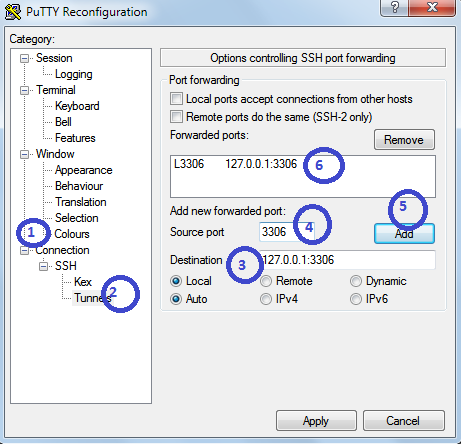
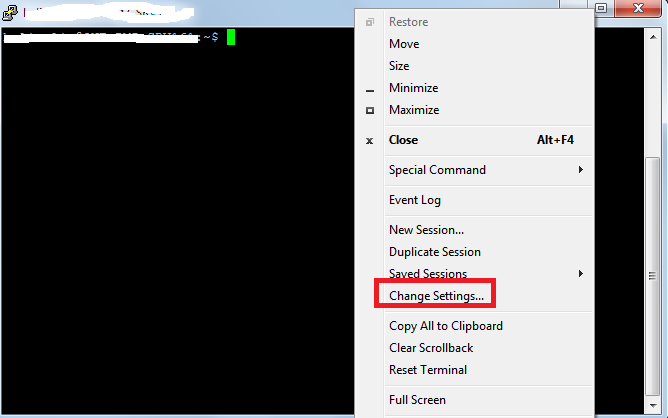 2. Click on Change Settings
i) On the left side click on "Connections"
ii) Expand SSH then click on Tunnels
iii) Give destination as : 127.0.0.1:3306 or localhost:3306
iv) Give source port as : 3306
v) Now, click on Add
Find OS version
Find which Ubuntu version number using this command
root@SAD-AKAR-LLM167:/usr/bin# cat /etc/*-release
DISTRIB_ID=Ubuntu
DISTRIB_RELEASE=12.04
DISTRIB_CODENAME=precise
DISTRIB_DESCRIPTION="Ubuntu 12.04.3 LTS"
NAME="Ubuntu"
VERSION="12.04.3 LTS, Precise Pangolin"
ID=ubuntu
ID_LIKE=debian
PRETTY_NAME="Ubuntu precise (12.04.3 LTS)"
VERSION_ID="12.04"
Environment:
Client location
1) Ubuntu Server 12.04
Development location
1) Windows 7 64 bit OS ( DEV location)
2) PuTTY installed in Windows.
3) DBVisulalizer(OR any MySQL client tool installed for connecting to remote servers)
4) MySQL installed in Windows and service running state.
This post is divided into two sections.
PART-I : MySQL installation in remote Ubuntu 12.04 Server using PuTTY
PART-II : How to by pass 3306 port number by Tunneling concept to access the MySQL database.
( Even though if 3306 port number is not opened in the Ubuntu server we can access the mySQL database)
Connect to Ubuntu server using given credentials(Username, password and ppk file)
PART-I : MySQL installation in remote Ubuntu 12.04 Server using PuTTY
1)root@SAD-AKAR-LLM167: aptitude update
2) Download and install using below command
root@SAD-AKAR-LLM167:aptitude install mysql-server
3) The installer should ask you to set a root password : set it as "password" and click on OK.
4) Installation will complete after clicking on OK.
5) MySQL Service status command after installation completed
root@SAD-AKAR-LLM167:/# service mysql status
mysql start/running, process 28645
6) MySQL Start command :
root@SAD-AKAR-LLM167:/# service mysql start
mysql start/running, process 29040
7) MySQL Stop command:
root@SAD-AKAR-LLM167:/# service mysql stop
mysql stop/waiting
8) MySQL installed location:
root@SAD-AKAR-LLM167:/# which mysql
/usr/bin/mysql
9) Connect to MySQL
root@SAD-AKAR-LLM167:/# /usr/bin/mysql -u root -p
Enter password:password
Welcome to the MySQL monitor. Commands end with ; or g.
Your MySQL connection id is 36
Server version: 5.5.34-0ubuntu0.12.04.1 (Ubuntu)
Copyright (c) 2000, 2013, Oracle and/or its affiliates. All rights reserved.
Oracle is a registered trademark of Oracle Corporation and/or its
affiliates. Other names may be trademarks of their respective
owners.
Type help; or h for help. Type c to clear the current input statement.
mysql>
10) Find mySQL version using below command
mysql>SHOW VARIABLES LIKE "%version%";
PART-II : How to by pass 3306 port number by Tunneling concept to access the MySQL database
1. On your PuTTY window which will drop down the options in a list shown in below figure.
(Assume that you have already working with PuTTY for MySQL installation and not closed it).
i) On the left side click on "Connections"
ii) Expand SSH then click on Tunnels
iii) Give destination as : 127.0.0.1:3306 or localhost:3306
iv) Give source port as : 3306
v) Now, click on Add
3. Once you click on Add you should find added host in the box.
4. Impotently note that in your local machine(Windows) MySQL server is running.
In Destination you are giving localhost or 127.0.0.1 so you should run MySQL server in your local machine. And note that from the PuTTY(lets say Ubuntu server) you are by passing 3306 port number to get the actual MySQL database installed on the Ubuntu server.
5. Now test whether it is working or not.
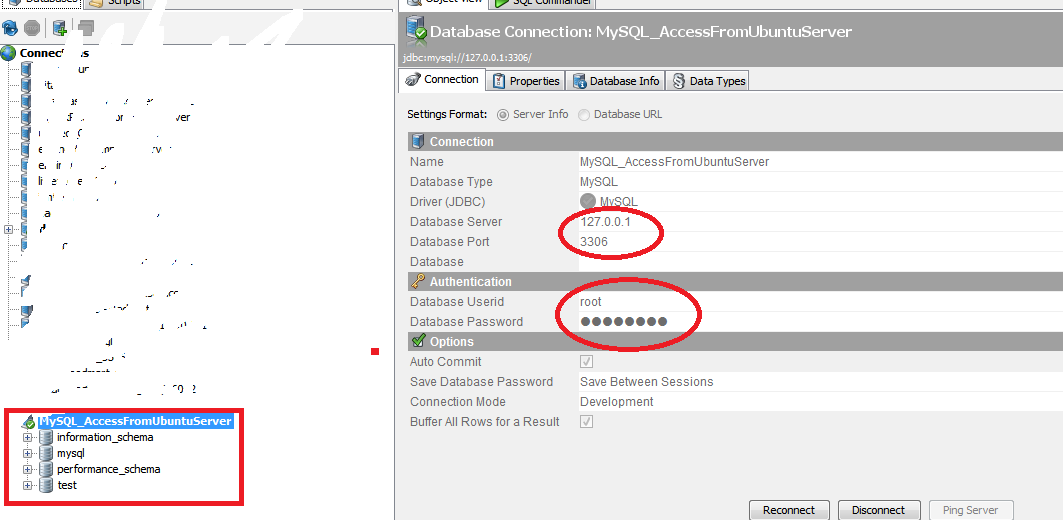
Open MySQL Query browser or any client tool where you can access remote MySQL server.
In this example I have taken DBVisualizer
Give all the database deatils
Database server : 127.0.0.1 or localhost (remember that it is not the IP of Ubuntu server).
Database Port : 3306
Username and password : root/password
Find OS version
Find which Ubuntu version number using this command
root@SAD-AKAR-LLM167:/usr/bin# cat /etc/*-release
DISTRIB_ID=Ubuntu
DISTRIB_RELEASE=12.04
DISTRIB_CODENAME=precise
DISTRIB_DESCRIPTION="Ubuntu 12.04.3 LTS"
NAME="Ubuntu"
VERSION="12.04.3 LTS, Precise Pangolin"
ID=ubuntu
ID_LIKE=debian
PRETTY_NAME="Ubuntu precise (12.04.3 LTS)"
VERSION_ID="12.04"

Tip Export JPivot output to excel in Pentaho 5 x version By default export to Excel is disabled in 5 x server
Hi Readers,
This tip is useful to enable the "Print" property of JPivot output to Export into Excel sheet.
By default in pentaho 5.x version servers it is disabled.
Un comment below code in plugin.spring.xml file
<bean id="Print" class="org.pentaho.jpivot.proxies.ProxyPrintServlet"/>
Location of the file is :
<YourDrivePath>/biserver-ce/pentaho-solutions/system/pentaho-jpivot-plugin
NOTE : Once you enable the code, stop the BI server and start again. [Bz it is a configuration file and changes will be affected iff you restart the server.]
Test: In the xml file it was suggested to replace with fop-0.20.5, but I didnt do it instead just uncommented the code and tested which is worked as expected.. If you still unable to get export work , you might have to replace the specified jar file.
:-)
This tip is useful to enable the "Print" property of JPivot output to Export into Excel sheet.
By default in pentaho 5.x version servers it is disabled.
Un comment below code in plugin.spring.xml file
<bean id="Print" class="org.pentaho.jpivot.proxies.ProxyPrintServlet"/>
Location of the file is :
<YourDrivePath>/biserver-ce/pentaho-solutions/system/pentaho-jpivot-plugin
NOTE : Once you enable the code, stop the BI server and start again. [Bz it is a configuration file and changes will be affected iff you restart the server.]
Test: In the xml file it was suggested to replace with fop-0.20.5, but I didnt do it instead just uncommented the code and tested which is worked as expected.. If you still unable to get export work , you might have to replace the specified jar file.
:-)
Wednesday, January 28, 2015
Datatable Server Side Processing Using Java
Lets start creating datatable server side listing page using java. Datatable is an ultimate solution for those who want to develop listing pages. By using datatable we can can handle, render large and complicated data very easily. In this example I have implemented so many features like custom toolbar, initialized filter delay, added refresh and multiple search boxes at the top for individual column search. The processing of sorting, pagination and search is completely done at serverside using java.Technologies used in this example are java, servlet, jsp, jquery-datatable plugin and little bit css. You can also use this plugin in your frameworks like spring MVC and structs.

Eclipse Project Structure and caret image


The complete serverside logic is written in JqueryDatatablePluginDemo.java handles all incoming request and process the response.
iDisplayStart: This is used to display initial point of data with pagination like 0, 10, 20, 30. For example your are displaying 10 records per page and you want to display 4th page set intially 30.
iDisplayLength: Using this we can set records display range per each page.
iSortCol_0: Used to get column index.
sSortDir_0: Used to get sorting direction. whether it is ascending(ASC) order or desending(DSC) order.
iTotalRecords: Total number of records.
iTotalDisplayRecords: Total number of display records.
sSearch and sSearch_0, 1, 2, 3, 4, sSearch_5 are used to get global filter and multi filter values.
JqueryDatatablePluginDemo.java
package com.studywithdemo;

import java.io.*;
import java.sql.*;
import javax.servlet.ServletException;
import javax.servlet.http.*;
import org.json.*;

@SuppressWarnings("serial")
public class JqueryDatatablePluginDemo extends HttpServlet {

 private String GLOBAL_SEARCH_TERM;
 private String COLUMN_NAME;
 private String DIRECTION;
 private int INITIAL;
 private int RECORD_SIZE;
 private String ID_SEARCH_TERM,NAME_SEARCH_TERM,PLACE_SEARCH_TERM,CITY_SEARCH_TERM,
 STATE_SEARCH_TERM,PHONE_SEARCH_TERM;

 public void doGet(HttpServletRequest request, HttpServletResponse response)
   throws ServletException, IOException {

  String[] columnNames = { "id", "name", "place", "city", "state","phone" };

  JSONObject jsonResult = new JSONObject();
  int listDisplayAmount = 10;
  int start = 0;
  int column = 0;
  String dir = "asc";
  String pageNo = request.getParameter("iDisplayStart");
  String pageSize = request.getParameter("iDisplayLength");
  String colIndex = request.getParameter("iSortCol_0");
  String sortDirection = request.getParameter("sSortDir_0");

  if (pageNo != null) {
   start = Integer.parseInt(pageNo);
   if (start < 0) {
    start = 0;
   }
  }
  if (pageSize != null) {
   listDisplayAmount = Integer.parseInt(pageSize);
   if (listDisplayAmount < 10 || listDisplayAmount > 50) {
    listDisplayAmount = 10;
   }
  }
  if (colIndex != null) {
   column = Integer.parseInt(colIndex);
   if (column < 0 || column > 5)
    column = 0;
  }
  if (sortDirection != null) {
   if (!sortDirection.equals("asc"))
    dir = "desc";
  }

  String colName = columnNames[column];
  int totalRecords= -1;
  try {
   totalRecords = getTotalRecordCount();
  } catch (SQLException e1) {
   e1.printStackTrace();
  }

  RECORD_SIZE = listDisplayAmount;
  GLOBAL_SEARCH_TERM = request.getParameter("sSearch");
  ID_SEARCH_TERM=request.getParameter("sSearch_0");
  NAME_SEARCH_TERM=request.getParameter("sSearch_1");
  PLACE_SEARCH_TERM=request.getParameter("sSearch_2");
  CITY_SEARCH_TERM=request.getParameter("sSearch_3");
  STATE_SEARCH_TERM=request.getParameter("sSearch_4");
  PHONE_SEARCH_TERM=request.getParameter("sSearch_5");
  COLUMN_NAME = colName;
  DIRECTION = dir;
  INITIAL = start;

  try {
   jsonResult = getPersonDetails(totalRecords, request);
  } catch (ClassNotFoundException e) {
   e.printStackTrace();
  } catch (SQLException e) {
   e.printStackTrace();
  }

  response.setContentType("application/json");
  response.setHeader("Cache-Control", "no-store");
  PrintWriter out = response.getWriter();
  out.print(jsonResult);

 }

 public JSONObject getPersonDetails(int totalRecords, HttpServletRequest request)
   throws SQLException, ClassNotFoundException {

  int totalAfterSearch = totalRecords;
  JSONObject result = new JSONObject();
  JSONArray array = new JSONArray();
  String searchSQL = "";

  try {
   Class.forName("com.mysql.jdbc.Driver");
  } catch (ClassNotFoundException e) {
   e.printStackTrace();
  }
  String dbConnectionURL = "jdbc:mysql://localhost:3306/faruk?user=root&password=root";
  Connection con = DriverManager.getConnection(dbConnectionURL);
  String sql = "SELECT " + "id, name, place, city, state, "
    + "phone " + "FROM " + "person " + "WHERE ";

  String globeSearch = "id like %" + GLOBAL_SEARCH_TERM + "%"
    + "or name like %" + GLOBAL_SEARCH_TERM + "%"
    + "or place like %" + GLOBAL_SEARCH_TERM + "%"
    + "or city like %" + GLOBAL_SEARCH_TERM + "%"
    + "or state like  %" + GLOBAL_SEARCH_TERM + "%"
    + "or phone like %" + GLOBAL_SEARCH_TERM + "%";

  String idSearch="id like " + ID_SEARCH_TERM + "";
  String nameSearch="name like %" + NAME_SEARCH_TERM + "%";
  String placeSearch=" place like %" + PLACE_SEARCH_TERM + "%";
  String citySearch=" city like %" + CITY_SEARCH_TERM + "%";
  String stateSearch=" state like %" + STATE_SEARCH_TERM + "%";
  String phoneSearch=" phone like %" + PHONE_SEARCH_TERM + "%";
        System.out.println(phoneSearch);
  if (GLOBAL_SEARCH_TERM != "") {
   searchSQL = globeSearch;
  }
  else if(ID_SEARCH_TERM !="")
  {
   searchSQL=idSearch;
  }
  else if(NAME_SEARCH_TERM !="")
  {
   searchSQL=nameSearch;
  }
  else if(PLACE_SEARCH_TERM!="")
  {
   searchSQL=placeSearch;
  }
  else if(CITY_SEARCH_TERM!="")
  {
   searchSQL=citySearch;
  }
  else if(STATE_SEARCH_TERM!="")
  {
   searchSQL=stateSearch;
  }
  else if(PHONE_SEARCH_TERM!=null)
  {
   searchSQL=phoneSearch;

  }

  sql += searchSQL;
  sql += " order by " + COLUMN_NAME + " " + DIRECTION;
  sql += " limit " + INITIAL + ", " + RECORD_SIZE;

        //for searching
  PreparedStatement stmt = con.prepareStatement(sql);
  ResultSet rs = stmt.executeQuery();

  while (rs.next()) {
   JSONArray ja = new JSONArray();
   ja.put(rs.getString("id"));
   ja.put(rs.getString("name"));
   ja.put(rs.getString("place"));
   ja.put(rs.getString("city"));
   ja.put(rs.getString("state"));
   ja.put(rs.getString("phone"));
   array.put(ja);
  }
  stmt.close();
  rs.close();

  String query = "SELECT " + "COUNT(*) as count " + "FROM " + "person " + "WHERE ";

  //for pagination
  if (GLOBAL_SEARCH_TERM != ""||ID_SEARCH_TERM != "" || NAME_SEARCH_TERM != ""
||PLACE_SEARCH_TERM != ""||CITY_SEARCH_TERM != ""|| STATE_SEARCH_TERM != ""
|| PHONE_SEARCH_TERM != "" ) {
   query += searchSQL;


   PreparedStatement st = con.prepareStatement(query);
   ResultSet results = st.executeQuery();

   if (results.next()) {
    totalAfterSearch = results.getInt("count");
   }
   st.close();
   results.close();
   con.close();
  }
  try {
   result.put("iTotalRecords", totalRecords);
   result.put("iTotalDisplayRecords", totalAfterSearch);
   result.put("aaData", array);
  } catch (Exception e) {

  }

  return result;
 }

 public int getTotalRecordCount() throws SQLException {

  int totalRecords = -1;
  String sql = "SELECT " + "COUNT(*) as count " + "FROM " + "person";
        String dbConnectionURL = "jdbc:mysql://localhost:3306/myDB?user=root&password=root";
  try {
   Class.forName("com.mysql.jdbc.Driver");
  } catch (ClassNotFoundException e) {
   e.printStackTrace();
  }

  Connection con = DriverManager.getConnection(dbConnectionURL);

  PreparedStatement statement = con.prepareStatement(sql);
        ResultSet resultSet = statement.executeQuery();

  if (resultSet.next()) {
   totalRecords = resultSet.getInt("count");
  }
  resultSet.close();
  statement.close();
  con.close();

  return totalRecords;
 }

}
custom-datatable.js
var table;

jQuery(document).ready(function() {
 table = $(#personTable).dataTable({
     "bPaginate": true,
     "order": [ 0, asc ],
     "bInfo": true,
     "iDisplayStart":0,
     "bProcessing" : true,
    "bServerSide" : true,
    "sAjaxSource" : path+"/com/studywithdemo/JqueryDatatablePluginDemo.java",
    "dom": C<"clear">lfrtip,
   colVis: {
    "align": "right",
             restore: "Restore",
             showAll: "Show all",
             showNone: "Show none",
    order: alpha,
    "buttonText": "columns <img src="/datatableServersideExample/images/caaret.png"/>"
         },
      "language": {
             "infoFiltered": ""
         },
         "dom": Cf<"toolbar"">rtip,

       })
     .columnFilter({
      aoColumns: [
                  { type: "number"},
               { type: "text" },
               { type: "text" },
               { type: "text" },
                           { type: "text" },
                           { type: "text" },
       ],
      bUseColVis: true
      }).fnSetFilteringDelay();
   $("#personTable_length").hide();
   $("div.toolbar").append(<div class="btn-group" style="padding:5px "><button
class="btn btn-default" id="refreshbtn" style="background:none;border:1px solid #ccc;height:30px"
type="button"><span class="glyphicon glyphicon-refresh" style="padding:3px"></span></button>
</div>);
      $("div.toolbar").css("float","right");
      $(#refreshbtn).click(function(){
       table.fnStandingRedraw();
     });


 });
viewDatatable.jsp
<%@ page import="java.util.*"%><!DOCTYPE html>
<html>
<head>
<script type="text/javascript">
 var path = ${pageContext.request.contextPath};
</script>
<meta http-equiv="Content-Type" content="text/html; charset=UTF-8">
<link rel="stylesheet" href="http://maxcdn.bootstrapcdn.com/bootstrap/3.2.0/css/bootstrap.min.css">
<link href="http://cdn.datatables.net/1.10.3/css/jquery.dataTables.css" rel="stylesheet"
 type="text/css">
<link href="http://datatables.net/release-datatables/extensions/ColVis/css/dataTables.colVis.css"
rel="stylesheet" type="text/css">
<script src="http://code.jquery.com/jquery-1.11.1.min.js"></script>
<script src="http://cdn.datatables.net/1.10.3/js/jquery.dataTables.min.js"></script>
<script src="http://datatables.net/release-datatables/extensions/ColVis/js/dataTables.colVis.js"
></script>
<script src="http://jquery-datatables-column-filter.googlecode.com/svn/trunk/media/
js/jquery.dataTables.columnFilter.js"></script>
<script type="text/javascript" src="${pageContext.request.contextPath}/
assets/js/custom-datatable.js"></script>
<script type="text/javascript" src="${pageContext.request.contextPath}/
assets/plugin/fnStandingRedraw.js"></script>
<script type="text/javascript" src="${pageContext.request.contextPath}/
assets/plugin/fnSetFilteringDelay.js"></script>
<title>Person Form</title>
</head>
<body>
<form>
 <div class="form">
  <table width="100%" border="0" margin="0" padding="0"
   class="row-border tableHeader" id="personTable">
   <thead>
    <tr>
        <th>Id</th>
     <th>Name</th>
     <th>Place</th>
     <th>City</th>
     <th>State</th>
     <th>Phone</th>
    </tr>
   </thead>
   <tfoot>
     <tr>
     <th>Id</th>
     <th>Name</th>
     <th>Place</th>
     <th>City</th>
     <th>State</th>
     <th>Phone</th>
    </tr>
     </tfoot>
   <tbody>
   </tbody>
  </table>
 </div>
</form>
<style>
tfoot input {
        width: 100%;
        padding: 3px;
        box-sizing: border-box;
    }
.tableHeader{
text-align:left;
}
tfoot {
    display: table-header-group;
}
.dataTables_length
{
position: absolute;
    top: 10px;
    left: 220px;
}
.dataTables_info {
    position: absolute;
    top: 0px;
    left: 5px;
}
.ColVis{
 padding-right:10px;
 padding-top:5px;

}
.dataTables_filter {
   position: absolute;
   top: 10px;
   left: 200px;
   font-size:15px;
}
.dataTables_filter input{
height:22px;
width:150px
}
input
{
-moz-border-radius: 15px;
 border-radius: 3px;
 border:solid 1px #c7c7c7;
 padding:5px;
}
table.dataTable tbody td {
    padding: 5px;
    padding-left: 20px;
}
</style>
</body>

</html>
web.xml
<?xml version="1.0" encoding="UTF-8"?>

<web-app xmlns:xsi="http://www.w3.org/2001/XMLSchema-instance"
xmlns="http://java.sun.com/xml/ns/javaee" xmlns:jsp="http://java.sun.com/xml/ns/javaee/jsp"
xmlns:web="http://java.sun.com/xml/ns/javaee/web-app_2_5.xsd"
xsi:schemaLocation="http://java.sun.com/xml/ns/javaee
http://java.sun.com/xml/ns/javaee/web-app_3_0.xsd"
id="WebApp_ID" version="3.0">

  <display-name>datatableServersideExample</display-name>

  <servlet>

    <servlet-name>JqueryDatatablePluginDemo</servlet-name>

    <servlet-class>com.studywithdemo.JqueryDatatablePluginDemo</servlet-class>

  </servlet>

  <servlet-mapping>

    <servlet-name>JqueryDatatablePluginDemo</servlet-name>

    <url-pattern>/com/studywithdemo/JqueryDatatablePluginDemo.java</url-pattern>

  </servlet-mapping>

  <welcome-file-list>

    <welcome-file>

      /WEB-INF/views/viewDatatable.jsp

    </welcome-file>

  </welcome-file-list>

</web-app>
Subscribe to:
Posts (Atom)