Showing posts with label creating. Show all posts
Showing posts with label creating. Show all posts
Thursday, February 5, 2015
Creating a Flex AIR text editor Part 25
In this tutorial we will start working on another element of the interface which will count and enumerate lines in the text area.
This is what it is going to look like:
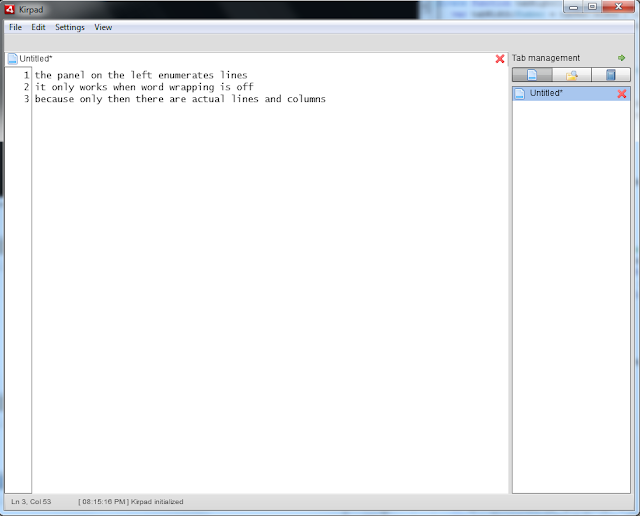
The column is a text field of a fixed width (for now), which is populated by characters by first checking how many lines there are in total and how many lines are displayed in the counter right now. If these two values are different, then we need to update the line enumeration - recount the lines and repopulate the text field.
This text field should also have the same font and size as the main text area, so that the lines match.
Another important thing is that we have to make it possible to toggle this line counter bar through the native menu, moreover, the bar will only be visible when the word wrapping is turned off. When wrapping is on, there are no lines and no columns in the text, so we dont really have anything to show.
By the end of this tutorial we will have a working, save-able and load-able line counting bar, which is updated when changing between tabs, when changing fonts, closing tabs, etc. However, it will not scroll and the width will be fixed, but these things will be improved in the next part.
Lets declare the new variables that we will be using in this part.
The pref_linecount variable is needed to toggle the bar. The textX variable didnt exist before, because the x was always 0. Because it will not be so from now on, we need to include this variable. We used textWidth for tabBar width before, now we will use tabWidth, because the width of the tabbar and textarea will not always be the same.
The lineCountWidth variable is the fixed width of the text area. The lineNumbers variable stores the text value for the bar text area. The lineDisplayedNum is a number that represents the number of lines that are shown on the bar right now.
First lets add the native menu item for toggling the pref_linecount variable and manage saving it and loading it. The procedure is already familiar to us. First add it to the XML:
Now update the preferences part in the init function.
Note 1: the wrap and linecount variables must be different by default.
Note 2: the first time running this code you will need to include "preferences.data.firsttime = null;" to reset the shared object.
Add this line to the menuSelect function:
Update savePreferences():
Now lets update the menuSelect function again - lets add a conditional which checks if pref_wrap is true. If it is, set linecount to false.
Also, call countLines() function (well create it later in the tutorial):
The countLines() function will be used to update the bar. We need to call it every time we change the value of the text area.
Now, lets update the updateTextSize() function. We need to manage the new textX variable, update the textWidth variable and manage tabWidth. The function after the changes:
Go to the removeTab() function and call the countLines() function in the end (while were at it):
Now lets create the text area bar as a component.
First update the textArea text area so that it calls the countLines() function on change event plus what we already have, and set its x property to textX:
Now update the tabbar by settings its width to tabWidth instead of textWidth:
Create a new TextArea object, give it an id of lineCount. Set its width to lineCountWidth, text to lineNumbers, visible to pref_linecount, height to textHeight, y to textY, editable, selectable and mouseEnabled to false and textAlign to right.
Now - the countLines function weve been talking about! Here we need to check if the linecount bar is toggled on and if word wrapping is off. If the conditions are met, count total lines and compare them to the lines currently displayed on the bar. If they do not match, recount and reenumerate the lines using a updateLineCount() function, which simply fills the text area with text:
As I said before, we want the font settings to be the same in the textArea and in the lineCount area:
Full code:
Woohoo! Looking back at the work done for the application, I can say that theres a lot done already. And theres much more to come. We dont even have basic save/load functions working, haha!
Thanks for reading!
Read more »
This is what it is going to look like:
The column is a text field of a fixed width (for now), which is populated by characters by first checking how many lines there are in total and how many lines are displayed in the counter right now. If these two values are different, then we need to update the line enumeration - recount the lines and repopulate the text field.
This text field should also have the same font and size as the main text area, so that the lines match.
Another important thing is that we have to make it possible to toggle this line counter bar through the native menu, moreover, the bar will only be visible when the word wrapping is turned off. When wrapping is on, there are no lines and no columns in the text, so we dont really have anything to show.
By the end of this tutorial we will have a working, save-able and load-able line counting bar, which is updated when changing between tabs, when changing fonts, closing tabs, etc. However, it will not scroll and the width will be fixed, but these things will be improved in the next part.
Lets declare the new variables that we will be using in this part.
[Bindable]
private var pref_linecount:Boolean = true;

[Bindable]
private var textX:Number;

[Bindable]
private var tabWidth:Number;

[Bindable]
private var lineCountWidth:Number = 40;
[Bindable]
private var lineNumbers:String = "1";
[Bindable]
private var lineDisplayedNum:int = 1;
The pref_linecount variable is needed to toggle the bar. The textX variable didnt exist before, because the x was always 0. Because it will not be so from now on, we need to include this variable. We used textWidth for tabBar width before, now we will use tabWidth, because the width of the tabbar and textarea will not always be the same.
The lineCountWidth variable is the fixed width of the text area. The lineNumbers variable stores the text value for the bar text area. The lineDisplayedNum is a number that represents the number of lines that are shown on the bar right now.
First lets add the native menu item for toggling the pref_linecount variable and manage saving it and loading it. The procedure is already familiar to us. First add it to the XML:
<fx:XML id="windowMenu">
<root>
<menuitem label="File">
<menuitem label="New" key="n" controlKey="true" />
<menuitem label="Open" key="o" controlKey="true" />
</menuitem>
<menuitem label="Edit">
<menuitem label="Cut" key="x" controlKey="true" />
<menuitem label="Copy" key="c" controlKey="true" />
<menuitem label="Paste" key="v" controlKey="true" />
<menuitem type="separator"/>
<menuitem label="Select all" key="a" controlKey="true" />
</menuitem>
<menuitem label="Settings">
<menuitem label="Word wrap" type="check" toggled="{pref_wrap}" />
<menuitem label="Font..."/>
</menuitem>
<menuitem label="View">
<menuitem label="Tool bar" type="check" toggled="{pref_toolbar}" />
<menuitem label="Status bar" type="check" toggled="{pref_status}" />
<menuitem label="Line count" type="check" toggled="{pref_linecount}" />
<menuitem label="Side pane" type="check" toggled="{pref_sidepane}" />
</menuitem>
</root>
</fx:XML>
Now update the preferences part in the init function.
Note 1: the wrap and linecount variables must be different by default.
Note 2: the first time running this code you will need to include "preferences.data.firsttime = null;" to reset the shared object.
// Set preferences if loaded for the first time
if (preferences.data.firsttime == null) {
preferences.data.firsttime = true;
preferences.data.wrap = false;
preferences.data.status = true;
preferences.data.toolbar = true;
preferences.data.sidepane = true;
preferences.data.linecount = true;
preferences.data.fontsettings = {fontfamily:"Lucida Console", fontsize:14, fontstyle:"normal", fontweight:"normal", fontcolor:0x000000, bgcolor:0xffffff};
preferences.flush();
}

// Set preferences loaded from local storage
pref_wrap = preferences.data.wrap;
pref_status = preferences.data.status;
pref_toolbar = preferences.data.toolbar;
pref_sidepane = preferences.data.sidepane;
pref_fontsettings = preferences.data.fontsettings;
pref_linecount = preferences.data.linecount;
Add this line to the menuSelect function:
(evt.item.@label == "Line count")?(pref_linecount = !pref_linecount):(void);
Update savePreferences():
private function savePreferences():void {
preferences.data.wrap = pref_wrap;
preferences.data.status = pref_status;
preferences.data.toolbar = pref_toolbar;
preferences.data.fontsettings = pref_fontsettings;
preferences.data.sidepane = pref_sidepane;
preferences.data.linecount = pref_linecount;
preferences.flush();
}
Now lets update the menuSelect function again - lets add a conditional which checks if pref_wrap is true. If it is, set linecount to false.
Also, call countLines() function (well create it later in the tutorial):
private function menuSelect(evt:FlexNativeMenuEvent):void {
(evt.item.@label == "New")?(doNew()):(void);
(evt.item.@label == "Word wrap")?(pref_wrap = !pref_wrap):(void);
(evt.item.@label == "Cut")?(doCut()):(void);
(evt.item.@label == "Copy")?(doCopy()):(void);
(evt.item.@label == "Paste")?(doPaste()):(void);
(evt.item.@label == "Select all")?(doSelectall()):(void);
(evt.item.@label == "Status bar")?(pref_status = !pref_status):(void);
(evt.item.@label == "Tool bar")?(pref_toolbar = !pref_toolbar):(void);
(evt.item.@label == "Side pane")?(pref_sidepane = !pref_sidepane):(void);
(evt.item.@label == "Line count")?(pref_linecount = !pref_linecount):(void);
(evt.item.@label == "Font...")?(doFont()):(void);
savePreferences();
updateStatus();
if (pref_wrap) {
pref_linecount = false;
}
updateTextSize();
countLines();
}
The countLines() function will be used to update the bar. We need to call it every time we change the value of the text area.
Now, lets update the updateTextSize() function. We need to manage the new textX variable, update the textWidth variable and manage tabWidth. The function after the changes:
private function menuSelect(evt:FlexNativeMenuEvent):void {
(evt.item.@label == "New")?(doNew()):(void);
(evt.item.@label == "Word wrap")?(pref_wrap = !pref_wrap):(void);
(evt.item.@label == "Cut")?(doCut()):(void);
(evt.item.@label == "Copy")?(doCopy()):(void);
(evt.item.@label == "Paste")?(doPaste()):(void);
(evt.item.@label == "Select all")?(doSelectall()):(void);
(evt.item.@label == "Status bar")?(pref_status = !pref_status):(void);
(evt.item.@label == "Tool bar")?(pref_toolbar = !pref_toolbar):(void);
(evt.item.@label == "Side pane")?(pref_sidepane = !pref_sidepane):(void);
(evt.item.@label == "Line count")?(pref_linecount = !pref_linecount):(void);
(evt.item.@label == "Font...")?(doFont()):(void);
savePreferences();
updateStatus();
if (pref_wrap) {
pref_linecount = false;
}
updateTextSize();
countLines();
}
Go to the removeTab() function and call the countLines() function in the end (while were at it):
private function removeTab(index:int):void {
// if this is the last tab, create a new empty tab
if (tabData.length == 1) {
tabData.addItem( { title:"Untitled", textData:"", saved:false } );
}
statusMessage = "[ " + new Date().toLocaleTimeString() + " ] Tab closed: " + tabData[index].title;
updateStatus();
tabData.removeItemAt(index);
tabSelectedIndex = tabBar.selectedIndex;
previousIndex = tabSelectedIndex;
textArea.text = tabData[tabSelectedIndex].textData;
textArea.selectRange(tabData[tabSelectedIndex].selectedAnchor, tabData[tabSelectedIndex].selectedActive);
if (closeAfterConfirm && tabsToClose == 0) {
FlexGlobals.topLevelApplication.close();
}
countLines();
}
Now lets create the text area bar as a component.
First update the textArea text area so that it calls the countLines() function on change event plus what we already have, and set its x property to textX:
<s:TextArea id="textArea" width="{textWidth}" height="{textHeight}" y="{textY}" x="{textX}" borderVisible="false" lineBreak="{(pref_wrap)?(toFit):(explicit)}" click="cursorFix(); updateStatus();" change="updateStatus(); countLines();" keyDown="updateStatus();"/>
Now update the tabbar by settings its width to tabWidth instead of textWidth:
<custom:CustomTabBar id="tabBar" dataProvider="{tabData}" width="{tabWidth}" y="{tabY}" itemRenderer="CustomTab" height="22" tabClose="onTabClose(event);" change="tabChange(tabbar);" selectedIndex="{tabSelectedIndex}"/>
Create a new TextArea object, give it an id of lineCount. Set its width to lineCountWidth, text to lineNumbers, visible to pref_linecount, height to textHeight, y to textY, editable, selectable and mouseEnabled to false and textAlign to right.
<s:TextArea id="lineCount" width="{lineCountWidth}" text="{lineNumbers}" visible="{pref_linecount}" height="{textHeight}" y="{textY}" editable="false" selectable="false" mouseEnabled="false" textAlign="right"/>
Now - the countLines function weve been talking about! Here we need to check if the linecount bar is toggled on and if word wrapping is off. If the conditions are met, count total lines and compare them to the lines currently displayed on the bar. If they do not match, recount and reenumerate the lines using a updateLineCount() function, which simply fills the text area with text:
private function countLines():void {
if (pref_linecount && !pref_wrap) {
var totalLines:int = textArea.text.split("
").length;
if (totalLines != lineDisplayedNum) {
updateLineCount(totalLines);
lineDisplayedNum = totalLines;
}
}
}

private function updateLineCount(total:int):void {
lineNumbers = "";
for (var i:int = 1; i < (total + 1); i++) {
lineNumbers += i + "
";
}
}
As I said before, we want the font settings to be the same in the textArea and in the lineCount area:
private function updateFonts():void{
textArea.setStyle("fontFamily", pref_fontsettings.fontfamily);
textArea.setStyle("fontSize", pref_fontsettings.fontsize);
textArea.setStyle("fontStyle", pref_fontsettings.fontstyle);
textArea.setStyle("fontWeight", pref_fontsettings.fontweight);
textArea.setStyle("color", pref_fontsettings.fontcolor);
textArea.setStyle("contentBackgroundColor", pref_fontsettings.bgcolor);

lineCount.setStyle("fontFamily", pref_fontsettings.fontfamily);
lineCount.setStyle("fontSize", pref_fontsettings.fontsize);
lineCount.setStyle("fontStyle", pref_fontsettings.fontstyle);
lineCount.setStyle("fontWeight", pref_fontsettings.fontweight);
lineCount.setStyle("color", pref_fontsettings.fontcolor);
lineCount.setStyle("contentBackgroundColor", pref_fontsettings.bgcolor);
}
Full code:
<?xml version="1.0" encoding="utf-8"?>
<s:WindowedApplication xmlns:fx="http://ns.adobe.com/mxml/2009"
                       xmlns:s="library://ns.adobe.com/flex/spark"
                       xmlns:mx="library://ns.adobe.com/flex/mx"
   xmlns:custom="*"
   creationComplete="init();" title="Kirpad" showStatusBar="{pref_status}"
   minWidth="400" minHeight="200" height="700" width="900">

<s:menu>
<mx:FlexNativeMenu dataProvider="{windowMenu}" showRoot="false" labelField="@label" keyEquivalentField="@key" itemClick="menuSelect(event);" />
</s:menu>

<fx:Script>
<![CDATA[
import flash.events.KeyboardEvent;
import flash.events.Event;
import flash.events.MouseEvent;
import flash.events.NativeWindowBoundsEvent;
import flash.net.SharedObject;
import mx.collections.ArrayCollection;
import mx.controls.Alert;
import mx.events.FlexNativeMenuEvent;
import flashx.textLayout.elements.TextFlow;
import flashx.textLayout.elements.Configuration;
import flash.system.System;
import flash.desktop.Clipboard;
import flash.desktop.ClipboardFormats;
import flash.ui.Mouse;
import mx.events.CloseEvent;
import flash.ui.ContextMenu;
import flash.ui.ContextMenuItem;
import flash.events.ContextMenuEvent;
import mx.events.ResizeEvent;
import mx.core.FlexGlobals;

private var preferences:SharedObject = SharedObject.getLocal("kirpadPreferences");
[Bindable]
private var pref_wrap:Boolean = true;
[Bindable]
private var pref_status:Boolean = true;
[Bindable]
private var pref_toolbar:Boolean = true;
[Bindable]
private var pref_sidepane:Boolean = true;
[Bindable]
private var pref_linecount:Boolean = true;
[Bindable]
public var pref_fontsettings:Object = new Object();

private var initHeight:Number;
private var heightFixed:Boolean = false;

private var statusMessage:String;
[Bindable]
private var textHeight:Number;
[Bindable]
private var textWidth:Number;
[Bindable]
private var textY:Number;
[Bindable]
private var textX:Number;
[Bindable]
private var tabY:Number;
[Bindable]
private var sidePaneY:Number;
[Bindable]
private var sidePaneX:Number;
[Bindable]
private var sidePaneHeight:Number;
[Bindable]
private var sidePaneWidth:Number = 180;
[Bindable]
private var sideContentWidth:Number = 170;
[Bindable]
private var tabWidth:Number;
[Bindable]
private var lineCountWidth:Number = 40;
[Bindable]
private var lineNumbers:String = "1";
[Bindable]
private var lineDisplayedNum:int = 1;

[Bindable]
private var tabSelectedIndex:int = 0;

private var previousIndex:int = 0;
private var rightclickTabIndex:int = 0;
private var untitledNum:int = 0;
private var tabsToClose:int = 0;
private var closeAfterConfirm:Boolean = false;

public var fontWindow:FontWindow = new FontWindow();

private function init():void {

// Create a listener for every frame
addEventListener(Event.ENTER_FRAME, everyFrame);

// Set initHeight to the initial height value on start
initHeight = height;

preferences.data.firsttime = null;

// Set preferences if loaded for the first time
if (preferences.data.firsttime == null) {
preferences.data.firsttime = true;
preferences.data.wrap = false;
preferences.data.status = true;
preferences.data.toolbar = true;
preferences.data.sidepane = true;
preferences.data.linecount = true;
preferences.data.fontsettings = {fontfamily:"Lucida Console", fontsize:14, fontstyle:"normal", fontweight:"normal", fontcolor:0x000000, bgcolor:0xffffff};
preferences.flush();
}

// Set preferences loaded from local storage
pref_wrap = preferences.data.wrap;
pref_status = preferences.data.status;
pref_toolbar = preferences.data.toolbar;
pref_sidepane = preferences.data.sidepane;
pref_fontsettings = preferences.data.fontsettings;
pref_linecount = preferences.data.linecount;

// Allow insertion of tabs
var textFlow:TextFlow = textArea.textFlow;
var config:Configuration = Configuration(textFlow.configuration);
config.manageTabKey = true;

// Set status message
statusMessage = "[ " + new Date().toLocaleTimeString() + " ] Kirpad initialized";
updateStatus();

// Close all sub-windows if main window is closed
addEventListener(Event.CLOSING, onClose);

// Add listener for the event that is dispatched when new font settings are applied
fontWindow.addEventListener(Event.CHANGE, fontChange);

// Update real fonts with the data from the settings values
updateFonts();

// Create a listener for resizing
addEventListener(NativeWindowBoundsEvent.RESIZE, onResize);

// Context menu declaration for the tabbar control
var cm_close:ContextMenuItem = new ContextMenuItem("Close tab");
cm_close.addEventListener(ContextMenuEvent.MENU_ITEM_SELECT, tabContextClose);
var cm_closeother:ContextMenuItem = new ContextMenuItem("Close other tabs");
cm_closeother.addEventListener(ContextMenuEvent.MENU_ITEM_SELECT, tabContextCloseOther);

var cm:ContextMenu = new ContextMenu();
cm.items = [cm_close, cm_closeother];
cm.hideBuiltInItems();
tabBar.contextMenu = cm;
tabBar.addEventListener(MouseEvent.RIGHT_MOUSE_DOWN, tabRightClick);

// Listen to keyboard
addEventListener(KeyboardEvent.KEY_DOWN, onKeyDown);
}

private function menuSelect(evt:FlexNativeMenuEvent):void {
(evt.item.@label == "New")?(doNew()):(void);
(evt.item.@label == "Word wrap")?(pref_wrap = !pref_wrap):(void);
(evt.item.@label == "Cut")?(doCut()):(void);
(evt.item.@label == "Copy")?(doCopy()):(void);
(evt.item.@label == "Paste")?(doPaste()):(void);
(evt.item.@label == "Select all")?(doSelectall()):(void);
(evt.item.@label == "Status bar")?(pref_status = !pref_status):(void);
(evt.item.@label == "Tool bar")?(pref_toolbar = !pref_toolbar):(void);
(evt.item.@label == "Side pane")?(pref_sidepane = !pref_sidepane):(void);
(evt.item.@label == "Line count")?(pref_linecount = !pref_linecount):(void);
(evt.item.@label == "Font...")?(doFont()):(void);
savePreferences();
updateStatus();
if (pref_wrap) {
pref_linecount = false;
}
updateTextSize();
countLines();
}

private function savePreferences():void {
preferences.data.wrap = pref_wrap;
preferences.data.status = pref_status;
preferences.data.toolbar = pref_toolbar;
preferences.data.fontsettings = pref_fontsettings;
preferences.data.sidepane = pref_sidepane;
preferences.data.linecount = pref_linecount;
preferences.flush();
}

private function doCut():void {
var selectedText:String = textArea.text.substring(textArea.selectionActivePosition, textArea.selectionAnchorPosition);
System.setClipboard(selectedText);
insertText("");
}

private function doCopy():void {
var selectedText:String = textArea.text.substring(textArea.selectionActivePosition, textArea.selectionAnchorPosition);
System.setClipboard(selectedText);
}

private function doPaste():void{
var myClip:Clipboard = Clipboard.generalClipboard;
var pastedText:String = myClip.getData(ClipboardFormats.TEXT_FORMAT) as String;
insertText(pastedText);
}

private function doSelectall():void {
textArea.selectAll();
}

private function insertText(str:String):void {
var substrPositions:int = textArea.selectionActivePosition - textArea.selectionAnchorPosition;
var oldSel1:int = (substrPositions>0)?(textArea.selectionAnchorPosition):(textArea.selectionActivePosition);
var oldSel2:int = (substrPositions<0)?(textArea.selectionAnchorPosition):(textArea.selectionActivePosition);
var preText:String = textArea.text.substring(0, oldSel1);
var postText:String = textArea.text.substring(oldSel2);
var newSelectRange:int = preText.length + str.length;
textArea.text = preText + str + postText;
textArea.selectRange(newSelectRange, newSelectRange);
}

private function cursorFix():void{
Mouse.cursor = "ibeam";
}

private function everyFrame(evt:Event):void {
if (!heightFixed && height==initHeight) {
height = initHeight - 20;
if (height != initHeight) {
heightFixed = true;
updateTextSize();
}
}
}

private function onResize(evt:ResizeEvent):void {
updateTextSize();
}

private function updateTextSize():void {
tabY = (toolBar.visible)?(toolBar.height):(0);
textY = tabBar.height + tabY;
textX = (pref_linecount)?(lineCountWidth):(0);
var statusHeight:Number = (pref_status)?(statusBar.height):(0);
textHeight = height - textY - statusHeight;
textWidth = (pref_sidepane)?(width - sidePaneWidth - textX):(width - textX);
tabWidth = textWidth + textX;
focusManager.setFocus(textArea);
sidePaneHeight = textHeight + tabBar.height;
sidePaneY = textY-tabBar.height;
sidePaneX = width - sidePaneWidth;
}

private function updateStatus():void {
var str:String = new String();
str = (pref_wrap)?("Word wrapping on"):(caretPosition());
status = str + "	" + statusMessage;
}

private function caretPosition():String {
var pos:int = textArea.selectionActivePosition;
var str:String = textArea.text.substring(0, pos);
var lines:Array = str.split("
");
var line:int = lines.length;
var col:int = lines[lines.length - 1].length + 1;

return "Ln " + line + ", Col " + col;
}

private function doFont():void{
fontWindow.open();
fontWindow.activate();
fontWindow.visible = true;
fontWindow.setValues(pref_fontsettings.fontsize, pref_fontsettings.fontfamily, pref_fontsettings.fontstyle, pref_fontsettings.fontweight, pref_fontsettings.fontcolor, pref_fontsettings.bgcolor);
}

private function onClose(evt:Event):void {
if(!closeAfterConfirm){
evt.preventDefault();
var allWindows:Array = NativeApplication.nativeApplication.openedWindows;
for (var i:int = 1; i < allWindows.length; i++)
{
allWindows[i].close();
}

// Check if there are any unsaved tabs
var needSaving:Boolean = false;
tabsToClose = 0;

for (var u:int = 0; u < tabData.length; u++) {
if (tabData[u].saved == false) {
needSaving = true;
tabsToClose++;
}
}

// If there are unsaved tabs, dont close window yet, set closeAfterConfirm to true and close all tabs
if (needSaving) {
closeAfterConfirm = true;
for (var t:int = 0; t < tabData.length; t++) {
closeTab(t);
}
}
if (!needSaving) {
FlexGlobals.topLevelApplication.close();
}
}
}

private function fontChange(evt:Event):void{
pref_fontsettings.fontfamily = fontWindow.fontCombo.selectedItem.fontName;
pref_fontsettings.fontsize = fontWindow.sizeStepper.value;

if (fontWindow.styleCombo.selectedIndex == 0) {
pref_fontsettings.fontstyle = "normal";
pref_fontsettings.fontweight = "normal";
}
if (fontWindow.styleCombo.selectedIndex == 1) {
pref_fontsettings.fontstyle = "italic";
pref_fontsettings.fontweight = "normal";
}
if (fontWindow.styleCombo.selectedIndex == 2) {
pref_fontsettings.fontstyle = "normal";
pref_fontsettings.fontweight = "bold";
}
if (fontWindow.styleCombo.selectedIndex == 3) {
pref_fontsettings.fontstyle = "italic";
pref_fontsettings.fontweight = "bold";
}

pref_fontsettings.fontcolor = fontWindow.colorPicker.selectedColor;
pref_fontsettings.bgcolor = fontWindow.bgColorPicker.selectedColor;

savePreferences();
updateFonts();
}

private function updateFonts():void{
textArea.setStyle("fontFamily", pref_fontsettings.fontfamily);
textArea.setStyle("fontSize", pref_fontsettings.fontsize);
textArea.setStyle("fontStyle", pref_fontsettings.fontstyle);
textArea.setStyle("fontWeight", pref_fontsettings.fontweight);
textArea.setStyle("color", pref_fontsettings.fontcolor);
textArea.setStyle("contentBackgroundColor", pref_fontsettings.bgcolor);

lineCount.setStyle("fontFamily", pref_fontsettings.fontfamily);
lineCount.setStyle("fontSize", pref_fontsettings.fontsize);
lineCount.setStyle("fontStyle", pref_fontsettings.fontstyle);
lineCount.setStyle("fontWeight", pref_fontsettings.fontweight);
lineCount.setStyle("color", pref_fontsettings.fontcolor);
lineCount.setStyle("contentBackgroundColor", pref_fontsettings.bgcolor);
}

private function onTabClose(evt:Event):void {
var tabWidth:Number = tabBar.width / tabData.length;
var cIndex:int = Math.floor(tabBar.mouseX / tabWidth);
tabSelectedIndex = cIndex;
tabChange();
closeTab(tabSelectedIndex);
}

private function onListClose(evt:Event):void {
tabSelectedIndex = sideList.selectedIndex;
tabChange();
closeTab(tabSelectedIndex);
}

private function closeTab(index:int):void {
if (tabData[index].saved) {
removeTab(index);
}
if (!tabData[index].saved) {
Alert.show("Save " + tabData[index].title + " before closing?", "Confirmation", Alert.YES | Alert.NO, null, confirmClose);
}
function confirmClose(evt:CloseEvent):void {
tabsToClose--;
if (evt.detail == Alert.YES) {
// TODO: call saving function here
removeTab(index);
}else {
removeTab(index);
}
}
}

private function removeTab(index:int):void {
// if this is the last tab, create a new empty tab
if (tabData.length == 1) {
tabData.addItem( { title:"Untitled", textData:"", saved:false } );
}
statusMessage = "[ " + new Date().toLocaleTimeString() + " ] Tab closed: " + tabData[index].title;
updateStatus();
tabData.removeItemAt(index);
tabSelectedIndex = tabBar.selectedIndex;
previousIndex = tabSelectedIndex;
textArea.text = tabData[tabSelectedIndex].textData;
textArea.selectRange(tabData[tabSelectedIndex].selectedAnchor, tabData[tabSelectedIndex].selectedActive);
if (closeAfterConfirm && tabsToClose == 0) {
FlexGlobals.topLevelApplication.close();
}
countLines();
}

private function doNew():void {
statusMessage = "[ " + new Date().toLocaleTimeString() + " ] New tab created";
updateStatus();
untitledNum++;
tabData.addItem( { title:"Untitled("+untitledNum+")", textData:"", saved:false } );
tabSelectedIndex = tabData.length - 1;
tabChange();
}

private function tabChange(from:String = "none"):void {
if (from == "tabbar") {
tabSelectedIndex = tabBar.selectedIndex;
}
if (from == "sidelist") {
tabSelectedIndex = sideList.selectedIndex;
}
tabData[previousIndex].textData = textArea.text;
tabData[previousIndex].selectedActive = textArea.selectionActivePosition;
tabData[previousIndex].selectedAnchor = textArea.selectionAnchorPosition;
previousIndex = tabSelectedIndex;
textArea.text = tabData[tabSelectedIndex].textData;
textArea.selectRange(tabData[tabSelectedIndex].selectedAnchor, tabData[tabSelectedIndex].selectedActive);
updateStatus();
countLines();
}

private function tabContextClose(evt:ContextMenuEvent):void{
closeTab(rightclickTabIndex);
}

private function tabContextCloseOther(evt:ContextMenuEvent):void {
var len:int = tabData.length;
for (var i:int = 0; i < len; i++) {
if (i != rightclickTabIndex) {
closeTab(i);
}
}
}

private function tabRightClick(evt:MouseEvent):void {
var tabWidth:Number = tabBar.width / tabData.length;
var rcIndex:int = Math.floor(tabBar.mouseX / tabWidth);
rightclickTabIndex = rcIndex;
}

private function onKeyDown(evt:KeyboardEvent):void{
if (evt.ctrlKey) {
// Ctrl+TAB - next tab
if (evt.keyCode == 9 && !evt.shiftKey) {
if (tabData.length - tabSelectedIndex > 1) {
tabSelectedIndex++;
tabChange();
}
}
// Ctrl+Shift+TAB - previous tab
if (evt.keyCode == 9 && evt.shiftKey) {
if (tabSelectedIndex > 0) {
tabSelectedIndex--;
tabChange();
}
}
// Ctrl+number (1-8) - go to numbered tab
if (evt.keyCode >= 49 && evt.keyCode <= 56) {
var num:int = evt.keyCode - 48;
if (tabData.length > num - 1) {
tabSelectedIndex = num - 1;
tabChange();
}
}
// Ctrl+9 - go to last tab
if (evt.keyCode == 57) {
tabSelectedIndex = tabData.length - 1;
tabChange();
}
}
}

private function closeSidePane():void{
pref_sidepane = !pref_sidepane
savePreferences();
updateTextSize();
}

private function countLines():void {
if (pref_linecount && !pref_wrap) {
var totalLines:int = textArea.text.split("
").length;
if (totalLines != lineDisplayedNum) {
updateLineCount(totalLines);
lineDisplayedNum = totalLines;
}
}
}

private function updateLineCount(total:int):void {
lineNumbers = "";
for (var i:int = 1; i < (total + 1); i++) {
lineNumbers += i + "
";
}
}
]]>
</fx:Script>

<fx:Declarations>
<fx:XML id="windowMenu">
<root>
<menuitem label="File">
<menuitem label="New" key="n" controlKey="true" />
<menuitem label="Open" key="o" controlKey="true" />
</menuitem>
<menuitem label="Edit">
<menuitem label="Cut" key="x" controlKey="true" />
<menuitem label="Copy" key="c" controlKey="true" />
<menuitem label="Paste" key="v" controlKey="true" />
<menuitem type="separator"/>
<menuitem label="Select all" key="a" controlKey="true" />
</menuitem>
<menuitem label="Settings">
<menuitem label="Word wrap" type="check" toggled="{pref_wrap}" />
<menuitem label="Font..."/>
</menuitem>
<menuitem label="View">
<menuitem label="Tool bar" type="check" toggled="{pref_toolbar}" />
<menuitem label="Status bar" type="check" toggled="{pref_status}" />
<menuitem label="Line count" type="check" toggled="{pref_linecount}" />
<menuitem label="Side pane" type="check" toggled="{pref_sidepane}" />
</menuitem>
</root>
</fx:XML>
<mx:ArrayCollection id="tabData">
<fx:Object title="Untitled" textData="" saved="false" seletedActive="0" selectedAnchor="0" />
</mx:ArrayCollection>
<mx:ArrayCollection id="sidePaneData">
<fx:Object icon="@Embed(../lib/page.png)" tip="Tab management" />
<fx:Object icon="@Embed(../lib/folder_magnify.png)" tip="File browsing" />
<fx:Object icon="@Embed(../lib/book.png)" tip="Snippets" />
</mx:ArrayCollection>
<mx:ArrayCollection id="sidePaneTabHeadings">
<fx:String>Tab management</fx:String>
<fx:String>File browsing</fx:String>
<fx:String>Snippets</fx:String>
</mx:ArrayCollection>
</fx:Declarations>

<s:Group width="100%" height="100%">
<s:TextArea id="textArea" width="{textWidth}" height="{textHeight}" y="{textY}" x="{textX}" borderVisible="false" lineBreak="{(pref_wrap)?(toFit):(explicit)}"  click="cursorFix(); updateStatus();" change="updateStatus(); countLines();" keyDown="updateStatus();"/>
<custom:CustomTabBar id="tabBar" dataProvider="{tabData}" width="{tabWidth}" y="{tabY}" itemRenderer="CustomTab" height="22" tabClose="onTabClose(event);" change="tabChange(tabbar);" selectedIndex="{tabSelectedIndex}"/>
<s:TextArea id="lineCount" width="{lineCountWidth}" text="{lineNumbers}" visible="{pref_linecount}" height="{textHeight}" y="{textY}" editable="false" selectable="false" mouseEnabled="false" textAlign="right"/>
<mx:Box id="toolBar" width="100%" backgroundColor="#dddddd" height="24" visible="{pref_toolbar}">
</mx:Box>
<mx:Box id="sidePane" width="{sidePaneWidth}" y="{sidePaneY}" x="{sidePaneX}" height="{sidePaneHeight}" backgroundColor="#dddddd" visible="{pref_sidepane}" paddingTop="5" paddingLeft="5" horizontalScrollPolicy="off">
<s:Group>
<s:Label text="{sidePaneTabHeadings.getItemAt(sidePaneButtons.selectedIndex)}" width="{sidePaneWidth}" />
<mx:Image source="@Embed(../lib/bullet_go.png)" top="-4" right="15" click="closeSidePane();" useHandCursor="true" buttonMode="true"/>
</s:Group>
<mx:ToggleButtonBar id="sidePaneButtons" dataProvider="{sidePaneData}" iconField="icon" width="{sidePaneWidth-10}" toolTipField="tip" />
<mx:ViewStack id="sidePaneStack" height="100%" selectedIndex="{sidePaneButtons.selectedIndex}">
<s:NavigatorContent id="tabs">
<custom:CustomList id="sideList" dataProvider="{tabData}" width="{sideContentWidth}" height="100%" itemRenderer="CustomListItem" selectedIndex="{tabSelectedIndex}" change="tabChange(sidelist);" tabClose="onListClose(event);"/>
</s:NavigatorContent>
<s:NavigatorContent id="files">
<mx:FileSystemTree height="100%" width="100%" />
</s:NavigatorContent>
<s:NavigatorContent id="snippets">
<s:VGroup height="100%" width="100%">
<mx:Tree height="100%" width="100%" />
<s:Button width="100%" label="New snippet" />
<s:Button width="100%" label="Manage snippets" />
</s:VGroup>
</s:NavigatorContent>
</mx:ViewStack>
</mx:Box>
</s:Group>

</s:WindowedApplication>
Woohoo! Looking back at the work done for the application, I can say that theres a lot done already. And theres much more to come. We dont even have basic save/load functions working, haha!
Thanks for reading!

Android beginner tutorial Part 2 Creating a project in Eclipse
Today well learn how to create Android projects in Eclipse.
Launch the Eclipse IDE with Android SDK built in. It will ask you to perform some one-time tasks, such as create a workspace on your hard drive.
When thats done, we can start creating our first application. To begin creating a new Android project, select File > New > Android Application Project.
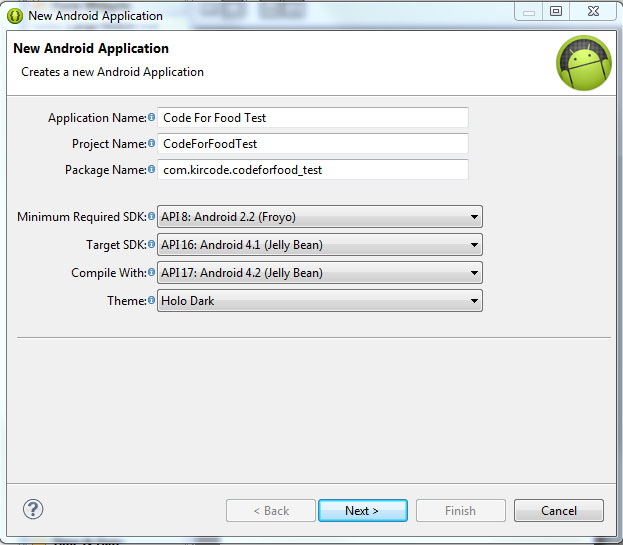
A dialog box pops up, which requires us to fill out some of the general settings for our future application. The first field is called "Application Name". This is the title of your application - it appears as the name of your app in the Play Store, Manage Applications screen, etc.
The second field is called Project Name. Unlike Application Name, this isnt shown to anyone but the developer when using Eclipse. Usually, the Application Name and Project Name are the same.
The third field is called Package Name. This is basically the id of your application - usually its not shown to the user, but it is required to stay the same for all of the versions of your application. This is similar to ids in Adobe AIR descriptor files. The format is the same as packages in AS3, for example - com.kircode.codeforfood_test
Then we are required to select Minimum Required SDK. This is basically the Android version that is required to run your application. Keep in mind that the lower the version is, the bigger your audience is, but your application wont be able to use some of the newer SDK features. It is recommended to set this value to API 8, this way, according to Android development center, youre targeting 95% of the users. Thats good enough.
The next field is Target SDK. Set this to the highest API version that your application will run on. This value informs the system that the application has been tested on this API and is supposed to work without the sytem having to do any compatibility processes. If youre unsure what to select here, pick one of the modern versions - this way your application wont look dated and will still be compatible with older versions (up to Minimum Required SDK).
The next field is Compile With. This is the API version that the application will be compiled with. If the default value isnt the most recent version, its recommended to pick that.
And finally theres Theme. Pick the color theme that will suit your application. You will, of course, be able to customize every element of your application manually if you want, but choosing a Theme here is a good alternative too.
Hit next, and you should be taken to the next configuration step. Here youll see a few check boxes and fields. The first checkbox, "Create custom launcher icon", can be selected if you want to create a custom icon for your application. I do! So I always have this checked.
The next checkbox is "Create activity". Check this, because we want to generate ourselves an Activity. I will explain what an Activity is in details a bit later.
This isnt going to be a library, so dont check "Mark this project as a library". If you have "Create Project in Workspace" checked, the application project folder will be created in the workspace that you defined when you first launched Eclipse. If its unchecked, youll be able to set a custom location for your project. I think its nice to keep things organized and all development projects should be in the development workspace, so I leave this checked.
The next part consists of a checkbox and a selection menu. Its labeled as "Working sets" and the checkbox asks us if we want to add our project to a working set. Working sets are basically groups of projects that are displayed together in the menu when youre working on one of those projects. This is a useful feature and might come in handy when working on multiple applications of the same sort, or of the same purpose, or grouped together for some other reason. Right now we dont want to include our projects in any working sets.
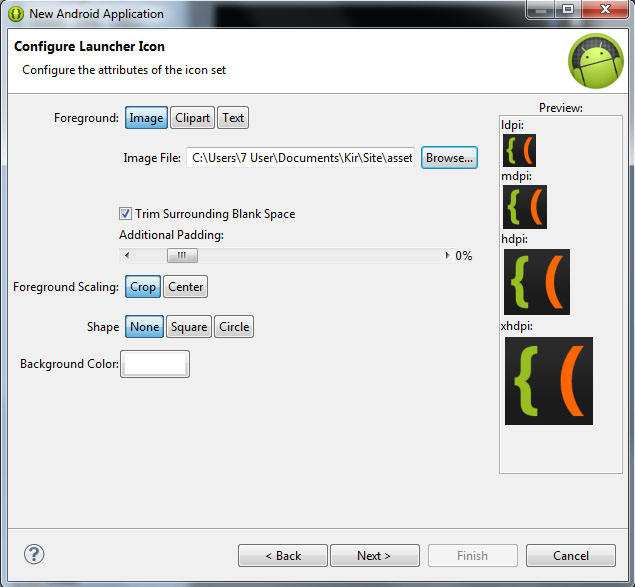
Hit next. We can now set a Launcher Icon for our application. If you have an image ready for that, you can import it here. You can create a new icon using any of the preset clipart images or enter some text to act as an icon. You have several other tools in this window to style your icon.
Click next, and now were asked to choose what kind of activity we want to create. Now, simply put, an Activity is a window in Android. You probably know that there arent really any windows in Android at all, except for some dialog boxes, and thats true. But the way Activities behave are similar to windows in computer operating systems. For example, if we launch a game on Android, we are first taken to the main menu screen. This is an Activity. If we click "play", the game itself launches where we can actually play it. This is another Activity. It should be noted that if we didnt purposefully close the previous (main menu) activity when launching the game, it doesnt close. The main menu is still there, under the game, not visible to the user, just "sleeping" and waiting to be opened again.
The Activities have a complex life cycle, which I will explain in later tutorials. For now, you just need to understand that an Activity is a single screen that contains some content, it can be opened, paused, stopped, etc.
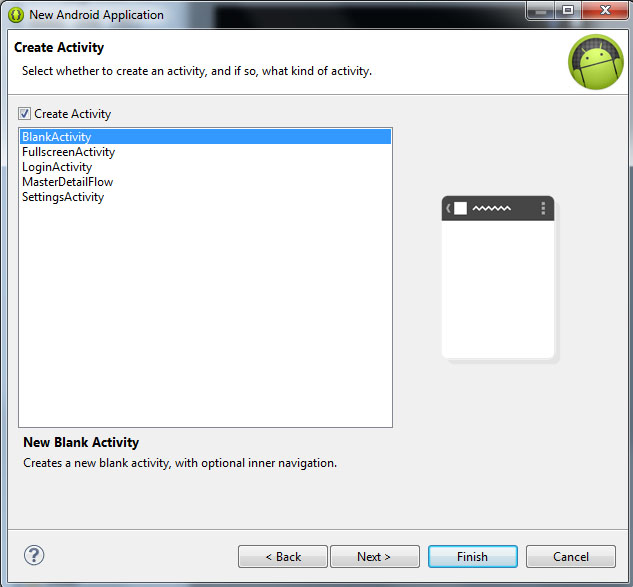
So right now were on the Create Activity screen, with 5 available activity types - BlankActivity, FullscreenActivity, LoginActivity, MasterDetailFlow and SettingsActivity. Think of these as of templates.
The BlankActivity is a blank page that we can fill with content.
The FullscreenActivity is a blank page also, but it hides all the UI elements of the device. This is probably most suited for games and video applications.
The LoginActivity is a simple template used for registering or logging in using email and password.
The MasterDetailFlow is a template that has a menu and a content area. It should be noted that the template is displayed differently on tablets and phones (it creates 2 columns on bigger screens where possible, and 1 column on smaller screens).
The SettingsActivity is a simple page with UI components lined up like in the settings screen of your device.
Pick BlankActivity and click Next.
Here we are asked to set the Activity Name, Layout Name and Navigation Type for our main Activity. Leave their values as they are by default - MainActivity, activity_main and None. The names are basically for the developer to remember which Activity is which. The Navigation Type dropdown box lets you select a default navigation method for your Activity. There are multiple nice and useful pre-set navigation features here, but well leave this field None for our first project.
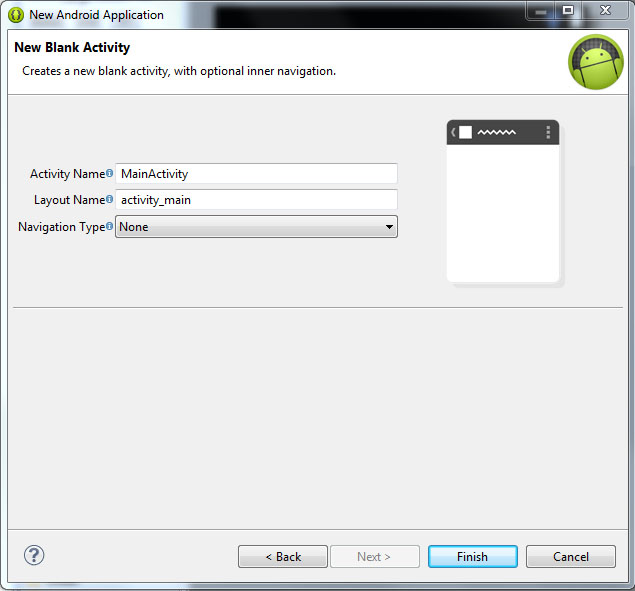
Click Finish, wait, and youre done!
Well continue next time!
Thanks for reading!
Read more »
Launch the Eclipse IDE with Android SDK built in. It will ask you to perform some one-time tasks, such as create a workspace on your hard drive.
When thats done, we can start creating our first application. To begin creating a new Android project, select File > New > Android Application Project.
A dialog box pops up, which requires us to fill out some of the general settings for our future application. The first field is called "Application Name". This is the title of your application - it appears as the name of your app in the Play Store, Manage Applications screen, etc.
The second field is called Project Name. Unlike Application Name, this isnt shown to anyone but the developer when using Eclipse. Usually, the Application Name and Project Name are the same.
The third field is called Package Name. This is basically the id of your application - usually its not shown to the user, but it is required to stay the same for all of the versions of your application. This is similar to ids in Adobe AIR descriptor files. The format is the same as packages in AS3, for example - com.kircode.codeforfood_test
Then we are required to select Minimum Required SDK. This is basically the Android version that is required to run your application. Keep in mind that the lower the version is, the bigger your audience is, but your application wont be able to use some of the newer SDK features. It is recommended to set this value to API 8, this way, according to Android development center, youre targeting 95% of the users. Thats good enough.
The next field is Target SDK. Set this to the highest API version that your application will run on. This value informs the system that the application has been tested on this API and is supposed to work without the sytem having to do any compatibility processes. If youre unsure what to select here, pick one of the modern versions - this way your application wont look dated and will still be compatible with older versions (up to Minimum Required SDK).
The next field is Compile With. This is the API version that the application will be compiled with. If the default value isnt the most recent version, its recommended to pick that.
And finally theres Theme. Pick the color theme that will suit your application. You will, of course, be able to customize every element of your application manually if you want, but choosing a Theme here is a good alternative too.
Hit next, and you should be taken to the next configuration step. Here youll see a few check boxes and fields. The first checkbox, "Create custom launcher icon", can be selected if you want to create a custom icon for your application. I do! So I always have this checked.
The next checkbox is "Create activity". Check this, because we want to generate ourselves an Activity. I will explain what an Activity is in details a bit later.
This isnt going to be a library, so dont check "Mark this project as a library". If you have "Create Project in Workspace" checked, the application project folder will be created in the workspace that you defined when you first launched Eclipse. If its unchecked, youll be able to set a custom location for your project. I think its nice to keep things organized and all development projects should be in the development workspace, so I leave this checked.
The next part consists of a checkbox and a selection menu. Its labeled as "Working sets" and the checkbox asks us if we want to add our project to a working set. Working sets are basically groups of projects that are displayed together in the menu when youre working on one of those projects. This is a useful feature and might come in handy when working on multiple applications of the same sort, or of the same purpose, or grouped together for some other reason. Right now we dont want to include our projects in any working sets.
Hit next. We can now set a Launcher Icon for our application. If you have an image ready for that, you can import it here. You can create a new icon using any of the preset clipart images or enter some text to act as an icon. You have several other tools in this window to style your icon.
Click next, and now were asked to choose what kind of activity we want to create. Now, simply put, an Activity is a window in Android. You probably know that there arent really any windows in Android at all, except for some dialog boxes, and thats true. But the way Activities behave are similar to windows in computer operating systems. For example, if we launch a game on Android, we are first taken to the main menu screen. This is an Activity. If we click "play", the game itself launches where we can actually play it. This is another Activity. It should be noted that if we didnt purposefully close the previous (main menu) activity when launching the game, it doesnt close. The main menu is still there, under the game, not visible to the user, just "sleeping" and waiting to be opened again.
The Activities have a complex life cycle, which I will explain in later tutorials. For now, you just need to understand that an Activity is a single screen that contains some content, it can be opened, paused, stopped, etc.
So right now were on the Create Activity screen, with 5 available activity types - BlankActivity, FullscreenActivity, LoginActivity, MasterDetailFlow and SettingsActivity. Think of these as of templates.
The BlankActivity is a blank page that we can fill with content.
The FullscreenActivity is a blank page also, but it hides all the UI elements of the device. This is probably most suited for games and video applications.
The LoginActivity is a simple template used for registering or logging in using email and password.
The MasterDetailFlow is a template that has a menu and a content area. It should be noted that the template is displayed differently on tablets and phones (it creates 2 columns on bigger screens where possible, and 1 column on smaller screens).
The SettingsActivity is a simple page with UI components lined up like in the settings screen of your device.
Pick BlankActivity and click Next.
Here we are asked to set the Activity Name, Layout Name and Navigation Type for our main Activity. Leave their values as they are by default - MainActivity, activity_main and None. The names are basically for the developer to remember which Activity is which. The Navigation Type dropdown box lets you select a default navigation method for your Activity. There are multiple nice and useful pre-set navigation features here, but well leave this field None for our first project.
Click Finish, wait, and youre done!
Well continue next time!
Thanks for reading!
Wednesday, February 4, 2015
Creating Advanced Alert Window class Part 7
In this part we will remake the way the user implements skins for alert windows.
Right now to apply a custom alert window skin the user has to pass a reference to an AdvAlertSkin object to the alert() method each time an alert is called. This is unconvenient, so we are going to add new ways to implement skins.
The first way will be to pass a skin value through the constructor of AdvAlertManager. The parameter is optional, default skin is used if nothing is specified here.
The second way will be to use AdvAlertManagers setSkin() method, which sets the skin of all alert windows created after setSkin() being called.
Lets implement those features now.
Go to AdvAlertManager.as and declare a new variable "skin":
Go to the constructor and add a new optional parameter, windowSkin, set default value to null.
Then check if the value is null, and if so - create a new AdvAlertSkin() and apply it to skin variable. Otherwise, apply the passed AdvAlertSkin object to our skin variable:
Now create a new public function called setSkin(), which simply receives a skin object and applies it to "skin":
Remove the skin parameter and code related to it from alert():
Full AdvAlertManager.as code:
Go to main.as.
Here, there are now 3 ways to set a skin.
The first way is to use the default skin, by simply specifying nothing and alerting a window:
The second way is to pass a custom skin through the constructor of AdvAlertManager:
The third way is to pass nothing through the constructor, but call setSkin() to apply a custom skin:
And thats all for today.
Thanks for reading!
Read more »
Right now to apply a custom alert window skin the user has to pass a reference to an AdvAlertSkin object to the alert() method each time an alert is called. This is unconvenient, so we are going to add new ways to implement skins.
The first way will be to pass a skin value through the constructor of AdvAlertManager. The parameter is optional, default skin is used if nothing is specified here.
The second way will be to use AdvAlertManagers setSkin() method, which sets the skin of all alert windows created after setSkin() being called.
Lets implement those features now.
Go to AdvAlertManager.as and declare a new variable "skin":
private var skin:AdvAlertSkin;
Go to the constructor and add a new optional parameter, windowSkin, set default value to null.
Then check if the value is null, and if so - create a new AdvAlertSkin() and apply it to skin variable. Otherwise, apply the passed AdvAlertSkin object to our skin variable:
/**
 * AdvAlertManager constructor.
 * @paramdefaultWindowContainer Parent container of alert windows.
 * @paramparentWidth Containers width.
 * @paramparentHeight Containers height.
 */

public function AdvAlertManager(defaultWindowContainer:DisplayObjectContainer, parentWidth:int, parentHeight:int, windowSkin:AdvAlertSkin = null)
{
trace(": AdvAlertManager instance created.");
skin = windowSkin;
if (skin == null) skin = new AdvAlertSkin();
defaultContainer = defaultWindowContainer;
pWidth = parentWidth;
pHeight = parentHeight;
windows = [];
}
Now create a new public function called setSkin(), which simply receives a skin object and applies it to "skin":
/**
 * Set skin of all future created alert windows.
 * @paramwindowSkin Reference to a skin object.
 */

public function setSkin(windowSkin:AdvAlertSkin):void {
skin = windowSkin
Remove the skin parameter and code related to it from alert():
/**
 * Create an alert window.
 * @paramtext Text value of the alert window.
 * @paramtitle Title value of the alert window.
 * @paramwidth (Optional) Width of the alert window. 300 by default.
 * @paramheight (Optional) Height of the alert window. 200 by default.
 * @paramposition (Optional) Coordinates of top-left corner of the alert window. If not specified - the window is centered.
 */

public function alert(text:String, title:String = "", width:int = 300, height:int = 200, position:Point = null):void {
if (position == null) position = new Point((pWidth / 2) - (width / 2), (pHeight / 2) - (height / 2));
var w:AdvAlertWindow = new AdvAlertWindow(text, title, width, height, position, skin);
windows.push(w);
defaultContainer.addChild(w);

trace("Message: " + text);
}
Full AdvAlertManager.as code:
package com.kircode.AdvAlert
{
import flash.display.DisplayObjectContainer;
import flash.display.MovieClip;
import flash.geom.Point;
/**
 * Advanced Alert window manager.
 * @author Kirill Poletaev
 */
public class AdvAlertManager
{
private var windows:Array;
private var defaultContainer:DisplayObjectContainer;
private var pWidth:int;
private var pHeight:int;
private var skin:AdvAlertSkin;

/**
 * AdvAlertManager constructor.
 * @paramdefaultWindowContainer Parent container of alert windows.
 * @paramparentWidth Containers width.
 * @paramparentHeight Containers height.
 */

public function AdvAlertManager(defaultWindowContainer:DisplayObjectContainer, parentWidth:int, parentHeight:int, windowSkin:AdvAlertSkin = null)
{
trace(": AdvAlertManager instance created.");
skin = windowSkin;
if (skin == null) skin = new AdvAlertSkin();
defaultContainer = defaultWindowContainer;
pWidth = parentWidth;
pHeight = parentHeight;
windows = [];
}

/**
 * Set skin of all future created alert windows.
 * @paramwindowSkin Reference to a skin object.
 */

public function setSkin(windowSkin:AdvAlertSkin):void {
skin = windowSkin;
}

/**
 * Create an alert window.
 * @paramtext Text value of the alert window.
 * @paramtitle Title value of the alert window.
 * @paramwidth (Optional) Width of the alert window. 300 by default.
 * @paramheight (Optional) Height of the alert window. 200 by default.
 * @paramposition (Optional) Coordinates of top-left corner of the alert window. If not specified - the window is centered.
 */

public function alert(text:String, title:String = "", width:int = 300, height:int = 200, position:Point = null):void {
if (position == null) position = new Point((pWidth / 2) - (width / 2), (pHeight / 2) - (height / 2));
var w:AdvAlertWindow = new AdvAlertWindow(text, title, width, height, position, skin);
windows.push(w);
defaultContainer.addChild(w);

trace("Message: " + text);
}

}

}
Go to main.as.
Here, there are now 3 ways to set a skin.
The first way is to use the default skin, by simply specifying nothing and alerting a window:
// Default skin:
AlertManager = new AdvAlertManager(this, stage.stageWidth, stage.stageHeight);
AlertManager.alert("Text message.", "Default skin");
The second way is to pass a custom skin through the constructor of AdvAlertManager:
// Create custom skin:
var mySkin:AdvAlertSkin = new AdvAlertSkin();
mySkin.bgRect = new SolidColorRect(0xff8888);

// Apply custom skin (way 1:)
AlertManager = new AdvAlertManager(this, stage.stageWidth, stage.stageHeight, mySkin);
AlertManager.alert("Text message.", "Custom skin - way 1");
The third way is to pass nothing through the constructor, but call setSkin() to apply a custom skin:
// Create custom skin:
var mySkin:AdvAlertSkin = new AdvAlertSkin();
mySkin.bgRect = new SolidColorRect(0xff8888);

// Apply custom skin (way 2:)
AlertManager = new AdvAlertManager(this, stage.stageWidth, stage.stageHeight);
AlertManager.setSkin(mySkin);
AlertManager.alert("Text message.", "Custom skin - way 2");
And thats all for today.
Thanks for reading!
Creating Advanced Alert Window class Part 17
In this tutorial well add labels to the buttons, add the ability to set their width/height and rework the algorithm that positions the buttons.
Start by opening AdvAlertButton.as class and declaring 2 new variables - textField and txt:
In the constructor, receive 3 parameters (2 optional): label, width, height. Apply width, height and label values to w, h and txt variables. Set textField to a new TextField object, add it to container:
In the updateDraw() function add code that sets textFields width, height, selectable and text variables values. Also temporarily set textColor to white.
Full AdvAlertButton class:
Go to main.as, add 3 AdvAlertButtons to the button array of an alert window as an example. Set the middle ones width to something other than default value:
Go to AdvAlertWindow.as and find the piece of code in updateDraw() function that is used to position the buttons in the alert window. Well rewrite this code, because right now it assumes that each button has the same width and height.
Declare a variable xCoord before the loop, check if buttons array has any elements in it, and if so - set the value to the coordinate of the left button:
Then we loop through all the elements and increase the xCoord value with the interval and each buttons width (if i is greater than 0):
Full AdvAlertWindow.as code:
And thats it for now! Now we can label and set size of each button separately, and they are positioned properly!
Thanks for reading!
Read more »
Start by opening AdvAlertButton.as class and declaring 2 new variables - textField and txt:
private var textField:TextField;
private var txt;
In the constructor, receive 3 parameters (2 optional): label, width, height. Apply width, height and label values to w, h and txt variables. Set textField to a new TextField object, add it to container:
public function AdvAlertButton(label:String, width:Number = 80, height:Number = 30)
{
w = width;
h = height;
txt = label;
textField = new TextField();
addChild(textField);

updateDraw();
}
In the updateDraw() function add code that sets textFields width, height, selectable and text variables values. Also temporarily set textColor to white.
public function updateDraw():void {
this.graphics.clear();
// draw bg
this.graphics.beginFill(0x3333aa, 1);
this.graphics.drawRect(0, 0, w, h);

// text field
textField.width = w;
textField.height = h;
textField.textColor = 0xffffff;
textField.text = txt;
textField.selectable = false;
}
Full AdvAlertButton class:
package com.kircode.AdvAlert
{
import flash.display.MovieClip;
import flash.text.TextField;

/**
 * Advanced Alert window object.
 * @author Kirill Poletaev
 */
public class AdvAlertButton extends MovieClip
{

public var w:Number;
public var h:Number;
private var textField:TextField;
private var txt;

/**
 * Button object placed in the alert window.
 * @paramlabel Text label of the button.
 * @paramwidth Width of the button.
 * @paramheight Height of the button.
 */

public function AdvAlertButton(label:String, width:Number = 80, height:Number = 30)
{
w = width;
h = height;
txt = label;
textField = new TextField();
addChild(textField);

updateDraw();
}

public function updateDraw():void {
this.graphics.clear();
// draw bg
this.graphics.beginFill(0x3333aa, 1);
this.graphics.drawRect(0, 0, w, h);

// text field
textField.width = w;
textField.height = h;
textField.textColor = 0xffffff;
textField.text = txt;
textField.selectable = false;
}


}

}
Go to main.as, add 3 AdvAlertButtons to the button array of an alert window as an example. Set the middle ones width to something other than default value:
AlertManager = new AdvAlertManager(this, stage.stageWidth, stage.stageHeight);
AlertManager.alert("This is an alert window with the default skin.", "Example alert!", [new AdvAlertButton("OK"), new AdvAlertButton("Cancel", 60), new AdvAlertButton("Back")]);
Go to AdvAlertWindow.as and find the piece of code in updateDraw() function that is used to position the buttons in the alert window. Well rewrite this code, because right now it assumes that each button has the same width and height.
Declare a variable xCoord before the loop, check if buttons array has any elements in it, and if so - set the value to the coordinate of the left button:
var xCoord:Number;
if (buttons.length > 0) xCoord = pos.x + w - buttons[0].w - buttonbarPadding.right;
Then we loop through all the elements and increase the xCoord value with the interval and each buttons width (if i is greater than 0):
for (var i:int = 0; i < buttons.length; i++) {
if (i > 0) xCoord -= buttons[i].w + buttonInterval;
buttons[i].x = xCoord;
buttons[i].y = pos.y + h - buttons[i].h - buttonbarPadding.bottom;
}
Full AdvAlertWindow.as code:
package com.kircode.AdvAlert
{
import flash.display.MovieClip;
import flash.geom.Point;
import flash.text.TextField;
import flash.text.TextFormat;
import flash.display.GradientType;

/**
 * Advanced Alert window object.
 * @author Kirill Poletaev
 */
public class AdvAlertWindow extends MovieClip
{
private var t:String;
private var tt:String;
private var w:int;
private var h:int;
private var pos:Point;
private var buttons:Array;

private var textField:TextField;
private var titleField:TextField;

private var textPadding:TextPadding;
private var headerPadding:TextPadding;
private var titlePadding:TextPadding;
private var headerHeight:Number;
private var buttonbarPadding:TextPadding;
private var buttonbarHeight:Number;
private var titleFormat:TextFormat;
private var textFormat:TextFormat;
private var selectable:Boolean;
private var headerRect:*;
private var bgRect:*;
private var headerStroke:*;
private var bgStroke:*;
private var skinFilters:Array;
private var buttonInterval:Number;

public function AdvAlertWindow(pt:String, ptt:String, pw:int, ph:int, ppos:Point, sk:AdvAlertSkin, bt:Array)
{
t = pt;
tt = ptt;
w = pw;
h = ph;
pos = ppos;
buttons = bt;

setSkin(sk);

textField = new TextField();
addChild(textField);

titleField = new TextField();
addChild(titleField);

for (var i:int = 0; i < buttons.length; i++) {
addChild(buttons[i]);
}

updateDraw();
}

public function setSkin(skin:AdvAlertSkin):void {
textPadding = skin.textPadding;
headerPadding = skin.headerPadding;
titlePadding = skin.titlePadding;
headerHeight = skin.headerHeight;
titleFormat = skin.titleFormat;
textFormat = skin.textFormat;
selectable = skin.selectable;
bgRect = skin.bgRect;
headerRect = skin.headerRect;
bgStroke = skin.bgStroke;
headerStroke = skin.headerStroke;
skinFilters = skin.filters;
buttonbarHeight = skin.buttonbarHeight;
buttonbarPadding = skin.buttonbarPadding;
buttonInterval = skin.buttonInterval;
}

public function updateDraw():void {
this.graphics.clear();
// filters
this.filters = skinFilters;

// bg stroke
if (bgStroke is SolidColorStroke) {
this.graphics.lineStyle(bgStroke._lineThickness, bgStroke._lineColor, bgStroke._lineAlpha);
}
if (bgStroke is GradientColorStroke) {
this.graphics.lineStyle(bgStroke._lineThickness);
this.graphics.lineGradientStyle(bgStroke._gradientType, bgStroke._colors, bgStroke._alphas, bgStroke._ratios, bgStroke._matrix, bgStroke._spreadMethod, bgStroke._interpolationMethod, bgStroke._focalPointRatio);
}
if (bgStroke is BitmapStroke) {
this.graphics.lineStyle(bgStroke._lineThickness);
this.graphics.lineBitmapStyle(bgStroke._bitmap, bgStroke._matrix, bgStroke._repeat, bgStroke._smooth);
}

// bg fill
if (bgRect is SolidColorRect) this.graphics.beginFill(bgRect._backgroundColor, bgRect._alpha);
if (bgRect is GradientColorRect) this.graphics.beginGradientFill(bgRect._gradientType, bgRect._colors, bgRect._alphas, bgRect._ratios, bgRect._matrix, bgRect._spreadMethod, bgRect._interpolationMethod, bgRect._focalPointRatio);
if (bgRect is BitmapRect) this.graphics.beginBitmapFill(bgRect._bitmap, bgRect._matrix, bgRect._repeat, bgRect._smooth);

this.graphics.drawRoundRectComplex(pos.x, pos.y, w, h,
bgRect._radius[0], bgRect._radius[1], bgRect._radius[2], bgRect._radius[3]);
this.graphics.endFill();

// header stroke
if (headerStroke is SolidColorStroke) {
this.graphics.lineStyle(headerStroke._lineThickness, headerStroke._lineColor, headerStroke._lineAlpha);
}
if (headerStroke is GradientColorStroke) {
this.graphics.lineStyle(headerStroke._lineThickness);
this.graphics.lineGradientStyle(headerStroke._gradientType, headerStroke._colors, headerStroke._alphas, headerStroke._ratios, headerStroke._matrix, headerStroke._spreadMethod, headerStroke._interpolationMethod, headerStroke._focalPointRatio);
}
if (headerStroke is BitmapStroke) {
this.graphics.lineStyle(headerStroke._lineThickness);
this.graphics.lineBitmapStyle(headerStroke._bitmap, headerStroke._matrix, headerStroke._repeat, headerStroke._smooth);
}

// header fill
if (headerRect is SolidColorRect) this.graphics.beginFill(headerRect._backgroundColor, headerRect._alpha);
if (headerRect is GradientColorRect) this.graphics.beginGradientFill(headerRect._gradientType, headerRect._colors, headerRect._alphas, headerRect._ratios, headerRect._matrix, headerRect._spreadMethod, headerRect._interpolationMethod, headerRect._focalPointRatio);
if (headerRect is BitmapRect) this.graphics.beginBitmapFill(headerRect._bitmap, headerRect._matrix, headerRect._repeat, headerRect._smooth);

this.graphics.drawRoundRectComplex(pos.x + headerPadding.left, pos.y + headerPadding.top, w - (headerPadding.left + headerPadding.right), headerHeight,
headerRect._radius[0], headerRect._radius[1], headerRect._radius[2], headerRect._radius[3]);
this.graphics.endFill();

// title
titleField.width = w - (headerPadding.left + headerPadding.right);
titleField.text = tt;
titleField.height = headerHeight;
titleField.x = pos.x + headerPadding.left + titlePadding.left;
titleField.y = pos.y + headerPadding.top + titlePadding.top;

// text
textField.width = w - (textPadding.right + textPadding.left);
textField.height = h - (textPadding.top + textPadding.bottom + headerPadding.top + headerPadding.bottom + headerHeight + buttonbarHeight + buttonbarPadding.top + buttonbarPadding.bottom);
textField.text = t;
textField.x = pos.x + textPadding.right;
textField.y = pos.y + textPadding.top + headerHeight + headerPadding.bottom + headerPadding.top;

// formats
textField.setTextFormat(textFormat);
titleField.setTextFormat(titleFormat);
textField.selectable = selectable;
titleField.selectable = selectable;
textField.multiline = true;
textField.wordWrap = true;

// buttons
var xCoord:Number;
if (buttons.length > 0) xCoord = pos.x + w - buttons[0].w - buttonbarPadding.right;
for (var i:int = 0; i < buttons.length; i++) {
if (i > 0) xCoord -= buttons[i].w + buttonInterval;
buttons[i].x = xCoord;
buttons[i].y = pos.y + h - buttons[i].h - buttonbarPadding.bottom;
}
}


}

}
And thats it for now! Now we can label and set size of each button separately, and they are positioned properly!
Thanks for reading!
Monday, February 2, 2015
Creating a Flex AIR Annotator app Part 48
In the last tutorial we implemented an ability to draw zig zags using lines and arrows.
We made it possible using the lastX and lastY values that stored previous line/arrow end coordinates. They never reset, though, and if you undo or redo a line/arrow, the coordinates still remain the same.
To fix this, and synchronize previous line end coordinates with undo/redo flow, well need to create a new separate memory array that will store coordinate values. That doesnt mean well get rid of the lastX and lastY variables - we will still need them.
First of all, we need to declare this variable:
Now in stackChange() function, which is called when the project is opened, set this variables value to an empty array, also set lastX and lastY values to -1 here:
Set it empty in clearDrawBitmap() as well:
Now go to addUndo() function and inside the two conditionals, do a similar procedure that is done with undo_memory array: in the first conditional, set its currently selected element to a new point with coordinates lastX and lastY. In the second conditional, shift() it and set its last elements value to a new point with lastX and lastY values.
Now in drawDown() function, find the isCtrl conditional (we have two, but they are the same) and change it to this:
This checks if the currently selected element in the memory array actually exists and if its coordinates equal or are greater than 0. Then it sets values to the ones from the array instead of lastX and lastY.
After updating the two if statements, the whole function looks like this:
And were done!
Full code:
Thanks for reading!
Read more »
We made it possible using the lastX and lastY values that stored previous line/arrow end coordinates. They never reset, though, and if you undo or redo a line/arrow, the coordinates still remain the same.
To fix this, and synchronize previous line end coordinates with undo/redo flow, well need to create a new separate memory array that will store coordinate values. That doesnt mean well get rid of the lastX and lastY variables - we will still need them.
First of all, we need to declare this variable:
private var undo_lastPointsMemory:Array;
Now in stackChange() function, which is called when the project is opened, set this variables value to an empty array, also set lastX and lastY values to -1 here:
private function stackChange():void {
if (stack.selectedIndex == 1) {
imgHolder.source = new Bitmap(bitmapData);
drawArea.width = content.width;
drawArea.height = content.height;
drawGroup.width = content.width;
drawGroup.height = content.height;
cropDraw.width = content.width;
cropDraw.height = content.height;
eraser.width = content.width;
eraser.height = content.height;
buttonsEnabled = true;
clearDrawBitmap();
var anns:Number = annotations.numChildren;
for (var i:int = 0; i < anns; i++){
annotations.removeElementAt(0);
}
var imgs:Number = images.numChildren;
for (var u:int = 0; u < imgs; u++){
images.removeElementAt(0);
}
drawTempBitmap();
updateDrawHitArea();
crop_deselect();
undo_canRedo = false;
undo_canUndo = false;
undo_currentMemory = 0;
undo_memory = [];
undo_lastPointsMemory = [];
lastX = -1;
lastY = -1;
}
}
Set it empty in clearDrawBitmap() as well:
private function clearDrawBitmap():void {
undo_canRedo = false;
undo_canUndo = false;
undo_currentMemory = 0;
undo_memory = [];
undo_lastPointsMemory = [];
drawBitmap.source = new Bitmap(new BitmapData(content.width, content.height, true, 0x00ffffff));
lastX = -1;
lastY = -1;
}
Now go to addUndo() function and inside the two conditionals, do a similar procedure that is done with undo_memory array: in the first conditional, set its currently selected element to a new point with coordinates lastX and lastY. In the second conditional, shift() it and set its last elements value to a new point with lastX and lastY values.
private function addUndo(bd:BitmapData):void {
undo_canRedo = false;
if (undo_currentMemory < undo_memoryLimit - 1) {
undo_currentMemory++;
undo_memory[undo_currentMemory] = bd.clone();
undo_lastPointsMemory[undo_currentMemory] = new Point(lastX, lastY).clone();
undo_canUndo = true;
}else
if (undo_currentMemory == undo_memoryLimit - 1) {
undo_memory.shift();
undo_memory[undo_memoryLimit - 1] = bd.clone();
undo_lastPointsMemory.shift();
undo_lastPointsMemory[undo_memoryLimit - 1] = new Point(lastX, lastY).clone();
undo_canUndo = true;
}
}
Now in drawDown() function, find the isCtrl conditional (we have two, but they are the same) and change it to this:
if (isCtrl && undo_lastPointsMemory[undo_currentMemory] && undo_lastPointsMemory[undo_currentMemory].x>=0 && undo_lastPointsMemory[undo_currentMemory].y>=0) {
tempSprite.graphics.moveTo(undo_lastPointsMemory[undo_currentMemory].x, undo_lastPointsMemory[undo_currentMemory].y);
anchorX = undo_lastPointsMemory[undo_currentMemory].x;
anchorY = undo_lastPointsMemory[undo_currentMemory].y;
}else {
tempSprite.graphics.moveTo(drawArea.mouseX, drawArea.mouseY);
anchorX = drawArea.mouseX;
anchorY = drawArea.mouseY;
}
This checks if the currently selected element in the memory array actually exists and if its coordinates equal or are greater than 0. Then it sets values to the ones from the array instead of lastX and lastY.
if (isCtrl && undo_lastPointsMemory[undo_currentMemory] && undo_lastPointsMemory[undo_currentMemory].x>=0 && undo_lastPointsMemory[undo_currentMemory].y>=0) {
tempSprite.graphics.moveTo(undo_lastPointsMemory[undo_currentMemory].x, undo_lastPointsMemory[undo_currentMemory].y);
anchorX = undo_lastPointsMemory[undo_currentMemory].x;
anchorY = undo_lastPointsMemory[undo_currentMemory].y;
}else {
tempSprite.graphics.moveTo(drawArea.mouseX, drawArea.mouseY);
anchorX = drawArea.mouseX;
anchorY = drawArea.mouseY;
}
After updating the two if statements, the whole function looks like this:
private function drawDown():void {
// cropping
if(toolbarStack.selectedIndex == 4 && mouseY>60) crop_mouseDown(drawArea.mouseX, drawArea.mouseY);

// drawing
if (toolbarStack.selectedIndex == 2 && drawTools.selectedIndex == 0) {
drawMode = "pen";
tempSprite.graphics.clear();
tempSprite.graphics.moveTo(drawArea.mouseX, drawArea.mouseY);
cursorManager.removeAllCursors();
cursorManager.setCursor(emptyCursor, 2, -10, -10);
}
if (toolbarStack.selectedIndex == 2 && drawTools.selectedIndex == 3) {
drawMode = "line";
if (isCtrl && undo_lastPointsMemory[undo_currentMemory] && undo_lastPointsMemory[undo_currentMemory].x>=0 && undo_lastPointsMemory[undo_currentMemory].y>=0) {
tempSprite.graphics.moveTo(undo_lastPointsMemory[undo_currentMemory].x, undo_lastPointsMemory[undo_currentMemory].y);
anchorX = undo_lastPointsMemory[undo_currentMemory].x;
anchorY = undo_lastPointsMemory[undo_currentMemory].y;
}else {
tempSprite.graphics.moveTo(drawArea.mouseX, drawArea.mouseY);
anchorX = drawArea.mouseX;
anchorY = drawArea.mouseY;
}
cursorManager.removeAllCursors();
cursorManager.setCursor(emptyCursor, 2, -10, -10);
}
if (toolbarStack.selectedIndex == 2 && drawTools.selectedIndex == 2) {
drawMode = "rect";
anchorX = drawArea.mouseX;
anchorY = drawArea.mouseY;
}
if (toolbarStack.selectedIndex == 2 && drawTools.selectedIndex == 1) {
drawMode = "ellipse";
anchorX = drawArea.mouseX;
anchorY = drawArea.mouseY;
}
if (toolbarStack.selectedIndex == 2 && drawTools.selectedIndex == 4) {
drawMode = "arrow";
if (isCtrl && undo_lastPointsMemory[undo_currentMemory] && undo_lastPointsMemory[undo_currentMemory].x>=0 && undo_lastPointsMemory[undo_currentMemory].y>=0) {
tempSprite.graphics.moveTo(undo_lastPointsMemory[undo_currentMemory].x, undo_lastPointsMemory[undo_currentMemory].y);
anchorX = undo_lastPointsMemory[undo_currentMemory].x;
anchorY = undo_lastPointsMemory[undo_currentMemory].y;
}else {
tempSprite.graphics.moveTo(drawArea.mouseX, drawArea.mouseY);
anchorX = drawArea.mouseX;
anchorY = drawArea.mouseY;
}
cursorManager.removeAllCursors();
cursorManager.setCursor(emptyCursor, 2, -10, -10);
}
if (toolbarStack.selectedIndex == 2 && drawTools.selectedIndex == 5) {
drawMode = "picker";
drawTempBitmap();
getPickerColor();
}
}
And were done!
Full code:
<?xml version="1.0" encoding="utf-8"?>
<s:WindowedApplication xmlns:fx="http://ns.adobe.com/mxml/2009"
   xmlns:s="library://ns.adobe.com/flex/spark"
   xmlns:mx="library://ns.adobe.com/flex/mx"
   xmlns:custom="*"
   showStatusBar="false"
   creationComplete="init();"
   applicationComplete="listeners();"
   minWidth="800" minHeight="400"
   width="800" height="500">

<fx:Script>
<![CDATA[
import flash.display.Bitmap;
import flash.display.BitmapData;
import flash.display.FocusDirection;
import flash.display.Loader;
import flash.display.Sprite;
import flash.events.Event;
import flash.events.KeyboardEvent;
import flash.events.MouseEvent;
import flash.filesystem.File;
import flash.filesystem.FileStream;
import flash.filters.DropShadowFilter;
import flash.filters.GlowFilter;
import flash.geom.Matrix;
import flash.geom.Point;
import flash.geom.Rectangle;
import flash.net.FileFilter;
import flash.net.URLRequest;
import flash.text.TextField;
import flash.utils.ByteArray;
import mx.containers.Canvas;
import mx.containers.TitleWindow;
import mx.controls.Alert;
import flash.filesystem.FileMode;
import mx.controls.Image;
import mx.controls.Label;
import mx.controls.TextArea;
import mx.core.FlexGlobals;
import mx.events.CloseEvent;
import mx.events.FlexEvent;
import mx.graphics.codec.IImageEncoder;
import mx.graphics.codec.JPEGEncoder;
import mx.graphics.codec.PNGEncoder;
import spark.components.Group;
import spark.core.SpriteVisualElement;
import spark.primitives.Rect;
import flash.text.TextFieldAutoSize;
import mx.managers.PopUpManager;
import mx.utils.ObjectUtil;
import flash.display.BlendMode;
import flash.system.System;
import flash.desktop.Clipboard;
import flash.desktop.ClipboardFormats;
import flash.events.NativeDragEvent;
import flash.desktop.NativeDragManager;

private var bitmapData:BitmapData;
private var content:*;
[Bindable]
private var buttonsEnabled:Boolean = false;
[Bindable]
private var lineThickness:int = 5;
[Bindable]
private var lineColor:uint = 0xff0000;
[Bindable]
private var aBodyColor:uint = 0xffff88;
[Bindable]
private var aBodyAlpha:Number = 1;
[Bindable]
private var aTextSize:Number = 12;
[Bindable]
private var aTextColor:uint = 0x000000;

[Embed(source="../lib/cursor_cross.png")]
private var crossCursor:Class;
[Embed(source="../lib/cursor_move.png")]
private var moveCursor:Class;
[Embed(source="../lib/ic_eyedropper.png")]
private var pickerCursor:Class;
[Embed(source="../lib/cursor_resize_vertical.png")]
private var resizeVerticalCursor:Class;
[Embed(source="../lib/cursor_resize_horizontal.png")]
private var resizeHorizontalCursor:Class;
[Embed(source="../lib/cursor_resize_diag1.png")]
private var resizeDiag1Cursor:Class;
[Embed(source="../lib/cursor_resize_diag2.png")]
private var resizeDiag2Cursor:Class;
[Embed(source="../lib/cursor_empty.png")]
private var emptyCursor:Class;

private var drawMode:String = "";
private var anchorX:Number;
private var anchorY:Number;
private var lastX:Number = -1;
private var lastY:Number = -1;
private var isShift:Boolean = false;
private var isCtrl:Boolean = false;
private var temporaryBitmap:BitmapData;
private var currentlyEditing:*;
private var currentlyDragging:*;
private var dragOffsetX:Number;
private var dragOffsetY:Number;
private var currentImage:*;
private var imageAnchors:Array;
private var currentRatio:Number;
private var firstTimeEditing:Boolean = true;
private var currentAnn:*;
[Bindable]
private var screenshotAvailable:Boolean = false;
private var checkScreenshot:Boolean = true;

private var preferences:SharedObject = SharedObject.getLocal("kirannotatorPreferences");
private var selectedFormat:String;
private var selectedQuality:int;

private var img_resizing:Boolean = false;
private var img_currentDir:String = "";
private var img_anchorX:Number;
private var img_anchorY:Number;
private var img_rectangle:Array;

private var crop_rectangle:Array;
private var crop_anchorX:Number;
private var crop_anchorY:Number;
private var crop_drawing:Boolean = false;
private var crop_selectionType:Boolean;
private var crop_inSelection:Boolean = false;
private var crop_offsetX:Number;
private var crop_offsetY:Number;
private var crop_dragging:Boolean = false;
private var crop_inResize:Boolean = false;
private var crop_resizing:Boolean = false;
private var crop_resizeDir:String = "";
private var crop_resizeRadius:Number = 6;

[Bindable]
private var undo_canUndo:Boolean = false;
[Bindable]
private var undo_canRedo:Boolean = false;
private var undo_memory:Array;
private var undo_currentMemory:int;
private var undo_memoryLimit:int = 4;
private var undo_lastPointsMemory:Array;

private var annAnchors:Array;
private var ann_currentDir:String = "";
private var ann_anchorX:Number;
private var ann_resizing:Boolean;
private var ann_positions:Array;

private var erasing:Boolean = false;

private function init():void {
/* Uncomment this line to reset locally saved preferences: */
//preferences.data.firsttime = null;

// Set preferences if loaded for the first time
if (preferences.data.firsttime == null) {
preferences.data.firsttime = true;
preferences.data.selectedFormat = jpg;
preferences.data.selectedQuality = 70;
preferences.data.selectionType = true;
preferences.flush();
}

// Set preferences loaded from local storage
selectedFormat = preferences.data.selectedFormat;
selectedQuality = preferences.data.selectedQuality;
crop_selectionType = preferences.data.selectionType;

drawArea.filters = [new DropShadowFilter(4, 60, 0, 0.7, 10, 10, 1, 3)];
eraser.filters = [new GlowFilter(0xffffff, 1, 2, 2, 10, 1)];
}

private function listeners():void {
addEventListener(MouseEvent.MOUSE_UP, drawUp);
stage.addEventListener(KeyboardEvent.KEY_DOWN, keyDown);
stage.addEventListener(KeyboardEvent.KEY_UP, keyUp);
addEventListener(Event.ENTER_FRAME, everyFrame);
this.addEventListener(NativeDragEvent.NATIVE_DRAG_ENTER, onDragIn);
this.addEventListener(NativeDragEvent.NATIVE_DRAG_DROP, onDrop);
PopUpManager.addPopUp(imageWindow, this, true);
PopUpManager.centerPopUp(imageWindow);
PopUpManager.removePopUp(imageWindow);
}

private function onDragIn(evt:NativeDragEvent):void {
NativeDragManager.acceptDragDrop(this);
}

private function onDrop(evt:NativeDragEvent):void {
var files:Array = evt.clipboard.getData(ClipboardFormats.FILE_LIST_FORMAT) as Array;
var file:File = files[0];
switch (file.extension.toLowerCase()) {
case "jpg":
case "jpeg":
case "png":
case "gif":
if(stack.selectedIndex == 0){
importDropImage(file);
}
if(stack.selectedIndex == 1){
addDropImage(file);
}
break;
default:
Alert.show("Unsupported file format.");
}
}

private function addDropImage(file:File):void {
toolbarStack.selectedIndex = 1;
openImage();
imageWindow.validateNow();

var loader:Loader = new Loader();
loader.contentLoaderInfo.addEventListener(Event.COMPLETE, loadComp);
loader.load(new URLRequest(file.url));

function loadComp(evt:Event):void {
iPreview.source = evt.target.content;
iPreviewHidden.source = evt.target.content;
iPath.text = file.nativePath;
updatePreviewImage();
}
}

private function importDropImage(file:File):void {
var loader:Loader = new Loader();
loader.contentLoaderInfo.addEventListener(Event.COMPLETE, loadComplete);
loader.load(new URLRequest(file.url));
}

private function everyFrame(evt:Event):void{
if (checkScreenshot) {
var hasData:Boolean = Clipboard.generalClipboard.hasFormat(ClipboardFormats.BITMAP_FORMAT);
screenshotAvailable = hasData;
}
}

private function keyDown(evt:KeyboardEvent):void {
if (evt.keyCode == 16) {
isShift = true;
}
if (evt.keyCode == 17) {
isCtrl = true;
}
if (evt.ctrlKey && evt.keyCode == 90 && undo_canUndo && toolbarStack.selectedIndex == 2) doUndo();
if (evt.ctrlKey && evt.keyCode == 89 && undo_canRedo && toolbarStack.selectedIndex == 2) doRedo();
}

private function keyUp(evt:KeyboardEvent):void {
if (evt.keyCode == 16) {
isShift = false;
}
if (evt.keyCode == 17) {
isCtrl = false;
}
}

private function canvasOver():void {
if ((toolbarStack.selectedIndex == 3 || toolbarStack.selectedIndex == 1) && currentlyDragging != null) {
cursorManager.setCursor(moveCursor, 2, -9, -10);
}
if (toolbarStack.selectedIndex == 2 && drawTools) {
if (drawTools.selectedIndex < 5) cursorManager.setCursor(crossCursor, 2, -10, -10);
if (drawMode == "pen" || drawMode == "line" || drawMode == "arrow") {
cursorManager.removeAllCursors();
cursorManager.setCursor(emptyCursor, 2, -10, -10);
}
if (drawTools.selectedIndex == 5) cursorManager.setCursor(pickerCursor, 2, 0, -18);
if (drawTools.selectedIndex == 6) {
cursorManager.setCursor(emptyCursor, 2, -10, -10);
eraser.alpha = 1;
};
}
if (toolbarStack.selectedIndex == 4) {
if (!crop_dragging && !crop_resizing) cursorManager.setCursor(crossCursor, 2, -9, -10);
if (crop_dragging) cursorManager.setCursor(moveCursor, 2, -9, -10);
if (crop_resizing) {
switch(crop_resizeDir) {
case "up": case "down": cursorManager.setCursor(resizeVerticalCursor, 2, -9, -10); break;
case "right": case "left": cursorManager.setCursor(resizeHorizontalCursor, 2, -9, -10); break;
case "upLeft": case "downRight": cursorManager.setCursor(resizeDiag2Cursor, 2, -9, -10); break;
case "upRight": case "downLeft": cursorManager.setCursor(resizeDiag1Cursor, 2, -9, -10); break;
}
};
};
}

private function canvasOut():void {
eraser.alpha = 0;
cursorManager.removeAllCursors();
}

private function updateErase():void {
eraser.graphics.clear();
eraser.graphics.lineStyle(1, 0x000000);
eraser.graphics.drawCircle(canvas.mouseX + canvas.horizontalScrollPosition, canvas.mouseY + canvas.verticalScrollPosition, lineThickness*2);
}

private function moveErase():void {
updateErase();
if (erasing) doErase();
}

private function startErase():void {
if (toolbarStack.selectedIndex == 2 && drawTools && drawTools.selectedIndex == 6) {
erasing = true;
doErase();
}
}

private function doErase():void {
var hole:Group = new Group();
hole.graphics.beginFill(0x000000);
hole.graphics.drawCircle(0, 0, lineThickness * 2);
var holeMatrix:Matrix = new Matrix();
holeMatrix.translate(canvas.mouseX - drawArea.x + canvas.horizontalScrollPosition, canvas.mouseY - drawArea.y  + canvas.verticalScrollPosition);
Bitmap(drawBitmap.content).bitmapData.draw(hole, holeMatrix, null, BlendMode.ERASE);
}

private function drawDown():void {
// cropping
if(toolbarStack.selectedIndex == 4 && mouseY>60) crop_mouseDown(drawArea.mouseX, drawArea.mouseY);

// drawing
if (toolbarStack.selectedIndex == 2 && drawTools.selectedIndex == 0) {
drawMode = "pen";
tempSprite.graphics.clear();
tempSprite.graphics.moveTo(drawArea.mouseX, drawArea.mouseY);
cursorManager.removeAllCursors();
cursorManager.setCursor(emptyCursor, 2, -10, -10);
}
if (toolbarStack.selectedIndex == 2 && drawTools.selectedIndex == 3) {
drawMode = "line";
if (isCtrl && undo_lastPointsMemory[undo_currentMemory] && undo_lastPointsMemory[undo_currentMemory].x>=0 && undo_lastPointsMemory[undo_currentMemory].y>=0) {
tempSprite.graphics.moveTo(undo_lastPointsMemory[undo_currentMemory].x, undo_lastPointsMemory[undo_currentMemory].y);
anchorX = undo_lastPointsMemory[undo_currentMemory].x;
anchorY = undo_lastPointsMemory[undo_currentMemory].y;
}else {
tempSprite.graphics.moveTo(drawArea.mouseX, drawArea.mouseY);
anchorX = drawArea.mouseX;
anchorY = drawArea.mouseY;
}
cursorManager.removeAllCursors();
cursorManager.setCursor(emptyCursor, 2, -10, -10);
}
if (toolbarStack.selectedIndex == 2 && drawTools.selectedIndex == 2) {
drawMode = "rect";
anchorX = drawArea.mouseX;
anchorY = drawArea.mouseY;
}
if (toolbarStack.selectedIndex == 2 && drawTools.selectedIndex == 1) {
drawMode = "ellipse";
anchorX = drawArea.mouseX;
anchorY = drawArea.mouseY;
}
if (toolbarStack.selectedIndex == 2 && drawTools.selectedIndex == 4) {
drawMode = "arrow";
if (isCtrl && undo_lastPointsMemory[undo_currentMemory] && undo_lastPointsMemory[undo_currentMemory].x>=0 && undo_lastPointsMemory[undo_currentMemory].y>=0) {
tempSprite.graphics.moveTo(undo_lastPointsMemory[undo_currentMemory].x, undo_lastPointsMemory[undo_currentMemory].y);
anchorX = undo_lastPointsMemory[undo_currentMemory].x;
anchorY = undo_lastPointsMemory[undo_currentMemory].y;
}else {
tempSprite.graphics.moveTo(drawArea.mouseX, drawArea.mouseY);
anchorX = drawArea.mouseX;
anchorY = drawArea.mouseY;
}
cursorManager.removeAllCursors();
cursorManager.setCursor(emptyCursor, 2, -10, -10);
}
if (toolbarStack.selectedIndex == 2 && drawTools.selectedIndex == 5) {
drawMode = "picker";
drawTempBitmap();
getPickerColor();
}
}

private function drawUp(evt:MouseEvent):void {
if (erasing) {
erasing = false
var newBd:BitmapData = new BitmapData(content.width, content.height, true, 0xff0000);
newBd.draw(drawBitmap, null, null, null, null, true);
addUndo(newBd);
};
img_resizing = false;
ann_resizing = false;

// cropping
if (toolbarStack.selectedIndex == 4 && mouseY>60) crop_stopDraw();

// drawing
if (drawMode == "pen" || drawMode == "line" || drawMode == "rect" || drawMode == "ellipse" || drawMode == "arrow") {
doDrawBitmap();
tempSprite.graphics.clear();
cursorManager.removeAllCursors();
cursorManager.setCursor(crossCursor, 2, -9, -10);
}
drawMode = "";
currentlyDragging = null;
if (toolbarStack.selectedIndex == 3 || toolbarStack.selectedIndex == 1) {
drawHitArea.mouseEnabled = false;
cursorManager.removeAllCursors();
disableResize();
updateDrawHitArea();
}
}

private function addUndo(bd:BitmapData):void {
undo_canRedo = false;
if (undo_currentMemory < undo_memoryLimit - 1) {
undo_currentMemory++;
undo_memory[undo_currentMemory] = bd.clone();
undo_lastPointsMemory[undo_currentMemory] = new Point(lastX, lastY).clone();
undo_canUndo = true;
}else
if (undo_currentMemory == undo_memoryLimit - 1) {
undo_memory.shift();
undo_memory[undo_memoryLimit - 1] = bd.clone();
undo_lastPointsMemory.shift();
undo_lastPointsMemory[undo_memoryLimit - 1] = new Point(lastX, lastY).clone();
undo_canUndo = true;
}
}

private function doUndo():void {
undo_currentMemory--;
drawBitmap.source = new Bitmap(bdClone(undo_memory[undo_currentMemory]), "auto", true);
undo_canRedo = true;
if (undo_currentMemory > 0) undo_canUndo = true;
if (undo_currentMemory <= 0) undo_canUndo = false;
}

private function doRedo():void {
undo_currentMemory++;
drawBitmap.source = new Bitmap(bdClone(undo_memory[undo_currentMemory]), "auto", true);
undo_canUndo = true;
if (undo_currentMemory < undo_memory.length-1) undo_canRedo = true;
if (undo_currentMemory >= undo_memory.length-1) undo_canRedo = false;
}

private function bdClone(bd:BitmapData):BitmapData {
if (bd) {
return bd.clone();
}
else return new BitmapData(content.width, content.height, true, 0xff0000);
}

private function doDrawBitmap():void {
drawBitmap.width = content.width;
drawBitmap.height = content.height;
drawBitmap.validateNow();
var tempBd:BitmapData = new BitmapData(content.width, content.height, true, 0xff0000);
tempBd.draw(tempSprite, null, null, null, null, true);
var bd:BitmapData = new BitmapData(content.width, content.height, true, 0x00ff00);
bd.draw(drawBitmap, null, null, null, null, true);
bd.copyPixels(tempBd, new Rectangle(0, 0, content.width, content.height), new Point(0, 0), null, null, true);
drawBitmap.source = new Bitmap(bd, "auto", true);
addUndo(bd);
}

private function clearDrawBitmap():void {
undo_canRedo = false;
undo_canUndo = false;
undo_currentMemory = 0;
undo_memory = [];
undo_lastPointsMemory = [];
drawBitmap.source = new Bitmap(new BitmapData(content.width, content.height, true, 0x00ffffff));
lastX = -1;
lastY = -1;
}

private function drawMove():void {
// debug
if (toolbarStack.selectedIndex == 2 && mouseY > 100 && focusManager.getFocus() != saveBtn) {
focusManager.setFocus(saveBtn);
}

// image resizing
imageResize();

// annotation resizing
annResize();

// cropping
if(toolbarStack.selectedIndex == 4) crop_moveDraw(drawArea.mouseX, drawArea.mouseY);

// drawing
if (drawMode == "pen") {
tempSprite.graphics.lineStyle(lineThickness, lineColor);
tempSprite.graphics.lineTo(drawArea.mouseX, drawArea.mouseY);
tempSprite.validateNow();
}
if (drawMode == "line") {
if (!isShift) {
tempSprite.graphics.clear();
tempSprite.graphics.lineStyle(lineThickness, lineColor);
tempSprite.graphics.moveTo(anchorX, anchorY);
tempSprite.graphics.lineTo(drawArea.mouseX, drawArea.mouseY);
lastX = drawArea.mouseX;
lastY = drawArea.mouseY;
}
if (isShift) {
var straightLinePoint:Point = straightLine(drawArea.mouseX, drawArea.mouseY, anchorX, anchorY);
if (straightLinePoint.x > lineThickness / 2 && straightLinePoint.x < drawArea.width - lineThickness / 2 &&
straightLinePoint.y > lineThickness/2 && straightLinePoint.y < drawArea.height - lineThickness /2) {
tempSprite.graphics.clear();
tempSprite.graphics.lineStyle(lineThickness, lineColor);
tempSprite.graphics.moveTo(anchorX, anchorY);
tempSprite.graphics.lineTo(straightLinePoint.x, straightLinePoint.y);
lastX = straightLinePoint.x;
lastY = straightLinePoint.y;
}
}
}
if (drawMode == "rect") {
var newRectValues:Array;
if (!isShift) {
tempSprite.graphics.clear();
tempSprite.graphics.lineStyle(lineThickness, lineColor);
newRectValues = calculateRectValues(drawArea.mouseX, drawArea.mouseY, anchorX, anchorY);
}
if(isShift){
newRectValues = calculateSquareValues(drawArea.mouseX, drawArea.mouseY, anchorX, anchorY);
}
tempSprite.graphics.drawRect(newRectValues[0], newRectValues[1], newRectValues[2], newRectValues[3]);
lastX = drawArea.mouseX;
lastY = drawArea.mouseY;
}
if (drawMode == "ellipse") {
var newEllipseValues:Array;
if (!isShift) {
tempSprite.graphics.clear();
tempSprite.graphics.lineStyle(lineThickness, lineColor);
newEllipseValues = calculateRectValues(drawArea.mouseX, drawArea.mouseY, anchorX, anchorY);
}
if(isShift){
newEllipseValues = calculateSquareValues(drawArea.mouseX, drawArea.mouseY, anchorX, anchorY);
}
tempSprite.graphics.drawEllipse(newEllipseValues[0], newEllipseValues[1], newEllipseValues[2], newEllipseValues[3]);
lastX = drawArea.mouseX;
lastY = drawArea.mouseY;
}
if (drawMode == "arrow") {
var mouseX:Number = (isShift)?(straightLine(drawArea.mouseX, drawArea.mouseY, anchorX, anchorY).x):(drawArea.mouseX);
var mouseY:Number = (isShift)?(straightLine(drawArea.mouseX, drawArea.mouseY, anchorX, anchorY).y):(drawArea.mouseY);
var angle:Number = Math.atan2(anchorY - mouseY, anchorX - mouseX);
var armlength:Number = 10 + 2.5 * lineThickness;
var offset:Number = (24 - 0.5 * lineThickness) * Math.PI / 180;
var arm1x:Number = armlength * Math.cos(angle + offset) + mouseX;
var arm1y:Number = armlength * Math.sin(angle + offset) + mouseY;
var arm2x:Number = armlength * Math.cos(angle - offset) + mouseX;
var arm2y:Number = armlength * Math.sin(angle - offset) + mouseY;

if (arm1x > 0 + lineThickness / 2 && arm1x < drawArea.width - lineThickness / 2 &&
arm1y > 0 + lineThickness / 2 && arm1y < drawArea.height - lineThickness / 2 &&
arm2x > 0 + lineThickness / 2 && arm2x < drawArea.width - lineThickness / 2 &&
arm2y > 0 + lineThickness / 2 && arm2y < drawArea.height - lineThickness / 2 &&
mouseX > 9 + lineThickness / 2 && mouseX < drawArea.width - lineThickness / 2 - 9 &&
mouseY > 9 + lineThickness / 2 && mouseY < drawArea.height - lineThickness / 2 - 9){
tempSprite.graphics.clear();
tempSprite.graphics.lineStyle(lineThickness, lineColor, 1, false, "normal", CapsStyle.NONE, JointStyle.MITER);
tempSprite.graphics.moveTo(anchorX, anchorY);
tempSprite.graphics.lineTo(mouseX, mouseY);

tempSprite.graphics.beginFill(lineColor, 1);
tempSprite.graphics.moveTo(arm1x, arm1y);
tempSprite.graphics.lineTo(mouseX, mouseY);
tempSprite.graphics.lineTo(arm2x, arm2y);
tempSprite.graphics.lineTo(arm1x, arm1y);
tempSprite.graphics.endFill();

lastX = mouseX;
lastY = mouseY;
}
}
if (drawMode == "picker") {
getPickerColor();
}
if ((toolbarStack.selectedIndex == 3 || toolbarStack.selectedIndex == 1) && currentlyDragging != null) {
var nextDragX:Number = drawArea.mouseX - dragOffsetX;
var nextDragY:Number = drawArea.mouseY - dragOffsetY;
if (nextDragX >= 0 && nextDragX + currentlyDragging.width <= content.width) currentlyDragging.x = nextDragX;
if (nextDragY >= 0 && nextDragY + currentlyDragging.height <= content.height) currentlyDragging.y = nextDragY;
if (nextDragX < 0) currentlyDragging.x = 0;
if (nextDragY < 0) currentlyDragging.y = 0;
if (nextDragX + currentlyDragging.width > content.width) currentlyDragging.x = content.width - currentlyDragging.width;
if (nextDragY + currentlyDragging.height > content.height) currentlyDragging.y = content.height - currentlyDragging.height;
if (toolbarStack.selectedIndex == 1) positionResize();
if (toolbarStack.selectedIndex == 3) positionAnnResize();
}
}

private function straightLine(mouseX:Number, mouseY:Number, anchX:Number, anchY:Number):Point {
var p:Point = new Point(0, 0);
var rotation:Number = Math.atan2(mouseY - anchY, mouseX - anchX) * 180 / Math.PI;
if (rotation<-35 && rotation>-55) {
p = new Point(mouseX, anchY - (mouseX - anchX));
}else
if (rotation<-125 && rotation>-145) {
p = new Point(mouseX, (mouseX - anchX) + anchY);
}else
if (rotation>35 && rotation<55) {
p = new Point(mouseX, (mouseX - anchX) + anchY);
}else
if (rotation>125 && rotation<145) {
p = new Point(mouseX, anchY - (mouseX - anchX));
}else
if (Math.abs(mouseX - anchX) > Math.abs(mouseY - anchY)) {
p = new Point(mouseX, anchY);
}else
if (Math.abs(mouseX - anchX) < Math.abs(mouseY - anchY)) {
p = new Point(anchX, mouseY);
}
return p;
}

private function calculateRectValues(currentX:Number, currentY:Number, anchX:Number, anchY:Number):Array {
var newrect:Array = [0, 0, 0, 0];
// bottom - right
if (currentX > anchX  && currentY > anchY) {
newrect[0] = anchX;
newrect[1] = anchY-1;
newrect[2] = currentX - anchX;
newrect[3] = currentY - anchY;
}
// bottom - left
if (currentX < anchX  && currentY > anchY) {
newrect[0] = currentX;
newrect[1] = anchY-1;
newrect[2] = anchX - currentX;
newrect[3] = currentY - anchY;
}
// top - right
if (currentX > anchX  && currentY < anchY) {
newrect[0] = anchX;
newrect[1] = currentY-1;
newrect[2] = currentX - anchX;
newrect[3] = anchY - currentY;
}
// top - left
if (currentX < anchX  && currentY < anchY) {
newrect[0] = currentX;
newrect[1] = currentY-1;
newrect[2] = anchX - currentX;
newrect[3] = anchY - currentY;
}
return newrect;
}

private function calculateSquareValues(currentX:Number, currentY:Number, anchX:Number, anchY:Number):Array {
var newrect:Array = [0, 0, 0, 0];
// bottom - right
if (currentX > anchX  && currentY > anchY) {
currentY = (currentX - anchX) + anchY;
if (currentY > 0 + lineThickness/2 && currentY < drawArea.height - lineThickness/2) {
tempSprite.graphics.clear();
tempSprite.graphics.lineStyle(lineThickness, lineColor);
newrect[0] = anchX;
newrect[1] = anchY-1;
newrect[2] = currentX - anchX;
newrect[3] = currentY - anchY;
}
}
// bottom - left
if (currentX < anchX  && currentY > anchY) {
currentY = anchY - (currentX - anchX);
if (currentY > 0 + lineThickness/2 && currentY < drawArea.height - lineThickness/2) {
tempSprite.graphics.clear();
tempSprite.graphics.lineStyle(lineThickness, lineColor);
newrect[0] = currentX;
newrect[1] = anchY-1;
newrect[2] = anchX - currentX;
newrect[3] = currentY - anchY;
}
}
// top - right
if (currentX > anchX  && currentY < anchY) {
currentY = anchY - (currentX - anchX);
if (currentY > 0 + lineThickness/2 && currentY < drawArea.height - lineThickness/2) {
tempSprite.graphics.clear();
tempSprite.graphics.lineStyle(lineThickness, lineColor);
newrect[0] = anchX;
newrect[1] = currentY-1;
newrect[2] = currentX - anchX;
newrect[3] = anchY - currentY;
}
}
// top - left
if (currentX < anchX  && currentY < anchY) {
currentY = (currentX - anchX) + anchY;
if (currentY > 0 + lineThickness/2 && currentY < drawArea.height - lineThickness/2) {
tempSprite.graphics.clear();
tempSprite.graphics.lineStyle(lineThickness, lineColor);
newrect[0] = currentX;
newrect[1] = currentY-1;
newrect[2] = anchX - currentX;
newrect[3] = anchY - currentY;
}
}
return newrect;
}

private function importPicture():void {
var file:File = new File();
var imageFilter:FileFilter = new FileFilter("Images", "*.jpg;*jpeg;*.gif;*.png");
file.browseForOpen("Import picture", [imageFilter]);
file.addEventListener(Event.SELECT, fileSelect);
}

private function importScreenshot():void {
content = Clipboard.generalClipboard.getData(ClipboardFormats.BITMAP_FORMAT) as BitmapData;
bitmapData = Clipboard.generalClipboard.getData(ClipboardFormats.BITMAP_FORMAT) as BitmapData;
stackChange(); // needed if selectedIndex was already 1 when the function was called
stack.selectedIndex = 1;
}

private function fileSelect(evt:Event):void {
var file:File = evt.target as File;
var loader:Loader = new Loader();
loader.contentLoaderInfo.addEventListener(Event.COMPLETE, loadComplete);
loader.load(new URLRequest(file.url));
}

private function loadComplete(evt:Event):void {
content = evt.target.content;
bitmapData = new BitmapData(content.width, content.height, false);
bitmapData.draw(content, new Matrix(), null, null, null, true);
stackChange(); // needed if selectedIndex was already 1 when the function was called
stack.selectedIndex = 1;
}

private function stackChange():void {
if (stack.selectedIndex == 1) {
imgHolder.source = new Bitmap(bitmapData);
drawArea.width = content.width;
drawArea.height = content.height;
drawGroup.width = content.width;
drawGroup.height = content.height;
cropDraw.width = content.width;
cropDraw.height = content.height;
eraser.width = content.width;
eraser.height = content.height;
buttonsEnabled = true;
clearDrawBitmap();
var anns:Number = annotations.numChildren;
for (var i:int = 0; i < anns; i++){
annotations.removeElementAt(0);
}
var imgs:Number = images.numChildren;
for (var u:int = 0; u < imgs; u++){
images.removeElementAt(0);
}
drawTempBitmap();
updateDrawHitArea();
crop_deselect();
undo_canRedo = false;
undo_canUndo = false;
undo_currentMemory = 0;
undo_memory = [];
undo_lastPointsMemory = [];
lastX = -1;
lastY = -1;
}
}

private function toolbarChange():void {
if (toolbarStack.selectedIndex == 1) {
drawHitArea.mouseEnabled = false;
annotations.buttonMode = false;
annotations.mouseEnabled = false;
annotations.mouseChildren = false;
images.buttonMode = true;
images.mouseEnabled = true;
images.mouseChildren = true;
}else if
(toolbarStack.selectedIndex == 2) {
updateLineExample();
drawHitArea.mouseEnabled = true;
}else if
(toolbarStack.selectedIndex == 3) {
drawHitArea.mouseEnabled = false;
annotations.buttonMode = true;
annotations.mouseEnabled = true;
annotations.mouseChildren = true;
images.buttonMode = false;
images.mouseEnabled = false;
images.mouseChildren = false;
}else if
(toolbarStack.selectedIndex == 4) {
drawHitArea.mouseEnabled = true;
drawHitArea.width = content.width;
drawHitArea.height = content.height;
drawHitArea.x = -1;
drawHitArea.y = 1;
}else {
drawHitArea.mouseEnabled = false;
}
}

private function updateLineExample():void{
lineExample.graphics.clear();
lineExample.graphics.lineStyle(lineThickness, lineColor);
lineExample.graphics.moveTo(10, 10);
lineExample.graphics.lineTo(30, 10);

updateDrawHitArea();
}

private function updateDrawHitArea():void {
drawHitArea.width = content.width - lineThickness;
drawHitArea.height = content.height - lineThickness;
drawHitArea.x = lineThickness / 2;
drawHitArea.y = lineThickness / 2;

annHitArea.width = content.width;
annHitArea.height = content.height;
annHitArea.x = 0;
annHitArea.y = 0;
}

private function drawTempBitmap():void {
temporaryBitmap = new BitmapData(content.width, content.height, false, 0xffffff);
temporaryBitmap.draw(drawArea);
}

private function getPickerColor():void {
lineColor = temporaryBitmap.getPixel(drawArea.mouseX, drawArea.mouseY);
if (isShift) {
var myClip:Clipboard = Clipboard.generalClipboard;
myClip.setData(ClipboardFormats.TEXT_FORMAT, "#" + lineColor.toString(16));
}
}

private function openAnnotation(createX:Number = 0, createY:Number = 0):void {
if(toolbarStack.selectedIndex==3){
PopUpManager.addPopUp(annotationWindow, this, true);
PopUpManager.centerPopUp(annotationWindow);
annText.text = "Enter text here";
annotationWindow.title = "Create new annotation";
annWidth.maximum = drawArea.width;
if (firstTimeEditing) annWidth.value = 200;
firstTimeEditing = false;
annX.value = createX;
annY.value = createY;
updateAnnCoordLimits();
baNew.enabled = true;
baEdit.enabled = false;
baDelete.enabled = false;
}
}

private function closeAnnotation():void {
PopUpManager.removePopUp(annotationWindow);
}

private function addAnnotation():void {
var newAnn:spark.components.TextArea = new spark.components.TextArea();
newAnn.text = annText.text;
newAnn.width = annWidth.value;
newAnn.setStyle("contentBackgroundColor", aBodyColor);
newAnn.setStyle("color", aTextColor);
newAnn.setStyle("borderVisible", annBorder.selected);
newAnn.setStyle("contentBackgroundAlpha", aBodyAlpha)
newAnn.setStyle("fontSize", aTextSize);
newAnn.editable = false;
newAnn.selectable = false;
annotations.addElement(newAnn);
newAnn.validateNow();
newAnn.heightInLines = NaN;
newAnn.x = annX.value;
newAnn.y = annY.value;
newAnn.addEventListener(MouseEvent.ROLL_OVER, annOver);
newAnn.addEventListener(MouseEvent.ROLL_OUT, annOut);
newAnn.addEventListener(MouseEvent.DOUBLE_CLICK, annClick);
newAnn.addEventListener(MouseEvent.MOUSE_DOWN, annDown);
newAnn.addEventListener(MouseEvent.MOUSE_MOVE, annMove);
newAnn.buttonMode = true;
}

private function editAnnotation():void {
var editAnn:* = currentlyEditing;
editAnn.text = annText.text;
editAnn.width = annWidth.value;
editAnn.setStyle("contentBackgroundColor", aBodyColor);
editAnn.setStyle("borderVisible", annBorder.selected);
editAnn.setStyle("color", aTextColor);
editAnn.setStyle("contentBackgroundAlpha", aBodyAlpha);
editAnn.setStyle("fontSize", aTextSize);
editAnn.heightInLines = NaN;
editAnn.x = annX.value;
editAnn.y = annY.value;
}

private function deleteAnnotation():void {
annotations.removeElement(currentlyEditing);
}

private function annOver(evt:MouseEvent):void {
disableResize();
if (toolbarStack.selectedIndex == 3) {
evt.target.alpha = 0.8;
currentAnn = evt.currentTarget;
createAnnAnchors();
enableAnnResize();
positionAnnResize();
}
}

private function annOut(evt:MouseEvent):void{
evt.target.alpha = 1;
if (toolbarStack.selectedIndex == 3 && currentlyDragging == null) {
cursorManager.removeAllCursors();
}
}

private function annClick(evt:MouseEvent):void {
if (toolbarStack.selectedIndex == 3) {
currentlyEditing = evt.currentTarget;
PopUpManager.addPopUp(annotationWindow, this, true);
PopUpManager.centerPopUp(annotationWindow);
annText.text = currentlyEditing.text;
annotationWindow.title = "Edit annotation";
annWidth.maximum = drawArea.width;
annWidth.value = currentlyEditing.width;
aBodyColor = currentlyEditing.getStyle("contentBackgroundColor");
aTextColor = currentlyEditing.getStyle("color");
aBodyAlpha = currentlyEditing.getStyle("contentBackgroundAlpha");
aTextSize = currentlyEditing.getStyle("fontSize");
annBorder.selected = currentlyEditing.getStyle("borderVisible");
annX.value = currentlyEditing.x;
annY.value = currentlyEditing.y;
updateAnnCoordLimits();
baNew.enabled = false;
baEdit.enabled = true;
baDelete.enabled = true;
}
}

private function annDown(evt:MouseEvent):void {
if (toolbarStack.selectedIndex == 3) {
currentlyDragging = evt.currentTarget;
dragOffsetX = evt.currentTarget.mouseX;
dragOffsetY = evt.currentTarget.mouseY;
}
}

private function annMove(evt:MouseEvent):void {
if (toolbarStack.selectedIndex == 3 && currentlyDragging && !drawHitArea.mouseEnabled) {
annotations.setElementIndex(currentlyDragging, annotations.numElements - 1);
cursorManager.setCursor(moveCursor, 2, -10, -10);
drawHitArea.mouseEnabled = true;
drawHitArea.x = -1;
drawHitArea.y = 0;
drawHitArea.width = content.width;
drawHitArea.height = content.height;
}
}

private function updateAnnCoordLimits():void{
annX.maximum = content.width - annWidth.value;
annY.maximum = content.height;
}

private function newFile():void {
PopUpManager.addPopUp(newfileWindow, this, true);
PopUpManager.centerPopUp(newfileWindow);
newfileStack.selectedIndex = 0;
newfileWindow.width = 200;
newfileWindow.height = 130;
checkScreenshot = true;
}

private function closeNewfile():void {
PopUpManager.removePopUp(newfileWindow);
checkScreenshot = false;
}

private function blankPicture():void {
content = new Image();
bitmapData = new BitmapData(newWidth.value, newHeight.value, false, newColor.selectedColor);
content.width = newWidth.value;
content.height = newHeight.value;
stackChange();
stack.selectedIndex = 1;
}

private function saveFile():void {
PopUpManager.addPopUp(saveWindow, this, true);
PopUpManager.centerPopUp(saveWindow);
if (selectedFormat == jpg) {
radioJPG.selected = true;
}
if (selectedFormat == png) {
radioPNG.selected = true;
}
sliderJPG.value = selectedQuality;
}

private function closeSave():void {
PopUpManager.removePopUp(saveWindow);
}

private function changeSelectedFormat(format:String):void {
selectedFormat = format;
preferences.data.selectedFormat = selectedFormat;
preferences.flush();
}

private function changeSelectedQuality():void {
selectedQuality = sliderJPG.value;
preferences.data.selectedQuality = selectedQuality;
preferences.flush();
}

private function startExport():void {
var encoder:IImageEncoder;
var byteArray:ByteArray;
var file:File;
var fileStream:FileStream;
var bd:BitmapData;

if (selectedFormat == "jpg") {
encoder = new JPEGEncoder(selectedQuality);
}
if (selectedFormat == "png") {
encoder = new PNGEncoder();
}

if(crop_rectangle[2]==0 || crop_rectangle[3]==0){
bd = new BitmapData(content.width, content.height, false);
bd.draw(drawArea);
}else {
cropDraw.visible = false;
cropDraw.validateNow();
bd = new BitmapData(crop_rectangle[2] + 1, crop_rectangle[3] + 1, false);
bd.draw(drawArea, new Matrix(1, 0, 0, 1, -crop_rectangle[0], -crop_rectangle[1]));
cropDraw.visible = true;
}

byteArray = encoder.encode(bd);
file = File.documentsDirectory.resolvePath("annotation");
file.browseForSave("Save annotated image");
file.addEventListener(Event.SELECT, saveSelect);

function saveSelect():void {
file.nativePath += "." + selectedFormat;
if(!file.exists){
fileStream = new FileStream();
fileStream.open(file, FileMode.WRITE);
fileStream.writeBytes(byteArray);
fileStream.close();
} else {
Alert.show("File already exists. Overwrite?", "Hey!", Alert.YES | Alert.NO, null, onCloseOverwrite);
}
}

function onCloseOverwrite(evt:CloseEvent):void {
if (evt.detail == Alert.YES) {
fileStream = new FileStream();
fileStream.open(file, FileMode.WRITE);
fileStream.writeBytes(byteArray);
fileStream.close();
}
}
}

private function crop_mouseDown(mouseX:Number, mouseY:Number):void {
if (!crop_inSelection && !crop_inResize) crop_startDraw(mouseX, mouseY);
if (crop_inSelection && !crop_inResize) crop_startDrag(mouseX - crop_rectangle[0], mouseY - crop_rectangle[1]);
if (crop_inResize) crop_startResize();
}

private function crop_startDraw(mouseX:Number, mouseY:Number):void {
crop_anchorX = mouseX;
crop_anchorY = mouseY;
crop_drawing = true;

crop_rectangle = [crop_anchorX, crop_anchorY, 0, 0];
crop_updateDraw();
}

private function crop_startDrag(offX:Number, offY:Number):void {
crop_offsetX = offX;
crop_offsetY = offY;
crop_dragging = true;
}

private function crop_startResize():void {
crop_resizing = true;
if (crop_resizeDir == "up" || crop_resizeDir == "upLeft" || crop_resizeDir == "upRight") crop_anchorY = crop_rectangle[1] + crop_rectangle[3];
if (crop_resizeDir == "down" || crop_resizeDir == "downLeft" || crop_resizeDir == "downRight") crop_anchorY = crop_rectangle[1];
if (crop_resizeDir == "left" || crop_resizeDir == "upLeft" || crop_resizeDir == "downLeft") crop_anchorX = crop_rectangle[0] + crop_rectangle[2];
if (crop_resizeDir == "right" || crop_resizeDir == "upRight" || crop_resizeDir == "downRight") crop_anchorX = crop_rectangle[0];
}

private function crop_stopDraw():void {
crop_drawing = false;
crop_dragging = false;
crop_resizing = false;
if (new Rectangle(drawArea.x, drawArea.y, content.width, content.height).containsPoint(new Point(canvas.mouseX, canvas.mouseY)) == false && mouseY>=canvas.y){
cursorManager.removeAllCursors();
cursorManager.setCursor(crossCursor, 2, -9, -10);
}
}

private function crop_areaRollOut():void {
if(!crop_drawing && !crop_dragging && !crop_resizing && toolbarStack.selectedIndex == 4){
cursorManager.removeAllCursors();
cursorManager.setCursor(crossCursor, 2, -9, -10);
}
}

private function crop_moveDraw(mouseX:Number, mouseY:Number):void {
if(!crop_drawing && !crop_resizing && !crop_dragging){
cursorManager.removeAllCursors();
crop_inSelection = new Rectangle(crop_rectangle[0], crop_rectangle[1], crop_rectangle[2], crop_rectangle[3]).containsPoint(new Point(mouseX, mouseY));
if (new Rectangle(crop_rectangle[0] - crop_resizeRadius, crop_rectangle[1] - crop_resizeRadius, crop_resizeRadius * 2, crop_resizeRadius * 2).containsPoint(new Point(mouseX, mouseY))) {
crop_resizeDir = "upLeft";
crop_inResize = true;
cursorManager.setCursor(resizeDiag2Cursor, 2, -9, -10)
}else
if (new Rectangle(crop_rectangle[0] + crop_rectangle[2] - crop_resizeRadius, crop_rectangle[1] - crop_resizeRadius, crop_resizeRadius * 2, crop_resizeRadius * 2).containsPoint(new Point(mouseX, mouseY))) {
crop_resizeDir = "upRight";
crop_inResize = true;
cursorManager.setCursor(resizeDiag1Cursor, 2, -9, -10)
}else
if (new Rectangle(crop_rectangle[0] - crop_resizeRadius, crop_rectangle[1] + crop_rectangle[3] - crop_resizeRadius, crop_resizeRadius * 2, crop_resizeRadius * 2).containsPoint(new Point(mouseX, mouseY))) {
crop_resizeDir = "downLeft";
crop_inResize = true;
cursorManager.setCursor(resizeDiag1Cursor, 2, -9, -10)
}else
if (new Rectangle(crop_rectangle[0] + crop_rectangle[2] - crop_resizeRadius, crop_rectangle[1] + crop_rectangle[3] - crop_resizeRadius, crop_resizeRadius * 2, crop_resizeRadius * 2).containsPoint(new Point(mouseX, mouseY))) {
crop_resizeDir = "downRight";
crop_inResize = true;
cursorManager.setCursor(resizeDiag2Cursor, 2, -9, -10)
}else
if (new Rectangle(crop_rectangle[0], crop_rectangle[1] - crop_resizeRadius, crop_rectangle[2], crop_resizeRadius * 2).containsPoint(new Point(mouseX, mouseY))) {
crop_resizeDir = "up";
crop_inResize = true;
cursorManager.setCursor(resizeVerticalCursor, 2, -9, -10)
}else
if (new Rectangle(crop_rectangle[0], crop_rectangle[1] + crop_rectangle[3] - crop_resizeRadius, crop_rectangle[2], crop_resizeRadius * 2).containsPoint(new Point(mouseX, mouseY))) {
crop_resizeDir = "down";
crop_inResize = true;
cursorManager.setCursor(resizeVerticalCursor, 2, -9, -10)
}else
if (new Rectangle(crop_rectangle[0] - crop_resizeRadius, crop_rectangle[1], crop_resizeRadius * 2, crop_rectangle[3]).containsPoint(new Point(mouseX, mouseY))) {
crop_resizeDir = "left";
crop_inResize = true;
cursorManager.setCursor(resizeHorizontalCursor, 2, -9, -10)
}else
if (new Rectangle(crop_rectangle[0] + crop_rectangle[2] - crop_resizeRadius, crop_rectangle[1], crop_resizeRadius * 2, crop_rectangle[3]).containsPoint(new Point(mouseX, mouseY))) {
crop_resizeDir = "right";
crop_inResize = true;
cursorManager.setCursor(resizeHorizontalCursor, 2, -9, -10)
}else
{crop_inResize = false; }
if (crop_inSelection && !crop_inResize) cursorManager.setCursor(moveCursor, 2, -9, -10);
if (!crop_inSelection && !crop_inResize) cursorManager.setCursor(crossCursor, 2, -9, -10);
}
if (crop_drawing) {
crop_rectangle = calculateRectValues(mouseX, mouseY, crop_anchorX, crop_anchorY);
crop_updateDraw();
}
if (crop_dragging) {
var newX:Number = mouseX - crop_offsetX;
var newY:Number = mouseY - crop_offsetY;
if (newX >= 0 && newX + crop_rectangle[2] < content.width) crop_rectangle[0] = newX;
if (newX < 0) crop_rectangle[0] = 0;
if (newX + crop_rectangle[2] >= content.width) crop_rectangle[0] = content.width - crop_rectangle[2] - 1;
if (newY >= 0 && newY + crop_rectangle[3] < content.height) crop_rectangle[1] = newY;
if (newY < 0) crop_rectangle[1] = 0;
if (newY + crop_rectangle[3] >= content.height) crop_rectangle[1] = content.height - crop_rectangle[3] - 1;
crop_updateDraw();
}
if (crop_resizing) {
var prevRect:Array = crop_rectangle;
if (crop_resizeDir == "up" && mouseY >= 0 && mouseY < crop_anchorY) crop_rectangle = [prevRect[0], mouseY - 1, prevRect[2], crop_anchorY - mouseY + 1];
if (crop_resizeDir == "down" && mouseY < content.height && mouseY > crop_anchorY) crop_rectangle = [prevRect[0], crop_anchorY, prevRect[2], mouseY - crop_anchorY];
if (crop_resizeDir == "left" && mouseX >= 0 && mouseX < crop_anchorX) crop_rectangle = [mouseX, prevRect[1], crop_anchorX - mouseX, prevRect[3]];
if (crop_resizeDir == "right" && mouseX < content.width && mouseX > crop_anchorX) crop_rectangle = [crop_anchorX, prevRect[1], mouseX - crop_anchorX, prevRect[3]];
if (crop_resizeDir == "upLeft" && mouseY >= 0 && mouseY < crop_anchorY && mouseX >= 0 && mouseX < crop_anchorX) crop_rectangle = [mouseX, mouseY - 1, crop_anchorX - mouseX, crop_anchorY - mouseY + 1];
if (crop_resizeDir == "upRight" && mouseY >= 0 && mouseY < crop_anchorY && mouseX < content.width && mouseX > crop_anchorX) crop_rectangle = [crop_anchorX, mouseY - 1, mouseX - crop_anchorX, crop_anchorY - mouseY + 1];
if (crop_resizeDir == "downLeft" && mouseY < content.height && mouseY > crop_anchorY && mouseX >= 0 && mouseX < crop_anchorX) crop_rectangle = [mouseX, crop_anchorY, crop_anchorX - mouseX, mouseY - crop_anchorY];
if (crop_resizeDir == "downRight" && mouseY < content.height && mouseY > crop_anchorY && mouseX < content.width && mouseX > crop_anchorX) crop_rectangle = [crop_anchorX, crop_anchorY, mouseX - crop_anchorX, mouseY - crop_anchorY];
crop_updateDraw();
}
}

private function crop_updateDraw():void {
cropDraw.graphics.clear();
if(!crop_selectionType){
cropDraw.graphics.lineStyle(1, 0xff0000);
cropDraw.graphics.beginFill(0x00ff00, 0.2);
cropDraw.graphics.drawRect(crop_rectangle[0] - 1, crop_rectangle[1] - 1, crop_rectangle[2] + 2, crop_rectangle[3] + 2);
}
if(crop_selectionType){
cropDraw.graphics.beginFill(0x000000, 0.4);
cropDraw.graphics.lineStyle(1, 0x000000, 0);
cropDraw.graphics.drawRect(0, 0, content.width, crop_rectangle[1]);
cropDraw.graphics.drawRect(0, crop_rectangle[1], crop_rectangle[0], crop_rectangle[3] + 1);
cropDraw.graphics.drawRect(crop_rectangle[0] + crop_rectangle[2] + 1, crop_rectangle[1], content.width - crop_rectangle[0] - crop_rectangle[2] - 1, crop_rectangle[3] + 1);
cropDraw.graphics.drawRect(0, crop_rectangle[1] + crop_rectangle[3] + 1, content.width, content.height - crop_rectangle[1] - crop_rectangle[3] - 1);
}
if (crop_rectangle[2] == 0 || crop_rectangle[3] == 0) cropDraw.graphics.clear();
}

private function crop_deselect():void {
crop_rectangle = [0, -1000, 0, 0];
cropDraw.graphics.clear();
}

private function crop_changeSelectionType():void {
crop_selectionType = !crop_selectionType;
preferences.data.selectionType = crop_selectionType;
preferences.flush();
crop_updateDraw();
}

private function openImage():void {
if(toolbarStack.selectedIndex==1){
PopUpManager.addPopUp(imageWindow, this, true);
PopUpManager.centerPopUp(imageWindow);
imageWindow.title = "Add new image";
biNew.enabled = false;
biUpdate.enabled = false;
biDelete.enabled = false;
iPath.text = "";
iPreview.source = null;
iWidth.value = 10;
iHeight.value = 10;
iX.value = 0;
iY.value = 0;
updateImgLimits();
}
}

private function closeImage():void {
PopUpManager.removePopUp(imageWindow);
}

private function imageBrowse():void {
var file:File = new File();
var imageFilter:FileFilter = new FileFilter("Images", "*.jpg;*jpeg;*.gif;*.png");
file.browseForOpen("Import picture", [imageFilter]);
file.addEventListener(Event.SELECT, fileSel);

function fileSel(evt:Event):void {
var loader:Loader = new Loader();
loader.contentLoaderInfo.addEventListener(Event.COMPLETE, loadComp);
loader.load(new URLRequest(file.url));
}

function loadComp(evt:Event):void {
iPreview.source = evt.target.content;
iPreviewHidden.source = evt.target.content;
iPath.text = file.nativePath;
updatePreviewImage();
}
}

private function updatePreviewImage():void {
var ratio:Number;
smoothImage(iPreview);
iPreviewHidden.validateNow();
iWidth.value = iPreviewHidden.contentWidth;
iHeight.value = iPreviewHidden.contentHeight;
if (iWidth.value > content.width) {
ratio = iHeight.value / iWidth.value;
iWidth.value = content.width;
iHeight.value = content.width * ratio;
}
if (iHeight.value > content.height) {
ratio = iWidth.value / iHeight.value;
iHeight.value = content.height;
iWidth.value = content.height * ratio;
}
imgOriginal.text = "Original size: " + iPreviewHidden.contentWidth + "x" + iPreviewHidden.contentHeight;
if (!biUpdate.enabled) biNew.enabled = true;
}

private function smoothImage(target:Image):void{
var bitmap:Bitmap = ((target as Image).content as Bitmap);
if (bitmap != null) {
bitmap.smoothing = true;
}
}

private function addImage():void {
var newImg:Image = new Image();
newImg.source = new Bitmap(Bitmap(iPreview.content).bitmapData);
newImg.toolTip = iPath.text;
newImg.maintainAspectRatio = false;
newImg.scaleContent = true;
newImg.width = iWidth.value;
newImg.height = iHeight.value;
images.addElement(newImg);
smoothImage(newImg);
newImg.validateNow();
newImg.x = iX.value;
newImg.y = iY.value;
newImg.doubleClickEnabled = true;
newImg.addEventListener(MouseEvent.ROLL_OVER, imgOver);
newImg.addEventListener(MouseEvent.ROLL_OUT, imgOut);
newImg.addEventListener(MouseEvent.DOUBLE_CLICK, imgClick);
newImg.addEventListener(MouseEvent.MOUSE_DOWN, imgDown);
newImg.addEventListener(MouseEvent.MOUSE_MOVE, imgMove);
newImg.buttonMode = true;
}

private function editImage():void {
var editImg:* = currentlyEditing;
editImg.source = new Bitmap(Bitmap(iPreview.content).bitmapData);
editImg.toolTip = iPath.text;
editImg.width = iWidth.value;
editImg.height = iHeight.value;
editImg.x = iX.value;
editImg.y = iY.value;
updateImgLimits();
}

private function deleteImage():void {
images.removeElement(currentlyEditing);
}

private function imgOver(evt:MouseEvent):void {
if (toolbarStack.selectedIndex == 1) {
evt.target.alpha = 0.7;
currentImage = evt.currentTarget;
createAnchors();
enableResize();
positionResize();
}
}

private function imgOut(evt:MouseEvent):void{
evt.target.alpha = 1;
if (toolbarStack.selectedIndex == 1 && currentlyDragging == null) {
cursorManager.removeAllCursors();
}
}

private function imgClick(evt:MouseEvent):void {
if (toolbarStack.selectedIndex == 1) {
currentlyEditing = evt.currentTarget;
PopUpManager.addPopUp(imageWindow, this, true);
PopUpManager.centerPopUp(imageWindow);
imageWindow.title = "Edit image";
iPath.text = evt.currentTarget.toolTip;
iPreview.source = new Bitmap(Bitmap(evt.currentTarget.content).bitmapData);
iWidth.value = evt.currentTarget.width;
iHeight.value = evt.currentTarget.height;
iX.value = evt.currentTarget.x;
iY.value = evt.currentTarget.y;
iX.maximum = content.width;
iY.maximum = content.height;
biNew.enabled = false;
biUpdate.enabled = true;
biDelete.enabled = true;
}
}

private function imgDown(evt:MouseEvent):void {
if (toolbarStack.selectedIndex == 1) {
currentlyDragging = evt.currentTarget;
dragOffsetX = evt.currentTarget.mouseX;
dragOffsetY = evt.currentTarget.mouseY;
}
}

private function imgMove(evt:MouseEvent):void {
if (toolbarStack.selectedIndex == 1 && currentlyDragging && !drawHitArea.mouseEnabled) {
images.setElementIndex(currentlyDragging, images.numElements - 1);
cursorManager.setCursor(moveCursor, 2, -10, -10);
drawHitArea.mouseEnabled = true;
drawHitArea.x = -1;
drawHitArea.y = 0;
drawHitArea.width = content.width;
drawHitArea.height = content.height;
}
}

private function updateImgLimits():void {
iX.maximum = content.width - iWidth.value;
iY.maximum = content.height - iHeight.value;
iWidth.maximum = content.width;
iHeight.maximum = content.height;
}

private function createAnnAnchors():void {
if (annAnchors == null) {
annAnchors = [];
for (var i:int = 0; i < 2; i++) {
var newAnchor:SpriteVisualElement = new SpriteVisualElement();
newAnchor.width = 10;
newAnchor.height = 10;
newAnchor.graphics.lineStyle(2, 0x000000);
newAnchor.graphics.beginFill(0xffffff);
newAnchor.graphics.drawRect(0, 0, 10, 10);
anchorsAnn.addElement(newAnchor);
annAnchors.push(newAnchor);
newAnchor.addEventListener(MouseEvent.ROLL_OVER, anchorAnnOver);
newAnchor.addEventListener(MouseEvent.ROLL_OUT, anchorAnnOut);
newAnchor.addEventListener(MouseEvent.MOUSE_DOWN, anchorAnnDown);
}
}
/* Layout:
- - -
0 - 1
- - -*/
}

private function anchorAnnOver(evt:MouseEvent):void {
if(anchorsAnn.alpha>0){
cursorManager.setCursor(resizeHorizontalCursor, 2, -9, -10);
}
}

private function anchorAnnOut(evt:MouseEvent):void {
cursorManager.removeAllCursors();
}

private function anchorAnnDown(evt:MouseEvent):void {
ann_positions = [currentAnn.x, currentAnn.width];
switch(evt.currentTarget) {
case annAnchors[0]: ann_currentDir = "left"; ann_anchorX = currentAnn.x + currentAnn.width; break;
case annAnchors[1]: ann_currentDir = "right"; ann_anchorX = currentAnn.x; break;
}
ann_resizing = true;
drawHitArea.mouseEnabled = true;
drawHitArea.width = content.width;
drawHitArea.height = content.height;
drawHitArea.x = -1;
drawHitArea.y = 1;
}

private function annResize():void {
if (ann_resizing) {
cursorManager.removeAllCursors();
var mouseX:Number = drawArea.mouseX;
if (ann_currentDir == "left" && mouseX >= 0 && mouseX < ann_anchorX) {
ann_positions = [mouseX, ann_anchorX - mouseX];
cursorManager.setCursor(resizeHorizontalCursor, 2, -9, -10);
}
if (ann_currentDir == "right" && mouseX < content.width && mouseX > ann_anchorX) {
ann_positions = [ann_anchorX, mouseX - ann_anchorX];
cursorManager.setCursor(resizeHorizontalCursor, 2, -9, -10);
}

if(ann_positions[0] >=0 && ann_positions[1] + ann_positions[0]<=content.width){
updateAnn();
positionAnnResize();
}
}
}

private function updateAnn():void {
currentAnn.x = ann_positions[0];
currentAnn.width = ann_positions[1];
currentAnn.heightInLines = NaN;
annWidth.value = currentAnn.width;
updateAnnCoordLimits();
}

private function enableAnnResize():void {
anchorsAnn.alpha = 0.8;
anchorsAnn.mouseEnabled = true;
anchorsAnn.mouseChildren = true;
}

private function disableAnnResize():void {
if(toolbarStack.selectedIndex==3 && !ann_resizing){
anchorsAnn.alpha = 0;
anchorsAnn.mouseEnabled = false;
anchorsAnn.mouseChildren = false;
}
}

private function positionAnnResize():void {
currentAnn.heightInLines = NaN;
var cX:Number = currentAnn.x;
var cY:Number = currentAnn.y;
var cW:Number = currentAnn.width;
var cH:Number = currentAnn.height;
annAnchors[0].x = cX - 5;
annAnchors[0].y = cY + cH/2 - 5;
annAnchors[1].x = cX + cW - 5;
annAnchors[1].y = cY + cH/2 - 5;
}

/////////////////////////////////////////////////

private function createAnchors():void {
if (imageAnchors == null) {
imageAnchors = [];
for (var i:int = 0; i < 8; i++) {
var newAnchor:SpriteVisualElement = new SpriteVisualElement();
newAnchor.width = 10;
newAnchor.height = 10;
newAnchor.graphics.lineStyle(2, 0x000000);
newAnchor.graphics.beginFill(0xffffff);
newAnchor.graphics.drawRect(0, 0, 10, 10);
anchors.addElement(newAnchor);
imageAnchors.push(newAnchor);
newAnchor.addEventListener(MouseEvent.ROLL_OVER, anchorOver);
newAnchor.addEventListener(MouseEvent.ROLL_OUT, anchorOut);
newAnchor.addEventListener(MouseEvent.MOUSE_DOWN, anchorDown);
}
}
/* Layout:
0 1 2
3 - 4
5 6 7*/
}

private function anchorOver(evt:MouseEvent):void {
if(anchors.alpha>0){
switch(evt.currentTarget) {
case imageAnchors[0]: case imageAnchors[7]: cursorManager.setCursor(resizeDiag2Cursor, 2, -9, -10); break;
case imageAnchors[2]: case imageAnchors[5]: cursorManager.setCursor(resizeDiag1Cursor, 2, -9, -10); break;
case imageAnchors[1]: case imageAnchors[6]: cursorManager.setCursor(resizeVerticalCursor, 2, -9, -10); break;
case imageAnchors[3]: case imageAnchors[4]: cursorManager.setCursor(resizeHorizontalCursor, 2, -9, -10); break;
}
}
}

private function anchorOut(evt:MouseEvent):void {
cursorManager.removeAllCursors();
}

private function anchorDown(evt:MouseEvent):void {
currentRatio = currentImage.width / currentImage.height;
img_rectangle = [currentImage.x, currentImage.y, currentImage.width, currentImage.height];
switch(evt.currentTarget) {
case imageAnchors[0]: img_currentDir = "upLeft"; img_anchorY = img_rectangle[1] + img_rectangle[3]; img_anchorX = img_rectangle[0] + img_rectangle[2]; break;
case imageAnchors[1]: img_currentDir = "up"; img_anchorY = img_rectangle[1] + img_rectangle[3]; break;
case imageAnchors[2]: img_currentDir = "upRight"; img_anchorY = img_rectangle[1] + img_rectangle[3]; img_anchorX = img_rectangle[0]; break;
case imageAnchors[3]: img_currentDir = "left"; img_anchorX = img_rectangle[0] + img_rectangle[2]; break;
case imageAnchors[4]: img_currentDir = "right"; img_anchorX = img_rectangle[0]; break;
case imageAnchors[5]: img_currentDir = "downLeft"; img_anchorY = img_rectangle[1]; img_anchorX = img_rectangle[0] + img_rectangle[2]; break;
case imageAnchors[6]: img_currentDir = "down"; img_anchorY = img_rectangle[1]; break;
case imageAnchors[7]: img_currentDir = "downRight"; img_anchorY = img_rectangle[1]; img_anchorX = img_rectangle[0]; break;
}
img_resizing = true;
drawHitArea.mouseEnabled = true;
drawHitArea.width = content.width;
drawHitArea.height = content.height;
drawHitArea.x = -1;
drawHitArea.y = 1;
}

private function imageResize():void {
if (img_resizing) {
cursorManager.removeAllCursors();
var prevRect:Array = img_rectangle;
var mouseX:Number = drawArea.mouseX;
var mouseY:Number = drawArea.mouseY;
if (img_currentDir == "up" && mouseY >= 0 && mouseY < img_anchorY) {
img_rectangle = [prevRect[0], mouseY - 1, prevRect[2], img_anchorY - mouseY + 1]; cursorManager.setCursor(resizeVerticalCursor, 2, -9, -10);
}
if (img_currentDir == "down" && mouseY < content.height && mouseY > img_anchorY) {
img_rectangle = [prevRect[0], img_anchorY, prevRect[2], mouseY - img_anchorY]; cursorManager.setCursor(resizeVerticalCursor, 2, -9, -10);
}
if (img_currentDir == "left" && mouseX >= 0 && mouseX < img_anchorX) {
img_rectangle = [mouseX, prevRect[1], img_anchorX - mouseX, prevRect[3]]; cursorManager.setCursor(resizeHorizontalCursor, 2, -9, -10);
}
if (img_currentDir == "right" && mouseX < content.width && mouseX > img_anchorX) {
img_rectangle = [img_anchorX, prevRect[1], mouseX - img_anchorX, prevRect[3]]; cursorManager.setCursor(resizeHorizontalCursor, 2, -9, -10);
}
if (img_currentDir == "upLeft" && mouseY >= 0 && mouseY < img_anchorY && mouseX >= 0 && mouseX < img_anchorX) {
if (!isShift) img_rectangle = [mouseX, mouseY - 1, img_anchorX - mouseX, img_anchorY - mouseY + 1]; cursorManager.setCursor(resizeDiag2Cursor, 2, -9, -10);
if (isShift) img_rectangle = [mouseX, img_anchorY - (img_anchorX - mouseX)/currentRatio, img_anchorX - mouseX, (img_anchorX - mouseX)/currentRatio]; cursorManager.setCursor(resizeDiag2Cursor, 2, -9, -10);
}
if (img_currentDir == "upRight" && mouseY >= 0 && mouseY < img_anchorY && mouseX < content.width && mouseX > img_anchorX) {
if (!isShift) img_rectangle = [img_anchorX, mouseY - 1, mouseX - img_anchorX, img_anchorY - mouseY + 1]; cursorManager.setCursor(resizeDiag1Cursor, 2, -9, -10);
if (isShift) img_rectangle = [img_anchorX, img_anchorY - (mouseX - img_anchorX)/currentRatio, mouseX - img_anchorX, (mouseX - img_anchorX)/currentRatio]; cursorManager.setCursor(resizeDiag1Cursor, 2, -9, -10);
}
if (img_currentDir == "downLeft" && mouseY < content.height && mouseY > img_anchorY && mouseX >= 0 && mouseX < img_anchorX) {
if (!isShift) img_rectangle = [mouseX, img_anchorY, img_anchorX - mouseX, mouseY - img_anchorY]; cursorManager.setCursor(resizeDiag1Cursor, 2, -9, -10);
if (isShift) img_rectangle = [mouseX, img_anchorY, img_anchorX - mouseX, (img_anchorX - mouseX)/currentRatio]; cursorManager.setCursor(resizeDiag1Cursor, 2, -9, -10);
}
if (img_currentDir == "downRight" && mouseY < content.height && mouseY > img_anchorY && mouseX < content.width && mouseX > img_anchorX) {
if (!isShift) img_rectangle = [img_anchorX, img_anchorY, mouseX - img_anchorX, mouseY - img_anchorY]; cursorManager.setCursor(resizeDiag2Cursor, 2, -9, -10);
if (isShift) img_rectangle = [img_anchorX, img_anchorY, mouseX - img_anchorX, (mouseX - img_anchorX)/currentRatio]; cursorManager.setCursor(resizeDiag2Cursor, 2, -9, -10);
}

if(img_rectangle[0]>=0 && img_rectangle[1]>=0 && img_rectangle[2] + img_rectangle[0]<=content.width && img_rectangle[3] + img_rectangle[1]<=content.height){
updateImage();
positionResize();
}
}
}

private function updateImage():void {
currentImage.x = img_rectangle[0];
currentImage.y = img_rectangle[1];
currentImage.width = img_rectangle[2];
currentImage.height = img_rectangle[3];
}

private function enableResize():void {
anchors.alpha = 0.8;
anchors.mouseEnabled = true;
anchors.mouseChildren = true;
}

private function disableResize():void {
if(toolbarStack.selectedIndex==1 && !img_resizing){
anchors.alpha = 0;
anchors.mouseEnabled = false;
anchors.mouseChildren = false;
}
}

private function positionResize():void {
var cX:Number = currentImage.x;
var cY:Number = currentImage.y;
var cW:Number = currentImage.width;
var cH:Number = currentImage.height;
imageAnchors[0].x = cX - 5;
imageAnchors[0].y = cY - 5;
imageAnchors[1].x = cX + cW/2 - 5;
imageAnchors[1].y = cY - 5;
imageAnchors[2].x = cX + cW - 5;
imageAnchors[2].y = cY - 5;
imageAnchors[3].x = cX - 5;
imageAnchors[3].y = cY + cH/2 - 5;
imageAnchors[4].x = cX + cW - 5;
imageAnchors[4].y = cY + cH/2 - 5;
imageAnchors[5].x = cX - 5;
imageAnchors[5].y = cY + cH - 5;
imageAnchors[6].x = cX + cW/2 - 5;
imageAnchors[6].y = cY + cH - 5;
imageAnchors[7].x = cX + cW - 5;
imageAnchors[7].y = cY + cH - 5;
}

private function openAbout():void{
PopUpManager.addPopUp(aboutWindow, this, true);
PopUpManager.centerPopUp(aboutWindow);
}

private function closeAbout():void{
PopUpManager.removePopUp(aboutWindow);
}
]]>
</fx:Script>

<fx:Declarations>
<mx:ArrayCollection id="toolbarToggle">
<fx:Object icon="@Embed(../lib/ic_pen.png)" />
<fx:Object icon="@Embed(../lib/ic_ellipse.png)"/>
<fx:Object icon="@Embed(../lib/ic_rect.png)"/>
<fx:Object icon="@Embed(../lib/ic_line.png)"/>
<fx:Object icon="@Embed(../lib/ic_arrow.png)"/>
<fx:Object icon="@Embed(../lib/ic_eyedropper.png)"/>
<fx:Object icon="@Embed(../lib/ic_eraser.png)"/>
</mx:ArrayCollection>
<s:TitleWindow id="imageWindow" width="450" height="370" close="closeImage();" >
<s:VGroup width="500" paddingTop="10" paddingLeft="10" paddingRight="10" paddingBottom="10">
<s:HGroup width="100%">
<s:TextInput editable="false" width="350" id="iPath" />
<s:Button label="Browse.." click="imageBrowse();" />
</s:HGroup>
<mx:Box backgroundColor="#dddddd" width="430" height="180" verticalAlign="middle" horizontalAlign="center" horizontalScrollPolicy="off" verticalScrollPolicy="off">
<mx:Image id="iPreview" scaleContent="true" maxWidth="430" maxHeight="180" maintainAspectRatio="true" smoothBitmapContent="true"/>
</mx:Box>
<s:HGroup verticalAlign="middle">
<s:Label>Width:</s:Label>
<s:NumericStepper minimum="10" maximum="2000" id="iWidth" change="updateImgLimits();" />
<s:Label>Height:</s:Label>
<s:NumericStepper minimum="10" maximum="2000" id="iHeight" change="updateImgLimits();" />
<s:Label id="imgOriginal" />
</s:HGroup>
<s:HGroup verticalAlign="middle">
<s:Label>Coordinates: X</s:Label>
<s:NumericStepper minimum="0" id="iX" change="updateImgLimits();" />
<s:Label>Y</s:Label>
<s:NumericStepper minimum="0" id="iY" change="updateImgLimits();" />
</s:HGroup>
<s:HGroup>
<s:Button label="Add image" click="addImage(); closeImage();" id="biNew" />
<s:Button label="Update image" click="editImage(); closeImage();" id="biUpdate" />
<s:Button label="Delete image" click="deleteImage(); closeImage();" id="biDelete" />
</s:HGroup>
<mx:Image id="iPreviewHidden" scaleContent="false" visible="false" maintainAspectRatio="true" smoothBitmapContent="true"/>
</s:VGroup>
</s:TitleWindow>
<s:TitleWindow id="saveWindow" title="Save picture" width="200" height="120" close="closeSave();" >
<s:VGroup width="200" paddingTop="10" paddingLeft="10" paddingRight="10" paddingBottom="10">
<s:HGroup verticalAlign="middle">
<s:Label>Export format:</s:Label>
<s:RadioButton id="radioJPG" label="JPG" groupName="saveFormat" change="changeSelectedFormat(jpg);" />
<s:RadioButton id="radioPNG" label="PNG" groupName="saveFormat" change="changeSelectedFormat(png);" />
</s:HGroup>
<s:HGroup verticalAlign="middle">
<s:Label enabled="{radioJPG.selected}">JPG quality:</s:Label>
<s:HSlider id="sliderJPG" minimum="1" maximum="100" enabled="{radioJPG.selected}" change="changeSelectedQuality();" />
</s:HGroup>
<s:Button label="Export file" width="100%" click="closeSave(); startExport();" />
</s:VGroup>
</s:TitleWindow>
<s:TitleWindow id="newfileWindow" title="Start new..." width="200" height="100" close="closeNewfile();" >
<mx:ViewStack id="newfileStack">
<s:NavigatorContent>
<s:VGroup width="200" paddingTop="10" paddingLeft="10" paddingRight="10" paddingBottom="10">
<s:Button label="Import new picture" width="100%" click="closeNewfile(); importPicture();" />
<s:Button label="Create blank page" width="100%" click="newfileStack.selectedIndex = 1; newfileWindow.height = 160;" />
<s:Button label="Import screenshot" width="100%" click="closeNewfile(); importScreenshot();" enabled="{screenshotAvailable}" />
</s:VGroup>
</s:NavigatorContent>
<s:NavigatorContent>
<s:VGroup width="200" paddingTop="10" paddingLeft="10" paddingRight="10" paddingBottom="10">
<s:HGroup verticalAlign="middle">
<s:Label>Width:</s:Label>
<s:NumericStepper minimum="10" maximum="2000" value="400" id="newWidth" />
</s:HGroup>
<s:HGroup verticalAlign="middle">
<s:Label>Height:</s:Label>
<s:NumericStepper minimum="10" maximum="2000" value="300" id="newHeight" />
</s:HGroup>
<s:HGroup verticalAlign="middle">
<s:Label>Background color:</s:Label>
<mx:ColorPicker id="newColor" selectedColor="0xffffff" />
</s:HGroup>
<s:Button label="Create blank" width="100%" click="closeNewfile(); blankPicture();" />
</s:VGroup>
</s:NavigatorContent>
</mx:ViewStack>
</s:TitleWindow>
<s:TitleWindow id="annotationWindow" width="500" height="400" close="closeAnnotation();" >
<s:VGroup width="500" paddingTop="10" paddingLeft="10" paddingRight="10" paddingBottom="10">
<s:Label>Text:</s:Label>
<s:TextArea width="100%" height="100" id="annText"/>
<s:HGroup verticalAlign="middle">
<s:Label>Rectangle color:</s:Label>
<mx:ColorPicker selectedColor="@{aBodyColor}" toolTip="Annotation body color" />
</s:HGroup>
<s:HGroup verticalAlign="middle">
<s:Label>Rectangle visibility:</s:Label>
<mx:HSlider value="@{aBodyAlpha}" toolTip="Annotation body visibility" minimum="0" maximum="1" />
</s:HGroup>
<s:HGroup verticalAlign="middle">
<s:Label>Text color:</s:Label>
<mx:ColorPicker selectedColor="@{aTextColor}" toolTip="Annotation text color" />
</s:HGroup>
<s:HGroup verticalAlign="middle" >
<s:Label>Text size:</s:Label>
<s:NumericStepper value="@{aTextSize}" toolTip="Text size" minimum="8" maximum="100" />
</s:HGroup>
<s:HGroup verticalAlign="middle">
<s:Label>Annotation width:</s:Label>
<s:NumericStepper minimum="10" id="annWidth" change="updateAnnCoordLimits();" />
</s:HGroup>
<s:HGroup verticalAlign="middle">
<s:Label>Coordinates: X</s:Label>
<s:NumericStepper minimum="0" id="annX"/>
<s:Label>Y</s:Label>
<s:NumericStepper minimum="0" id="annY" />
</s:HGroup>
<s:HGroup verticalAlign="middle">
<s:CheckBox label="Enable border?" id="annBorder" />
</s:HGroup>
<s:HGroup>
<s:Button label="Create annotation" click="addAnnotation(); closeAnnotation();" id="baNew" />
<s:Button label="Edit annotation" click="editAnnotation(); closeAnnotation();" id="baEdit" />
<s:Button label="Delete annotation" click="deleteAnnotation(); closeAnnotation();" id="baDelete" />
</s:HGroup>
</s:VGroup>
</s:TitleWindow>
<s:TitleWindow id="aboutWindow" width="500" height="160" close="closeAbout();" title="About KirAnnotator">
<s:HGroup>
<mx:Image source="@Embed(../bin/icons/KirAnnotator128.png)"/>
<s:Group width="372">
<s:VGroup top="10" left="10" right="10" bottom="10" width="100%">
<s:Label width="100%">KirAnnotator is a free open-source AIR application developed by Kirill Poletaev.</s:Label>
<s:Label width="100%">You can find a step-by-step tutorial series of making this program at kirill-poletaev.blogspot.com.</s:Label>
<s:Label width="100%">Contact me at lirx3m@hotmail.com.</s:Label>
<s:Label width="100%">I hope you enjoy this app and find it useful!</s:Label>
</s:VGroup>
</s:Group>
</s:HGroup>
</s:TitleWindow>
</fx:Declarations>

<s:VGroup width="100%" height="100%" gap="0">
<mx:HBox backgroundColor="#ccccdd" width="100%" height="60">
<s:VGroup gap="0" width="100%" height="100%">
<s:HGroup gap="0" width="100%">
<custom:IconButton icon="@Embed(../lib/new.png)" toolTip="New" enabled="{buttonsEnabled}" buttonMode="true" click="newFile();" focusEnabled="false" />
<custom:IconButton icon="@Embed(../lib/images.png)" toolTip="Images" enabled="{buttonsEnabled}" buttonMode="true" click="toolbarStack.selectedIndex=1;" focusEnabled="false"/>
<custom:IconButton icon="@Embed(../lib/draw.png)" toolTip="Draw" enabled="{buttonsEnabled}" buttonMode="true" click="toolbarStack.selectedIndex=2;" focusEnabled="false"/>
<custom:IconButton icon="@Embed(../lib/bubble.png)" toolTip="Annotation" enabled="{buttonsEnabled}" buttonMode="true" click="toolbarStack.selectedIndex=3;" focusEnabled="false"/>
<custom:IconButton icon="@Embed(../lib/cut.png)" toolTip="Cut" enabled="{buttonsEnabled}" buttonMode="true" click="toolbarStack.selectedIndex=4;" focusEnabled="false"/>
<custom:IconButton id="saveBtn" icon="@Embed(../lib/save.png)" toolTip="Save" enabled="{buttonsEnabled}" buttonMode="true" click="saveFile();" focusEnabled="false"/>
<mx:ViewStack id="toolbarStack" width="466" height="100%" change="toolbarChange();">
<s:NavigatorContent>

</s:NavigatorContent>
<s:NavigatorContent>
<s:VGroup width="100%" height="44" top="4">
<s:Label fontSize="18" color="#333333">Selected: Images</s:Label>
<s:HGroup verticalAlign="middle">
<s:Label>Move and resize images with mouse, double-click to edit.</s:Label>
<custom:SmallButton label="Add a new image" icon="@Embed(../lib/bubble_add.png)" click="openImage();"/>
</s:HGroup>
</s:VGroup>
</s:NavigatorContent>
<s:NavigatorContent>
<s:VGroup width="100%" height="44" top="4">
<s:Label fontSize="18" color="#333333">Selected: Draw</s:Label>
<s:HGroup>
<custom:SmallButton icon="@Embed(../lib/arrow_undo.png)" enabled="{undo_canUndo}" click="doUndo();" />
<custom:SmallButton icon="@Embed(../lib/arrow_redo.png)" enabled="{undo_canRedo}" click="doRedo();" />
<mx:ToggleButtonBar dataProvider="{toolbarToggle}" width="150" id="drawTools" />
<mx:ColorPicker selectedColor="@{lineColor}" change="updateLineExample();" />
<mx:Slider minimum="1" maximum="10" change="updateLineExample();" value="@{lineThickness}" width="80" liveDragging="true"/>
<s:SpriteVisualElement width="40" height="20" id="lineExample"/>
<s:Button click="clearDrawBitmap();" label="Clear all" />
</s:HGroup>
</s:VGroup>
</s:NavigatorContent>
<s:NavigatorContent>
<s:VGroup width="100%" height="44" top="4">
<s:Label fontSize="18" color="#333333">Selected: Annotation</s:Label>
<s:HGroup verticalAlign="middle">
<s:Label>Move annotations by dragging them, double-click to edit.</s:Label>
<custom:SmallButton label="Add a new annotation" icon="@Embed(../lib/bubble_add.png)" click="openAnnotation();"/>
</s:HGroup>
</s:VGroup>
</s:NavigatorContent>
<s:NavigatorContent>
<s:VGroup width="100%" height="44" top="4">
<s:Label fontSize="18" color="#333333">Selected: Cut</s:Label>
<s:HGroup verticalAlign="middle">
<s:Label>Select an area to crop.</s:Label>
<custom:SmallButton label="Deselect" icon="@Embed(../lib/cross.png)" click="crop_deselect();"/>
<custom:SmallButton label="Change selection display" icon="@Embed(../lib/shape_handles.png)" click="crop_changeSelectionType();"/>
</s:HGroup>
</s:VGroup>
</s:NavigatorContent>
</mx:ViewStack>
<mx:Box width="100%" horizontalAlign="right">
<custom:SmallButton width="16" icon="@Embed(../lib/help.png)" click="openAbout();" />
</mx:Box>
</s:HGroup>
<mx:Box backgroundColor="#bbbbcc" width="100%" height="100%">
<s:Group width="100%" height="100%">
<mx:Box backgroundColor="#ffffff" width="52" height="100%" left="{52 * toolbarStack.selectedIndex}" visible="{buttonsEnabled}" />
</s:Group>
</mx:Box>
</s:VGroup>
</mx:HBox>
<mx:Canvas width="100%" height="100%" horizontalScrollPolicy="on" verticalScrollPolicy="on" rollOver="canvasOver();" rollOut="canvasOut();" id="canvas" mouseMove="moveErase();" mouseDown="startErase();" scroll="updateErase();">
<s:Group width="100%" height="100%">
<mx:Box backgroundColor="#eeeeee" width="100%" height="100%" verticalAlign="middle" horizontalAlign="center" horizontalScrollPolicy="off" verticalScrollPolicy="off" >
<mx:Box id="drawArea" backgroundColor="#ffffff" width="600" height="200" horizontalScrollPolicy="off" verticalScrollPolicy="off" rollOut="crop_areaRollOut();">
<mx:ViewStack id="stack" change="stackChange();">
<s:NavigatorContent>
<s:HGroup gap="0">
<custom:BigButton icon="@Embed(../lib/folder.png)" subtext="Import picture" toolTip="Open file" enabled="true" buttonMode="true" bWidth="200" bHeight="200" click="importPicture();" />
<custom:BigButton icon="@Embed(../lib/blank.png)" subtext="Create blank" toolTip="Blank page" enabled="true" buttonMode="true" bWidth="200" bHeight="200" click="newFile(); newfileStack.selectedIndex = 1; newfileWindow.height = 160;" />
<custom:BigButton icon="@Embed(../lib/camera.png)" subtext="Screenshot" toolTip="Use current screenshot in the clipboard" buttonMode="true" bWidth="200" bHeight="200" click="importScreenshot(); checkScreenshot = false;" enabled="{screenshotAvailable}" />
</s:HGroup>
</s:NavigatorContent>
<s:NavigatorContent>
<mx:Image id="imgHolder" />
<s:Group id="drawGroup">
<mx:Image id="drawBitmap" />
<s:Group id="tempSprite" />
</s:Group>
<mx:Box id="annHitArea" alpha="0" backgroundColor="#000000" click="openAnnotation(drawArea.mouseX, drawArea.mouseY);" rollOver="disableResize(); disableAnnResize();"/>
<s:Group id="images" />
<s:Group id="annotations" />
<s:Group id="cropDraw" mouseEnabled="false" />
<s:Group id="anchors"/>
<s:Group id="anchorsAnn"/>
<mx:Box id="drawHitArea" alpha="0" backgroundColor="#000000" mouseDown="drawDown();" mouseMove="drawMove();"/>
</s:NavigatorContent>
</mx:ViewStack>
</mx:Box>
</mx:Box>
<s:Group id="eraser" mouseEnabled="false" mouseChildren="false" alpha="0" />
</s:Group>
</mx:Canvas>
</s:VGroup>

</s:WindowedApplication>
Thanks for reading!
Subscribe to:
Posts (Atom)