Showing posts with label you. Show all posts
Showing posts with label you. Show all posts
Friday, February 27, 2015
How to See How Many Email Followers You Have and Who They Are Giveaway Announcement!
So the past two weeks I got mixed up and ended up missing two technology Tuesday posts in a row. Im so sorry! Im back today though... with a new Tech Tuesday post and a giveaway announcement!
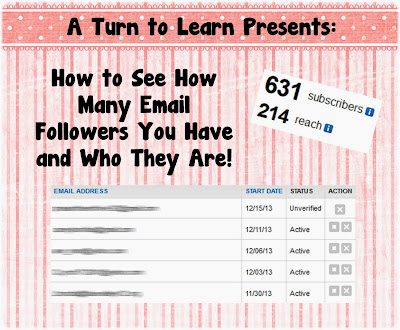
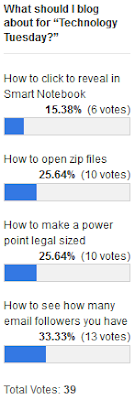
First things first, here is the tutorial. The winner on the poll this week was another blogger tutorial... how to see how many email followers you have and see who they are!
Here is the poll:
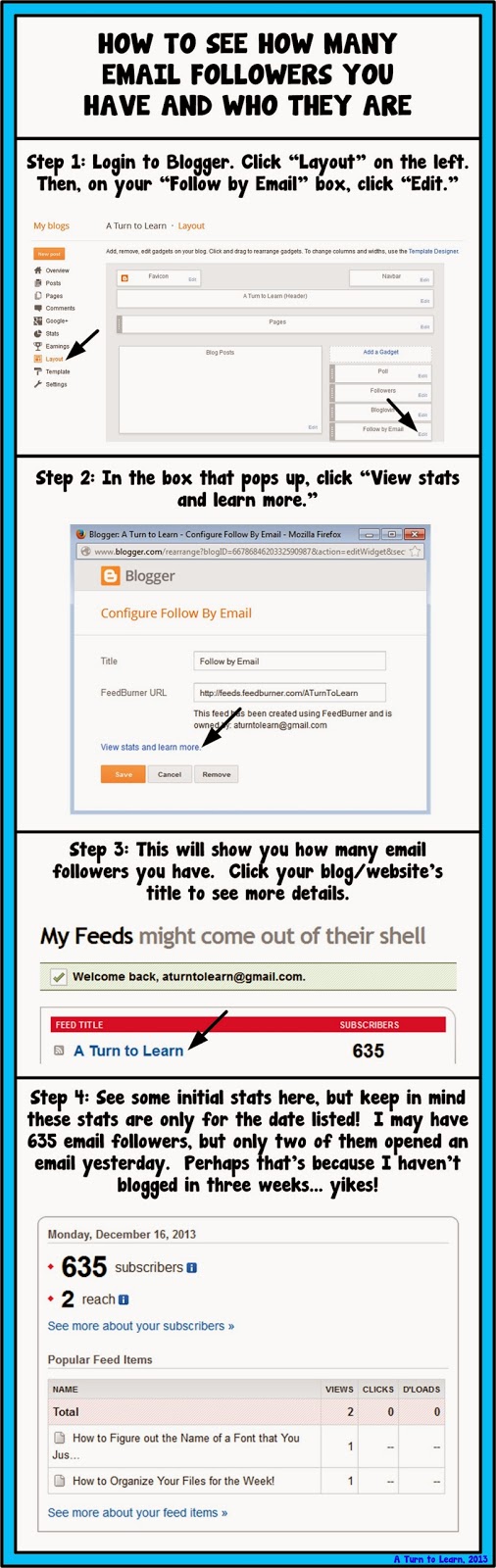
Now onto the tutorial!


For next weeks poll, Ill be adding the option to change the colors, features or special effects of a shape, picture, or text box in PowerPoint... even if those shapes/pictures are on different slides!
Now... for the giveaway announcement!!! For all of my lovely followers, check back in tomorrow to see some new products and a chance to win them all!
Read more »
First things first, here is the tutorial. The winner on the poll this week was another blogger tutorial... how to see how many email followers you have and see who they are!
Here is the poll:
Now onto the tutorial!
You can download this tutorial as a PDF by clicking this picture!
Note: This tutorial is hosted on Google Drive. To save it from there, just open the file and click File > Download to save onto your computer!
For next weeks poll, Ill be adding the option to change the colors, features or special effects of a shape, picture, or text box in PowerPoint... even if those shapes/pictures are on different slides!
Now... for the giveaway announcement!!! For all of my lovely followers, check back in tomorrow to see some new products and a chance to win them all!

Wednesday, February 11, 2015
Introduction to WEKA GUI Chooser Basic Layouts Explained Are you bored of lengthy paragraphs of doucments A quick write up
Hi Guys,
This post will teach you basic layout structure of WEKA and in upcoming posts with examples.
Read my other article on how to download and install WEKA in Cent OS here
Documentation:
You can refer for the official documentation here : Click Here.
Alternatively you can find the pdf documentation in your WEKA installation :
Path : <WEKA installation folder>/weka-3-6-11/WekaManual.pdf
The official documentation gives you the clear & in depth details though Id like to share in my words how the layout looks like.
1) Once you launch the WEKA, the window opens with 4 different options which are 4 different applications with in WEKA.

2) The 4 Applications are
i) Explorer
ii) Experimentor
iii) Knowledge Flow and
iv) Simple CLI
3) Also, the window has Menu contains options "Programs", "Visualization","Tools" & "Help".
4)
Explorer An environment for exploring data with WEKA
Experimenter An environment for performing experiments and conduct-
ing statistical tests between learning schemes.
KnowledgeFlow An environment supports essentially the same func-
tions as the Explorer but with a drag-and-drop interface. One advantage
is that it supports incremental learning.
SimpleCLI Provides a simple command-line interface that allows direct
execution of WEKA commands for operating systems that do not provide
their own command line interface.
Thank you... Next post with some other basics on DataMining & with a simple example...
:-)
This post will teach you basic layout structure of WEKA and in upcoming posts with examples.
Read my other article on how to download and install WEKA in Cent OS here
Documentation:
You can refer for the official documentation here : Click Here.
Alternatively you can find the pdf documentation in your WEKA installation :
Path : <WEKA installation folder>/weka-3-6-11/WekaManual.pdf
The official documentation gives you the clear & in depth details though Id like to share in my words how the layout looks like.
1) Once you launch the WEKA, the window opens with 4 different options which are 4 different applications with in WEKA.
2) The 4 Applications are
i) Explorer
ii) Experimentor
iii) Knowledge Flow and
iv) Simple CLI
3) Also, the window has Menu contains options "Programs", "Visualization","Tools" & "Help".
4)
Explorer An environment for exploring data with WEKA
Experimenter An environment for performing experiments and conduct-
ing statistical tests between learning schemes.
KnowledgeFlow An environment supports essentially the same func-
tions as the Explorer but with a drag-and-drop interface. One advantage
is that it supports incremental learning.
SimpleCLI Provides a simple command-line interface that allows direct
execution of WEKA commands for operating systems that do not provide
their own command line interface.
Thank you... Next post with some other basics on DataMining & with a simple example...
:-)
Subscribe to:
Posts (Atom)