Showing posts with label are. Show all posts
Showing posts with label are. Show all posts
Friday, February 27, 2015
How to See How Many Email Followers You Have and Who They Are Giveaway Announcement!
So the past two weeks I got mixed up and ended up missing two technology Tuesday posts in a row. Im so sorry! Im back today though... with a new Tech Tuesday post and a giveaway announcement!
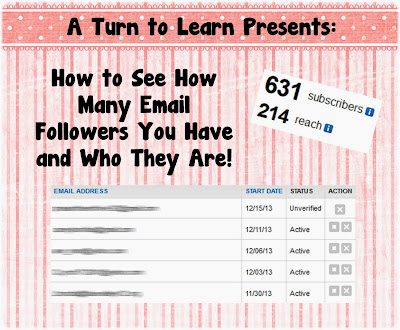
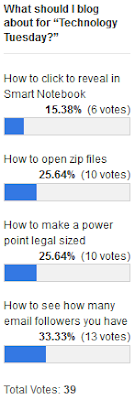
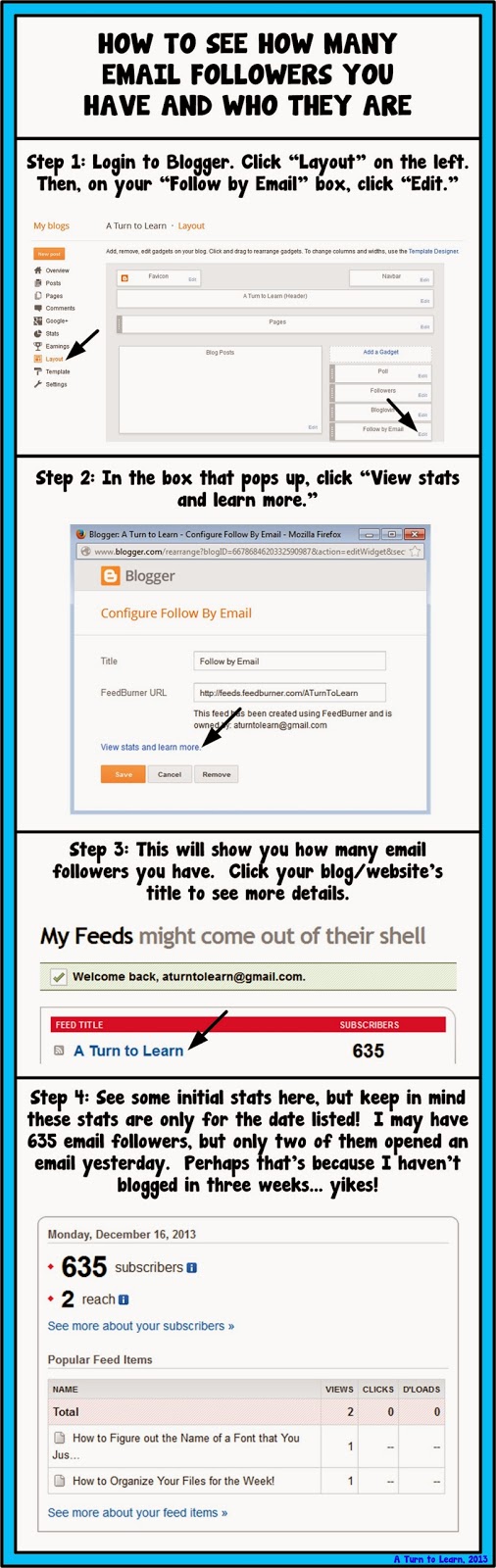
First things first, here is the tutorial. The winner on the poll this week was another blogger tutorial... how to see how many email followers you have and see who they are!
Here is the poll:
Now onto the tutorial!


For next weeks poll, Ill be adding the option to change the colors, features or special effects of a shape, picture, or text box in PowerPoint... even if those shapes/pictures are on different slides!
Now... for the giveaway announcement!!! For all of my lovely followers, check back in tomorrow to see some new products and a chance to win them all!
Read more »
First things first, here is the tutorial. The winner on the poll this week was another blogger tutorial... how to see how many email followers you have and see who they are!
Here is the poll:
Now onto the tutorial!
You can download this tutorial as a PDF by clicking this picture!
Note: This tutorial is hosted on Google Drive. To save it from there, just open the file and click File > Download to save onto your computer!
For next weeks poll, Ill be adding the option to change the colors, features or special effects of a shape, picture, or text box in PowerPoint... even if those shapes/pictures are on different slides!
Now... for the giveaway announcement!!! For all of my lovely followers, check back in tomorrow to see some new products and a chance to win them all!

Thursday, February 12, 2015
How to Find the Websites or Blogs that are Copying your Content

The websites or blogs that copy your content are actually committing Black-Hat SEO, which is something that Google punishes sites for. The trouble is that Google does not know who the duplicator is, and so will often punish both sites for duplicate content. This means that if another person copies your content, then they are also dragging your website down with them too. Added to this, is the insult that you have invested time (or money) into your web content, and now somebody else has come along and is stealing it.
Also Read: Tips on How to Have Better SEO Results with Link Building
CopyScape is a very good plagiarism checker
It is good because it has a reasonable mix of economy and quality. The truth is that there are some better plagiarism checkers out there, but they are very expensive when compared to CopyScape. On the other hand, do not let price fool you. There are some plagiarism checkers out there that are far more expensive than CopyScape and yet are not nearly as good as CopyScape.
This is a tool that you can use which will check the search engines for your content. The truth is that if the duplicate (plagiarized) content is not indexed by Google or Bing, then CopyScape is not going to find it. However, if Google or Bing has not indexed your plagiarized content yet, then there should not be any search engine penalizations.
You can check up to 2000 words in one go, and it only costs 5c. Or, you can load a number of text-filled documents into a batch search and it will check them all for you. It keys in on chains of three words. It also has a tolerance of around 5%. This is because some websites are going to have chains of three words that are the same as yours; however, if this occurs for more than 5% of the page, the CopyScape tool will show you a result. This does sometimes produce false positives, but they are few and far between.
CopySentry can stand guard over your content
If you are concerned that people are going to steal your content, then you can have CopySentry run a check on your chosen web pages every week. It is a tool offered by CopyScape, and it means that you will not have to keep running plagiarism checks manually. Also, as you can imagine, there is a small service charge for doing this, but CopyScape allows you to buy credit so that you will not have to make a payment every time it runs a check. CopyScape takes PayPal payments too, so you do not have to worry about entering your card details.
Also Read: Best Way to Easily Find and Remove Broken Links from your Website or Blog
CopyScape free URL searches
Every day you are able to run five free searches on the URLs of your choice. That means that if you were so inclined, you could check 35 pages per week for free. The tool will check the entire page and then show the pages that have been copied by others. If it does find copied content, the results it gives are pretty good. It will show you how many domains have the content, and you can click on the link to see what parts are copied from your website (or content). It will tell you how much of the page has copied content via a percentage, and it will highlight any copied content in red.
Google your own topics to look for plagiarism
When somebody re-writes your content or copies your content and hides it from the plagiarism checkers (it can be done), they are often uncreative in choosing a new title. All you need to do is Google your own page titles to see what turns up. Hopefully, you will see your own page riding high in the search engine results. Look around the search engine for articles with similar titles, and you may just come across your article that has been hidden from the plagiarism checkers.
Also Read: The Top 10 Websites to create free Logo for your Blog
You will have trouble finding spun content
This is true because according to a web crawler and plagiarism checker, if an article has been spun then it is new. Of course, it is not new by human standards, and if you are unlucky enough to read it then you will see that it makes very little sense and that it flows as well as syrup from a coffee filter. Nevertheless, for some reason people still do it, and it is possible to file a cease and desist order if you find content that has been spun from your content because it is still plagiarism.
About Author:
Kate Funk coaches individuals in SEO and business networking skills at Tutortop.
Wednesday, February 11, 2015
Introduction to WEKA GUI Chooser Basic Layouts Explained Are you bored of lengthy paragraphs of doucments A quick write up
Hi Guys,
This post will teach you basic layout structure of WEKA and in upcoming posts with examples.
Read my other article on how to download and install WEKA in Cent OS here
Documentation:
You can refer for the official documentation here : Click Here.
Alternatively you can find the pdf documentation in your WEKA installation :
Path : <WEKA installation folder>/weka-3-6-11/WekaManual.pdf
The official documentation gives you the clear & in depth details though Id like to share in my words how the layout looks like.
1) Once you launch the WEKA, the window opens with 4 different options which are 4 different applications with in WEKA.

2) The 4 Applications are
i) Explorer
ii) Experimentor
iii) Knowledge Flow and
iv) Simple CLI
3) Also, the window has Menu contains options "Programs", "Visualization","Tools" & "Help".
4)
Explorer An environment for exploring data with WEKA
Experimenter An environment for performing experiments and conduct-
ing statistical tests between learning schemes.
KnowledgeFlow An environment supports essentially the same func-
tions as the Explorer but with a drag-and-drop interface. One advantage
is that it supports incremental learning.
SimpleCLI Provides a simple command-line interface that allows direct
execution of WEKA commands for operating systems that do not provide
their own command line interface.
Thank you... Next post with some other basics on DataMining & with a simple example...
:-)
This post will teach you basic layout structure of WEKA and in upcoming posts with examples.
Read my other article on how to download and install WEKA in Cent OS here
Documentation:
You can refer for the official documentation here : Click Here.
Alternatively you can find the pdf documentation in your WEKA installation :
Path : <WEKA installation folder>/weka-3-6-11/WekaManual.pdf
The official documentation gives you the clear & in depth details though Id like to share in my words how the layout looks like.
1) Once you launch the WEKA, the window opens with 4 different options which are 4 different applications with in WEKA.
2) The 4 Applications are
i) Explorer
ii) Experimentor
iii) Knowledge Flow and
iv) Simple CLI
3) Also, the window has Menu contains options "Programs", "Visualization","Tools" & "Help".
4)
Explorer An environment for exploring data with WEKA
Experimenter An environment for performing experiments and conduct-
ing statistical tests between learning schemes.
KnowledgeFlow An environment supports essentially the same func-
tions as the Explorer but with a drag-and-drop interface. One advantage
is that it supports incremental learning.
SimpleCLI Provides a simple command-line interface that allows direct
execution of WEKA commands for operating systems that do not provide
their own command line interface.
Thank you... Next post with some other basics on DataMining & with a simple example...
:-)
Subscribe to:
Posts (Atom)